
Tech
OpenAI expands ChatGPT’s plugins with app-like interfaces and automations

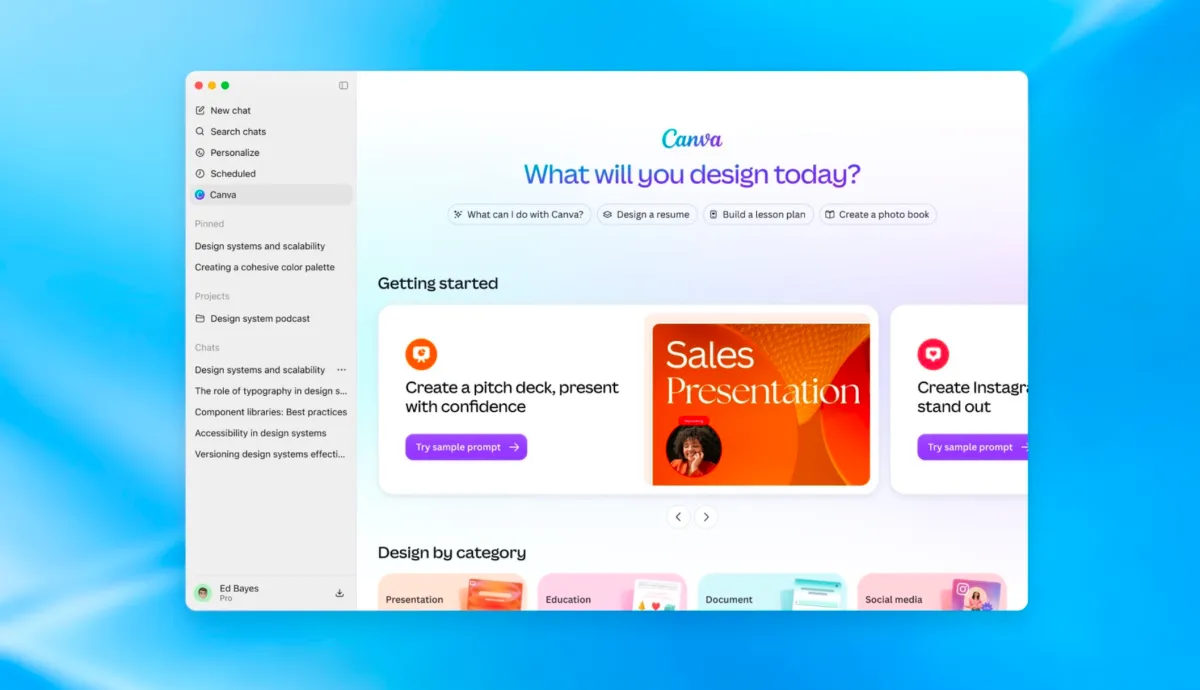
OpenAI isn’t only coming after productivity software with ChatGPT’s new Pages, Slides and Space features — the AI lab is now targeting any application that could work better when integrated with ChatGPT.
At the company’s Dev Day presentation on Tuesday, the AI company said it is now allowing developers to build their own app-like experiences within ChatGPT using plugin extensions.
OpenAI already supports plugins, which connect ChatGPT to everyday tools like Slack, SharePoint, Airtable and Google Drive, but the new plugin extensions will give apps a dedicated home in the ChatGPT sidebar.
Plus, developers will be able to build interactive panels that let users work with their tools while they’re chatting with ChatGPT. This experience can also include file viewers that support whatever file formats the developer’s product uses, the company notes.
In addition, OpenAI says it’s making it easier for developers to build plugins, and streamlining the discovery process for end users. Devs are getting a new Plugin Creator tool for building, and can submit them to the plugin directory via a redesigned flow that offers clearer feedback.
Meanwhile, the company says it has improved how plugins are ranked and recommended within its directory, as well as when they’re surfaced in conversations. When users choose a plugin to work with, they can approve its access needs individually as well.
In addition, ChatGPT Sites, the lightweight websites users can build with ChatGPT, can host these plugins, too. For example, this would let someone share their apps with colleagues, who can use it with their own connected data and permissions.
OpenAI also said it’s adding support for the proposed MCP Events specification, which would allow plugins to start automations based on events in a connected app. The company is also making automations easier to add and manage.
When you purchase through links in our articles, we may earn a small commission. This doesn’t affect our editorial independence.
>
Meta launches Enterprise Platform, bringing Muse, Business Agent and AI tools to companies as it takes on Microsoft and Salesforce.
The post Meta Wants to Run Your Business With AI — Microsoft and Salesforce Have a New Rival appeared first on TechRepublic.
>

OpenAI introduced new capabilities for its software engineering agent Codex, making it more useful beyond a developer’s laptop with reusable cloud development environments that can be accessed from any device.
The update, announced at OpenAI’s Dev Day on Tuesday, is one of several for Codex. OpenAI also announced a refreshed Codex CLI, a new code review experience, tools to harden infrastructure, and other API enhancements.
While Codex could already spin up cloud tasks to do work remotely, today’s announcement shows that OpenAI is making those cloud environments more persistent and configurable, rather than treating each cloud task as an isolated remote sandbox.
As the company explains, developers will now be able to run Codex wherever they need it, whether that’s on a computer, remotely from a phone, or in the cloud. The reusable development environments are designed to help tasks start more quickly and give teams a shared workspace with approved settings and permissions, OpenAI said.

Meanwhile, the Codex CLI is getting an update that allows developers to start and direct tasks using their voice.
A new /agents view is meant to make it easier to delegate work and track multiple tasks at the same time. Other changes include improvements to everyday tasks such as editing prompts, resuming sessions, and using worktrees. OpenAI is also rolling out a “cleaner” terminal user interface designed to make longer sessions easier to read.

Codex can also be pulled into a new code review experience within the ChatGPT desktop app, where users can read summaries, explore code changes, or ask Codex about potential issues before sharing feedback on GitHub pull requests or GitLab merge requests.
Automatic code reviews also let Codex perform an initial review while users step away from their computers.

On the security side, OpenAI is rolling out a new set of tools called Codex Security Cloud, designed to help developers secure their infrastructure. Developers can use the tools to scan entire GitHub repositories on demand or on a regular schedule, as well as whenever new commits arrive. Codex will then investigate findings, remove duplicates, and prepare fixes in the cloud — even when the user isn’t active and their laptop is closed.
Notably, the toolset includes access to the models offered through OpenAI’s cybersecurity initiative Daybreak Blue, without requiring developers to submit a separate application.

OpenAI also announced several API updates, including a new Decisions API for real-time decision-making. The API uses Luna to answer a set of user-defined questions with predefined answers. The company also introduced an updated a version of the Agents API that now supports computer use and the ability to use Amazon’s Bedrock Managed Agents to build OpenAI agents that run entirely on AWS.
When you purchase through links in our articles, we may earn a small commission. This doesn’t affect our editorial independence.
>
Tech
OpenAI takes on Microsoft with the launch of what feels a whole lot like ChatGPT’s own office suite

OpenAI has been a close partner of Microsoft from the jump, but the AI lab is increasingly going after the company’s bread and butter, workplace software, with new features that closely resemble an office software suite like Microsoft’s.
At its Dev Day developer conference in San Francisco on Tuesday, OpenAI announced several new ChatGPT features designed for office workers.
Most notably, OpenAI launched a feature called Space, a shared workspace inside ChatGPT where coworkers can collaborate with the chatbot and with their own Dots, OpenAI’s newly launched AI agent personas (that can carry out tasks on a user’s behalf), on a range of work tasks.
“Your pages and files all live together in Space, like they would in a drive,” said CEO Sam Altman during Tuesday’s presentation. “But spaces feel alive.” Altman said users can give a page specific instructions, such as checking a team channel and updating the page with what it finds.
OpenAI also announced Pages, a companion word processor that the company describes as “a new type of document, built for human and agent collaboration.” It appears to be OpenAI’s answer to Google Docs and Microsoft Word. Users can “write, research, generate charts, create images, or visualize information” in it, OpenAI says.
OpenAI has also launched its answer to PowerPoint with what it calls collaborative slides. These slides can be created by merely talking about them within ChatGPT. Once generated, multiple workers and agents can work together within them and will have the ability to leave comments and edit them.
As OpenAI edges into the territory of Microsoft, Microsoft and other software companies like Salesforce are busy trying to become more like OpenAI. Over the past year, both companies have released a slew of AI products as the software industry attempts to keep up with the shifting landscape.
When you purchase through links in our articles, we may earn a small commission. This doesn’t affect our editorial independence.
>

International South Asian Film Festival Canada Picks 2026 Winners

JMSN Fires Off Letter Over Use Of Song In Ad Spot Touting Trump
Olivia Miles, Caitlin Clark among WNBA stars who attribute hoops skills to soccer background
-

 movies4 months ago
Search For Canadian TV Actor Stewart McLean Now Homicide Investigation
-

 Fashion9 years ago
These ’90s fashion trends are making a comeback in 2017
-
Fashion9 years ago
According to Dior Couture, this taboo fashion accessory is back
-
Fashion9 years ago
Model Jocelyn Chew’s Instagram is the best vacation you’ve ever had
-
Fashion9 years ago
Emily Ratajkowski channels back-to-school style
-
Fashion9 years ago
9 Celebrities who have spoken out about being photoshopped
-

 Anime4 months ago
Rurouni Kenshin: Hokkaido Arc Manga Takes 1-Issue Break – News
-

 Anime3 months ago
HIDIVE to Stream English Dubs for The World Is Dancing, The Forsaken Saintess and Her Foodie Roadtrip in Another World, The Dangers in My Heart: The Movie Anime – News