
Tech
Microsoft Project vs Smartsheet: Best Choice for 2026


Important update:
Microsoft Project Online will retire on September 30, 2026. Project for the web, along with Project and Roadmap apps in Microsoft Teams, will transition to Microsoft Planner. If you are evaluating Microsoft Project, consider how these updates may affect long-term use and feature availability.
I’ve used both Microsoft Project and Smartsheet extensively, and while Project excels at complex scheduling and deep Microsoft 365 integration, Smartsheet wins on flexibility and ease of adoption for teams coming from spreadsheets. In this Microsoft Project vs Smartsheet comparison, I’ll break down how they differ across features, pricing, and use cases to help you decide which one fits your team.
- Microsoft Project suits power users who need advanced controls and already work in the Microsoft ecosystem.
- Smartsheet works well for spreadsheet users that need dedicated project management software
Though existing Microsoft customers may feel at home with Microsoft Project, the best choice in terms of pure project management software capabilities is Smartsheet.
Microsoft Project vs Smartsheet compared
| Best for | ||
| Starting price | ||
| Deployment | ||
| Ease of use | ||
| Resource management | ||
| Collaboration tools | ||
| Reporting & dashboards | ||
| Main strengths | ||
|
|
Microsoft Project: Better for Microsoft-aligned teams
Use Microsoft Projects if
- you need highly advanced project management software,
- your team comprises power users who aren’t intimidated by the higher learning curve,
- your company is already committed to the Microsoft ecosystem,
- you don’t need integrations with third-party software, or
- you want or need an on-premises deployment option.
Microsoft Project pros and cons
| Pros | Cons |
|---|---|
|
|
For more information, read our full Microsoft Project review and view our list of Microsoft Project alternatives.
Smartsheet: Better for teams with diverse software stacks
Use Smartsheet if
- you want a more cost-effective software platform,
- you are looking for an upgrade from spreadsheets and want a familiar-looking interface,
- you want a lower learning curve than Microsoft Project,
- you need integrations with third-party software, or
- you don’t need on-premises deployment.
Smartsheet pros and cons
| Pros | Cons |
|---|---|
|
|
For more information, read our full Smartsheet review and view our list of Smartsheet alternatives.
Microsoft Project vs Smartsheet pricing
Smartsheet offers lower entry-level pricing and a simpler pricing structure, making it the more accessible option for small teams and growing businesses. Paid plans start at $9 per user per month, with business-tier plans available at $19 per user per month.
Microsoft Project starts at $10 per user per month for basic project management capabilities, but most teams need the Project Plan 3 tier at $30 per user per month to access resource management, reporting, and advanced scheduling tools.
| Plan | Microsoft Project | Smartsheet |
|---|---|---|
| Free plan | Included in Microsoft 365 | ✗ |
| Free trial | 30 days | 30 days |
| Entry plan | Planner Plan 1: $10/user/month | Pro: $9/user/month |
| Mid-tier plan | Planner and Project Plan 3: $30/user/month | Business: $19/user/month |
| Enterprise plan | Microsoft 365 Copilot add-on: $30/user/month | Custom pricing |
If cost is your primary concern, Smartsheet delivers better value for collaborative project management. Microsoft Project justifies its higher price with advanced portfolio management, resource planning, and scheduling features designed for complex projects.
Microsoft Project vs Smartsheet: Feature comparison
Project management
Winner: Smartsheet
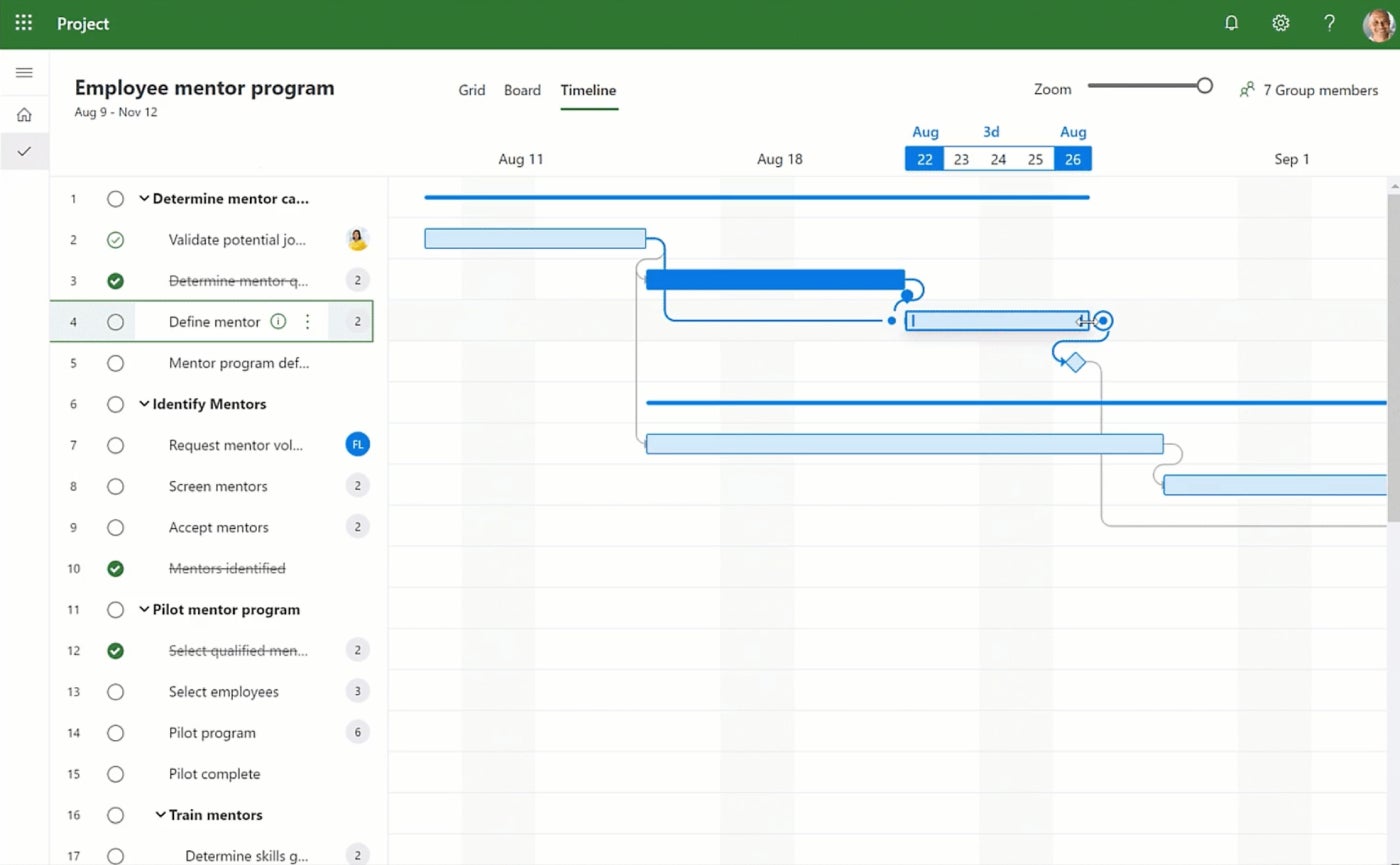
Microsoft Project offers three main project views: grid, board, and timeline (Gantt) view. The design is similar to other Microsoft products, but I didn’t find the interface particularly intuitive to use, and the sheer number of features can be overwhelming and makes it difficult to find what you need.
But what’s impressive about Microsoft Project is that it gives you the option to get very detailed with resource management, such as tracking costs of materials over the course of a project or seeing how much time an individual has spent on a task.
Smartsheet offers four project views: grid, card (kanban), calendar, and Gantt. It’s not the most colorful or appealing interface, but it is easier to navigate than Microsoft Project, in my opinion.
You can either start with a blank sheet or use a template to help guide the process. Conditional formatting rules speed up the process even further, and you can also create automation rules to cut down on manual work. Smartsheet does offer a paid add-on for resource management, but it’s not as robust as Microsoft Project.

Gantt view in Smartsheet shows important details like task status, duration, and team member assigned, reducing the need for extra clicks. With more details displayed, this interface may also be more cluttered for more complex projects.
Document management
Winner: Smartsheet
You can upload documents to a site in Microsoft Project, but editing and updating capabilities are limited because the assumption is that you are already using SharePoint or OneDrive for document storage and management. Microsoft Project also doesn’t integrate with other apps, so you can’t use an outside platform like Google Docs either. This is one of the reasons why Microsoft Project is best used by teams that are already committed to the Microsoft ecosystem.
Smartsheet also allows you to upload files to a project, and it links to multiple popular document management solutions, including Google Drive, Dropbox, and OneDrive. The Business and Enterprise plans offer a proofing feature that allows teams to visually mark up content, including videos, within the Smartsheet tool to keep everything centralized in one place.
If you’re not already using SharePoint or OneDrive, then I would recommend Smartsheet as the better choice for document management.

Communication tools
Winner: Smartsheet
Similar to document management, Microsoft Project does not contain any native features for communication or collaboration. Instead, users will be prompted to connect with colleagues using one of Microsoft’s many other communication tools like Teams, Outlook, or Skype. If you aren’t already part of the Microsoft ecosystem, then you will need to invest in other software that can take over this function — and it won’t integrate with Microsoft Project.
On the other hand, Smartsheet allows teams to have conversations via comments on sheets and rows. Individuals can tag each other in comments to send a notification. Comments can also be accessed via the mobile app so you can read and respond on the go.
While it doesn’t offer a more robust native chat function, Smartsheet does integrate with some messaging platforms, such as Slack, to supplement the built-in comment feature. Unless your team already uses Microsoft’s stack of applications, Smartsheet is the better choice for communication functionality.

Ease of use
Winner: Smartsheet
Smartsheet isn’t the most intuitive project management software I’ve tested, but it was far easier to figure things out compared to Microsoft Project since the layout is more logical. It was also much faster to create and load new projects in Smartsheet, and the larger number of template options helped speed up that process further.

While veteran project managers may appreciate the in-depth view of financials and resource planning in Microsoft Project, less experienced users may struggle with the steep learning curve.
Customer support
Winner: Microsoft Project
On the other hand, Microsoft Project performed a bit better than Smartsheet on the customer service front. The reason for this is that Smartsheet paywalls certain support features (such as 24/7 phone support and a chat bot app) either to the more expensive plans or to a support add-on that costs an additional fee.
Microsoft Project doesn’t charge extra for support, though some users do say that the customer service could be improved.
Integrations
Winner: Smartsheet
When it comes to integrations, Smartsheet beats Microsoft Project by a landslide. Not only does Smartsheet offer 100+ native integrations, it also connects to thousands more platforms through Zapier.
In contrast, Microsoft Project’s native integrations are mostly limited to other Microsoft products, and it doesn’t connect to Zapier (unlike some other Microsoft products), so there isn’t even a workaround.
My methodology
For this Microsoft Project vs Smartsheet comparison, I signed up for free trials in addition to viewing demo videos, consulting project documentation and reading user reviews. I considered features such as task management, portfolio management, document management, and communication tools. I also weighed other factors such as ease of use, customer support, integrations, and pricing.
If neither Microsoft Project nor Smartsheet sounds right for you, don’t worry. There are plenty of other project management solutions out there, including some with forever-free plans. Check out our picks for the top project management software to see what your options are.
More project management coverage
FAQs
What is the main difference between Microsoft Project vs Smartsheet?
The biggest difference is complexity. Microsoft Project focuses on advanced scheduling and enterprise project management, while Smartsheet combines project management with spreadsheet-style collaboration that is easier for most teams to adopt.
Which is easier to use, Microsoft Project or Smartsheet?
Smartsheet is easier to learn because its interface resembles a spreadsheet. Microsoft Project has a steeper learning curve due to its advanced scheduling, resource planning, and portfolio management capabilities.
Is Microsoft Project better than Smartsheet?
It depends on your team’s needs. Microsoft Project excels in enterprise portfolio management. Smartsheet is easier to adopt and integrates with more third-party tools. For teams outside the Microsoft ecosystem, Smartsheet typically offers better value.
>
This AI resume builder matches your application to each job description and flags missing keywords quickly.
The post Beat the Resume Bots With This $39.99 Lifetime Tool appeared first on TechRepublic.
>

Ethan Thornton dropped out of MIT at 19 to build weapons. The first one, a hydrogen-powered system he prototyped with parts from Home Depot and Amazon, didn’t work out — “hydrogen was just a bad bet in general,” he told me this past week at TechCrunch’s StrictlyVC event in Los Angeles. Three years later, his company, Mach Industries, is running six weapons programs and earlier this month closed a $300 million Series C round at a $1.8 billion valuation. The startup has now raised roughly $485 million altogether.
Thornton grew up in Burnet, Texas, a town with roughly 6,500 residents, in a family with deep military ties. Around 2017 or 2018 — when he was still in his early teens — he started becoming, by his own account, “really, really concerned” about the rise of China and what he saw as an impending great-power conflict. That concern eventually sharpened into a conviction that unmanned systems were about to redefine warfare, and that the U.S. was moving too slowly to meet the moment.
What that looks like in practice, midway through 2026, is those six simultaneous weapons programs and a company that has a lot to prove instead of focusing on one thing, getting that right, and then expanding. Thornton is aware that Mach’s diffuse focus creates some lingering questions for outsiders. “It’s very hard,” he volunteered Thursday night. But he doesn’t think defense rewards the kind of single-minded focus that rocket launch, say, demands. “It is a chess game you’re playing with an adversary,” he said, “with hundreds of different products that need to be shipped if we want security.” Pick just one, he suggested, and you’ve already lost the game.
These aren’t simple products. Mach is working on a vertical-takeoff strike aircraft, a long-range anti-ship missile, two stratospheric systems, a cheap surface-to-air interceptor built to kill drones, and — announced earlier this week — a 40-foot, roughly 4,000-pound Navy logistics-and-strike aircraft that takes off near-vertically and flies over a thousand miles with a thousand-pound payload.
That last one is a real jump for a company whose biggest aircraft to date has been about 13 feet long. And none of the six is in full-rate production yet. Thornton says Mach has won around 13 government contracts, most sitting in the middle stage of defense procurement — past initial design, into testing on a government range, but short of the rate-manufacturing tier that fewer than 10 programs industry-wide have ever reached.
He says several systems should see operational deployment by the end of this year, and that his goal is to push three of the six into rate manufacturing in that same window — which would mean going from hundreds of units a month to hundreds of thousands, at a factory that Thornton says Mach plans to stand up soon.
It’s an aggressive timeline laid on top of an already aggressive bet. But Mach’s underlying thesis is that the U.S. can’t out-manufacture China so it has to out-create it — find the first-mover advantage the way Ukraine has against Russia, despite being outproduced. “I don’t think we’re going to outmanufacture China,” Thornton said. “The thing America continues to do well, time after time, compared to China centers on creativity and productization.”
Thornton argues — as do other defense tech startups — that the true bottleneck isn’t the various platforms being built — it’s the supply chain beneath them. “The hard part is actually getting the stuff into the building,” he said: jet engines, solid rocket motors, radar. Mach built and fired two jet engines from scratch in about eight months, a process he says traditionally takes four years; it also in May acquired a 24-year-old solid rocket motor company, Exquadrum, for $50 million, beating out roughly eight other bidders per its own telling. Selling components, not just vehicles, now accounts for about half of Mach’s revenue.
Mach’s approach differs sharply from some of its peers. Shield AI, founded in 2015, spent years as essentially a one-product company around its V-BAT drone before unveiling a second platform, the autonomous X-BAT fighter, last October — and even that is being positioned as one large, deliberate bet, not a portfolio. Saronic, founded in 2022, builds only autonomous surface vessels, scaling one unified autonomy stack across hull sizes from six feet to 180 feet.
Both have been rewarded for that discipline: Shield AI raised $2 billion this year at a $12.7 billion valuation; Saronic raised $1.75 billion at $9.25 billion.
The company Mach’s strategy more closely resembles is Anduril — which is bigger, older, and the one company against which every other defense-tech startup gets measured, fairly or not. Thornton draws the comparison himself, though he argues there’s a meaningful difference between the two companies. “Anduril’s playbook has been very much top-down, starting with the software stack,” he said. “We’re very much bottom-up, starting from the hardware stack and then starting to wrap software around it.”
It’s a distinction, yes, but Mach is still inevitably operating in Anduril’s shadow. Anduril raised $5 billion in May at a $61 billion valuation — more than 30 times Mach’s — and in March it landed a 10-year, $20 billion-ceiling Army enterprise contract consolidating over 120 separate procurement actions. Whatever Mach is building toward, Anduril got there years and tens of billions of dollars earlier.
Thornton insists the field isn’t zero-sum. He points to the scale of the problem: China reportedly builds something like a thousand cruise missiles a day; the U.S. builds roughly one every three days. “X company and Y company and Z company could all go build these things and it still wouldn’t be enough production,” he said. He also argues the Pentagon structurally won’t allow a monopoly — that it deliberately keeps two or three vendors alive in each category rather than picking one winner.
Whether or not that’s a generous reading of the competitive landscape, I put it to him that Anduril’s most famous co-founder, Palmer Luckey, has never, as far as I can tell, acknowledged Mach publicly. Thornton shrugs off any suggestion that Anduril isn’t interested in making room for Mach, telling me he respects Luckey, and that they’re “on the same team,” fighting for the same goal of Western sovereignty.
No doubt his investors, including Sequoia, Khosla Ventures, and Ribbit Capital, couldn’t care less. Strip away the founder-prodigy framing — the Texas workshop, the MIT dropout story every profile leads with, including this one — and what’s left is a genuinely interesting experiment led by a founder who seems, at least, to know what he doesn’t know.
Thornton has been candid that the hardest part of running Mach changes every six months: engineering first, then sales, and now manufacturing at scale, which he expects to dominate the next year. He says he tries to protect four or five hours a day to think and “war game the future,” sometimes pulling colleagues off their work to do it with him — which, he admits, “can kind of frustrate them sometimes.”
On the question of who pushes back on him — who keeps a fast-rising founder honest — Thornton said the most valuable feedback doesn’t come from investors or even his executive team, who can end up in the same echo chamber as the CEO. It comes, he said, from the people actually doing the work.
He described routine company-wide forums, his COO’s idea, where employees get microphones and ask him anything. It started with Thornton quietly recruiting a few trusted colleagues to ask aggressive questions. It’s since evolved into something harder to control — and, he suggested, more useful for it. “I basically stand up there for like an hour,” he said, “and get asked the most aggressive possible questions by people in the company.” He seems to relish it.
For more, you can watch our sit-down with Thornton below.
When you purchase through links in our articles, we may earn a small commission. This doesn’t affect our editorial independence.
>

Claude Guillemot, co-founder of French video game company Ubisoft, died Friday at the age of 69.
According to French media (via Bloomberg), Guillemot died in a plane crash in the French resort town of La Baule. He was one of two people aboard the plane, both of whom died.
Guillemot founded Ubisoft with his four brothers in 1986. Since then, the company has published the Assassin’s Creed, Far Cry, Prince of Persia, and Tom Clancy video game franchises, as well as many other titles. The family retains control of Ubisoft, and Guillemot’s brother Yves is still CEO.
Guillemot was also chairman of Guillemot Corp., which makes gaming and audio accessories.
“Ubisoft was deeply saddened to learn of the death of Claude Guillemot, co-founder of the group and chairman of Guillemot Corp., in an accident,” Ubisoft said in a statement. “Our thoughts are with his family and loved ones during this difficult time. No further statements will be made at this time.””
>

‘Bad Fairies’ Adds James Acaster, Serrana Su-Ling Bliss to Voice Cast

What I’m hearing about the Timberwolves’ plans on the eve of the draft

Vivienne ‘VivziePop’ Medrano Announces Animated Feature Debut With WB

-

 Fashion9 years ago
These ’90s fashion trends are making a comeback in 2017
-
Fashion9 years ago
According to Dior Couture, this taboo fashion accessory is back
-
Fashion9 years ago
Model Jocelyn Chew’s Instagram is the best vacation you’ve ever had
-
Fashion9 years ago
Your comprehensive guide to this fall’s biggest trends
-
Fashion9 years ago
A photo diary of the nightlife scene from LA To Ibiza
-
Fashion9 years ago
Emily Ratajkowski channels back-to-school style
-
Fashion9 years ago
9 Celebrities who have spoken out about being photoshopped
-
Fashion9 years ago
The tremendous importance of owning a perfect piece of clothing
