Tired of paying for a dozen cloud subscriptions? A sub-$100 homelab can pay for itself in around two months just by replacing three paid services. Here’s how to get started — no expensive gear required.
A homelab is simply a small home server you run yourself, hosting your own versions of the apps and services you currently pay for monthly.
Step 1: Get Cheap Hardware
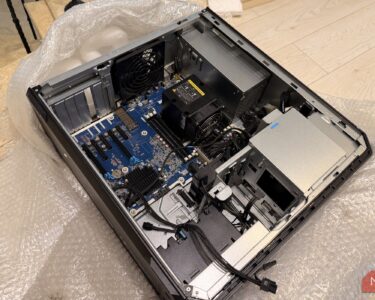
You don’t need expensive equipment. A used mini PC or old desktop from Facebook Marketplace — or an old system gathering dust in your house — is all you need. Most PCs made in the past 10-15 years can run self-hosted applications, and they outperform the Raspberry Pi 3B that has been a homelab staple for a decade.
Step 2: Install Docker
For software, start with Docker. It makes deploying services extremely simple, runs on Linux, macOS and Windows, and has tons of online documentation. Each service runs in its own container, so setup is straightforward.
Step 3: Replace 3 Subscriptions
Here are the best services to replace first:
1. Audible → Audiobookshelf. Audiobookshelf is a fantastic self-hosted audiobook server. Retailers sell DRM-free audiobooks you can host yourself, and free sources (or ripping thrift-store CDs) can replicate much of Audible’s included library.
2. Netflix / Hulu → a media server. Host your own library of media on the same box.
3. Cloud photo backup → self-hosted photo sync. Keep your photos on your own hardware instead of paying monthly for storage.
Cancel those three subscriptions and the hardware pays for itself — typically in about two months, after which you’re saving money every month.
Home server setup (Credits: How-To Geek)
Also Read: Binance Hack Rattles Crypto as Intel Plunges 23% and AI Spending Fears Hit Tech Stocks
Source: How-To Geek — read the full story there.