
Tech
Patreon launches 30 new creator features, including short-form Clips and revamped discovery

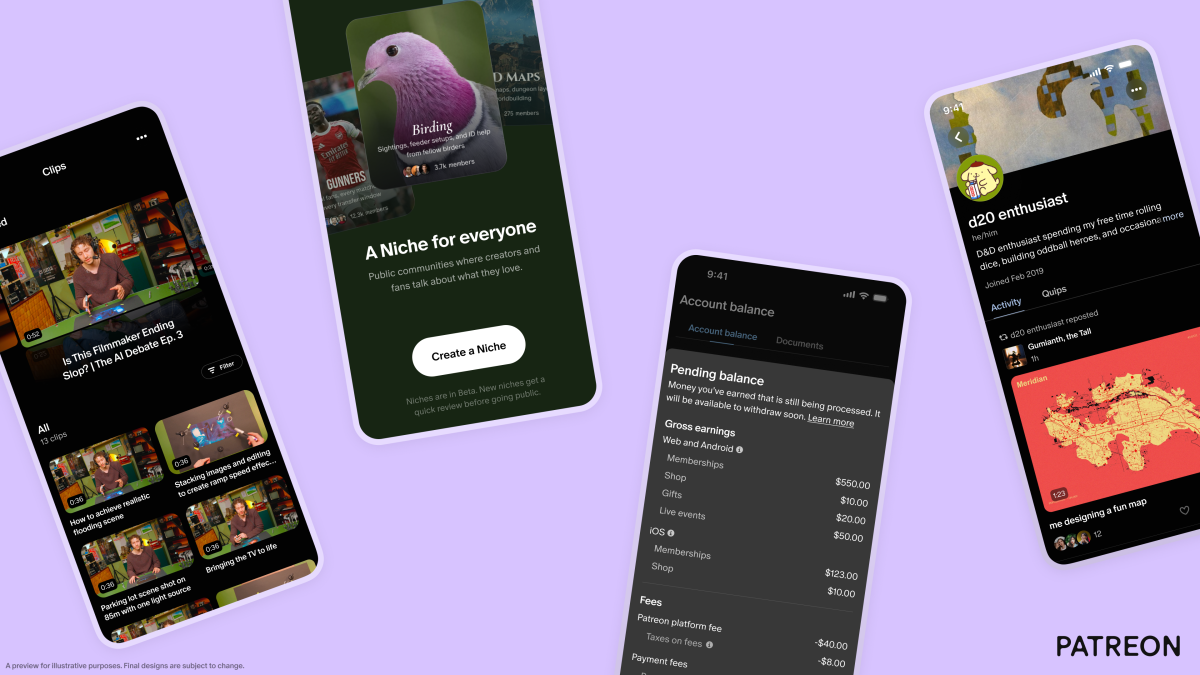
The team at Patreon, the membership platform for creators, has been building like crazy and is now revealing the result. On Thursday, the company debuted dozens of new features to help creators get discovered, build their community, learn from insights, and more.
Patreon says its roadmap is meant to reflect the core philosophy that today’s internet has failed creators by prioritizing fleeting engagement over genuine community, making it hard for creators to be fairly paid.
“The current version of the web is a failed promise for creators and fandoms. As creators, we can’t even reach our followers on the platforms anymore,” wrote Patreon CEO Jack Conte in an announcement about the new features. “Social media has created mass polarization, addiction, and made it increasingly difficult to build a creative community and business. I refuse to believe that this is the best or only way that the internet can work for creators and fans. I believe it can and should be better,” he added.
Patreon’s changes, however, acknowledge the role that short-form video platforms, like TikTok or Reels, play in helping creators find an audience.
To make that discovery easier, it’s rolling out a feature on iOS called Clips, which will turn creators’ videos into short, shareable clips. These can be downloaded and shared off-platform, as on TikTok, or posted as Patreon’s own short-form post format, known as Quip.

Plus, creators will be able to leverage new tools that offer potential fans more previews of their work.
The tools, which are still in early testing, include suggested video previews, which will pull out the most engaging parts of their paid videos, and another that lets creators quote snippets of their longer written posts into Quips. The video previews can be shown to fans who are weighing whether or not to pay to unlock the content or subscribe to a membership, while the text-based, quote Quips can be shared as previews to the Home feed, offering creators more exposure.

Native video and Quips are also now rolling out to creators of adult (18+) content.
Another significant change in today’s update involves Patreon’s discovery algorithm.
Before, the company’s recommendation systems focused on finding creators similar to those the user already liked, but it tended to favor larger creators. Now, discovery will focus more on comparing a particular post to other posts by topic, craft, style, theme, and other factors. Patreon says this will help to highlight smaller creators, too.

The company is also rolling out several new features designed to deepen fandoms and help make Patreon more of a destination.
The highlight here is a new communities feature called Niches, which allows creators to participate in dedicated, topic-based communities built around specific interests, subcultures, or fandoms. This could help fans discover more of what they like, without needing to dig around the site to find all the different creators focused on the topic at hand.

Patreon will also roll out other tools, like support for Live Q&As on creator livestreams, and tools that let fans make their own profiles. (Those profiles and the communities are now in early testing, while the Live Q&As are now arriving.)


Another set of tools will help creators track their audience and earnings, which can be key to developing a healthy fandom.
Patreon is launching more granular earnings, membership, and growth analytics, with an earnings tab that breaks down earnings by tier and billing cadence. The platform is also adding membership insights, like member counts that show free trials and members in payment retry, plus filters to break down memberships by trial, gift, active, and retrying status.


A revamped version of the Payouts tab will also show creators a complete record of the earnings moving in and out of their account.
Soon, Patreon will also add creator milestones, or key growth moments, to celebrate special moments in terms of the growth of their community.
As part of its longer-term roadmap, Patreon plans to develop security features like anti-AI scraping tools, real-time spam detection, expanded auto-moderation, additional verification measures, and more.
The full list of improvements includes thirty new or revamped features, some of which are still in early testing. Over the next few months, creators should expect to see many more changes arrive, Patreon said.
When you purchase through links in our articles, we may earn a small commission. This doesn’t affect our editorial independence.
>

Google and Samsung have priced their newest Android smartwatches within $20 of each other, making the cheaper option easy to identify. The real decision comes down to phone compatibility, battery life, and which health features you can actually use.
Pixel Watch 5 costs $399.99 for the 41mm Bluetooth/Wi-Fi model and $429.99 for the 45mm version. Galaxy Watch9 costs $379.99 for the 40mm Bluetooth model and $409.99 for the 44mm model, making Samsung exactly $20 cheaper at either comparable Bluetooth size.
Quick comparison
| Pixel Watch 5 | Galaxy Watch9 | |
|---|---|---|
| Price | $399.99 (41mm); $429.99 (45mm) | $379.99 (40mm); $409.99 (44mm) |
| Phone compatibility | Most phones running Android 12 or newer | Compatible Android phones |
| Battery claim with always-on display | Up to 30 hours (41mm); 40 hours (45mm) | Up to 30 hours |
| Key health restriction | Breathing Emergency Detection is limited to supported countries | ECG and sleep apnea require a compatible Galaxy phone |
Phone compatibility and battery life
Google’s official specifications say the Pixel Watch 5 works with most phones running Android 12 or newer, so you don’t need a Pixel phone to use it. The Pixel Watch 5 therefore works across a broad range of compatible Android phones.
Galaxy Watch9 also works with compatible Android phones, but Samsung Health Monitor is limited to compatible Galaxy phones. That restriction affects two of Samsung’s better-known health tools: ECG and sleep apnea monitoring.
For Galaxy phone owners, that restriction does not affect access. People using another Android brand can still use Galaxy Watch9, but they will not have access to those Samsung Health Monitor features.
Battery life is more straightforward to compare on paper. Google rates the 41mm Pixel Watch 5 for up to 30 hours with the always-on display enabled and the 45mm model for up to 40 hours. Samsung rates both Galaxy Watch9 sizes for up to 30 hours with the always-on display.
The smaller models are therefore even on the manufacturers’ estimates, while Google claims 10 additional hours for the 45mm Pixel Watch 5. Actual battery life will vary with GPS use, workouts, cellular connectivity, display settings, and other factors.
Gemini and health features
Both watches now support Gemini through a raise-your-wrist voice gesture. Google says Pixel Watch 5 can also handle some actions offline, including starting workouts and setting timers, and can provide proactive suggestions.
Samsung’s health suite includes Vitals, Heart Health Score, Fitness Index, and Daily Cardio Load. Its sleep apnea feature is FDA-cleared, although access still requires a compatible Galaxy phone because the feature runs through Samsung Health Monitor.
Google adds Breathing Emergency Detection, which can prompt a call to emergency services after detecting a severe, persistent drop in oxygen saturation if the wearer does not respond.
The feature is currently available only in supported European countries.
Google Health Premium starts at $9.99 per month and adds Gemini-powered health coaching. Basic activity, sleep, and health tracking do not require the subscription.
Neither watch directly measures blood glucose, so anyone looking specifically for blood sugar monitoring will still need a compatible continuous glucose monitor or separate app setup.
Galaxy Watch9 costs $20 less and gives Galaxy phone owners full access to Samsung Health Monitor. Pixel Watch 5 avoids that Galaxy-phone requirement, while the larger 45mm model also has the longer manufacturer-rated battery estimate.
Before buying, check the features available with your phone and in your region, because either watch can offer a different experience depending on both.
Also read: Check out our guide to smartwatch settings that can affect blood sugar alerts, visibility, and context across Apple Watch, Galaxy Watch, Pixel Watch, Huawei Watch, and Garmin.
>
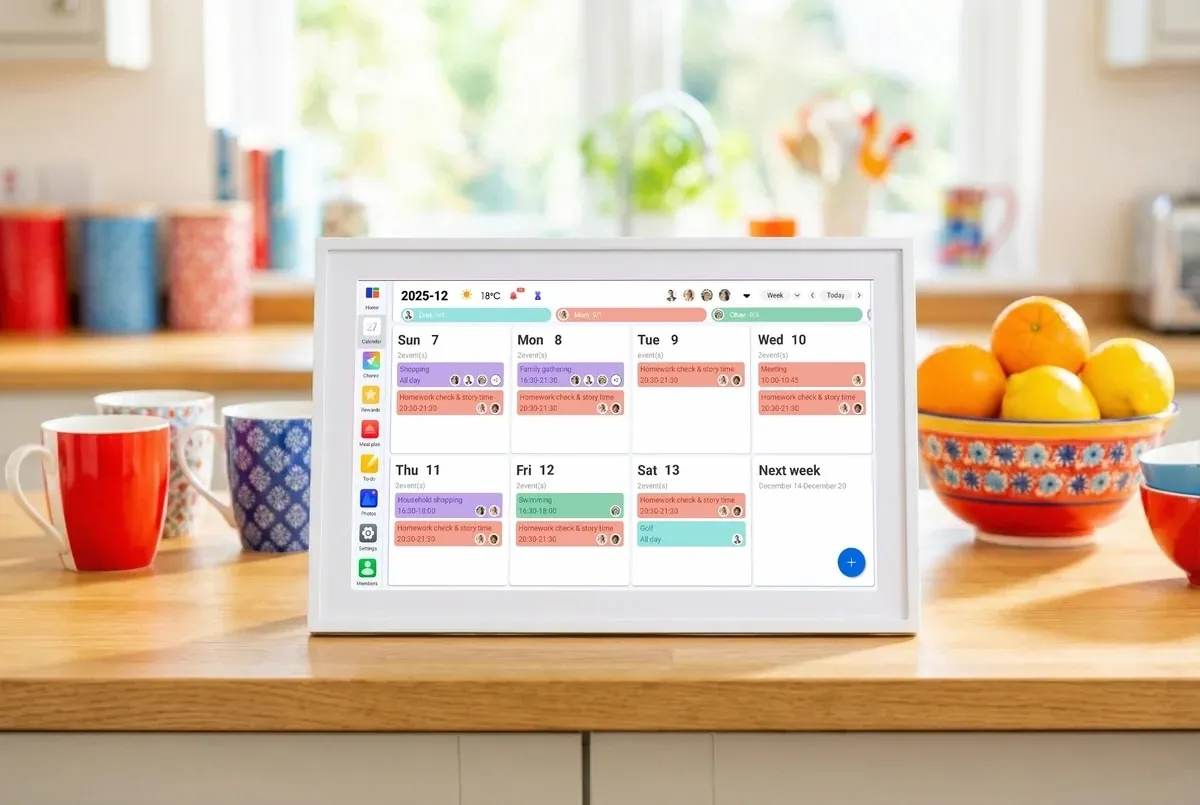
With back-to-school season approaching (or already here in some places), keeping track of everyone’s schedules can get pretty chaotic. Between work, school, appointments, sports, chores, and everything else going on, a regular paper calendar just doesn’t cut it. That’s where Linkdaze’s smart digital calendar comes in — a wall-mounted touchscreen tablet built specifically to organize a household rather than a single person.
One of Linkdaze’s biggest strengths is its calendar compatibility. The system can synchronize calendars from popular services including Google, iCloud, Outlook, Yahoo, and Cozi, which is a dedicated family-organizing app. This is particularly useful for families where different members use different platforms. Instead of asking everyone to switch to a single calendar app, Linkdaze brings multiple schedules together and uses color coding to make individual family members easy to identify.
Linkdaze is available in 15.6-inch and 10.1-inch models, giving you some flexibility depending on how much wall space you have. Beyond calendars and appointments, you can use it for chores and rewards, meal planning, shopping lists, and other family organization. It can even double as a digital photo frame for displaying family photos.

The most interesting feature, however, is Linkdaze’s AI meal planner with “Snap-to-Sync.” Instead of manually entering everything into a meal-planning app, you can take a photo of a paper recipe or your kid’s school lunch menu. Linkdaze will turn that information into a digital meal plan and generate a shopping list from it. While not an entirely new idea, it’s a useful feature that helps Linkdaze stand out from a basic digital calendar.
Another big plus is that Linkdaze doesn’t require a monthly subscription for its main features. It’s an interesting choice in a category where recurring revenue has become the default. Skylight, a competing smart-calendar brand, offers additional features through its $79 per month subscription. For a hardware company entering a crowded smart-display market, that decision is either going to differentiate its product or look like a lost revenue stream, depending on how the business scales.
Linkdaze is also less expensive upfront, with the 10.1-inch model priced at $119.99 compared with Skylight’s 10-inch model at $159.99.
Overall, this device could make a practical gift for busy parents who are trying to keep everyone’s schedules in one place. It could also be a great fit for college apartments, where roommates can use it to coordinate chores, study schedules, shared meals, and other household responsibilities. It’s also very helpful for those of us juggling interviews, deadlines, meetings, and story assignments.
When you purchase through links in our articles, we may earn a small commission. This doesn’t affect our editorial independence.
>
Windows updates and inconvenient restarts have been uneasy roommates for decades. Microsoft is now trying to make them see much less of each other.
Windows 11 hotpatching allows eligible business PCs to install certain monthly security updates without restarting. Combined with Microsoft’s newer effort to consolidate other Windows updates around a single monthly restart, the company is making a broader push to reduce one of the most disruptive parts of enterprise patch management.
But hotpatching does not mean the end of the Windows reboot. For IT teams considering the feature, the more useful questions are how many restarts it can actually eliminate, which organizations need to use it, and where the exceptions begin.
What is Windows 11 hotpatching?
Hotpatching allows Windows to apply eligible security fixes to a running operating system without requiring an immediate device restart.
According to Microsoft’s Windows hotpatch documentation, hotpatches are monthly security updates designed to reduce downtime and help organizations keep devices patched with fewer interruptions.
Hotpatches also have another practical advantage for businesses managing large device fleets: Microsoft says their package sizes are significantly smaller than standard cumulative updates, allowing them to install faster and consume less network bandwidth.
The technology has also expanded to Arm64 PCs. Microsoft’s August 2026 Windows 11 hotpatch release made hotpatching generally available for eligible Windows 11 versions 24H2 and 25H2 Arm64 devices.
There is an additional setup requirement for those systems. Arm64 devices must have Compiled Hybrid PE, or CHPE, disabled because Microsoft says the compatibility layer is incompatible with hotpatch updates. Disabling CHPE requires a one-time restart before the device is ready for hotpatching.
TechRepublic readers have already seen the technology put to practical use. In March, Microsoft used an out-of-band hotpatch to address critical Windows 11 RRAS vulnerabilities without requiring affected systems to restart.
That ability becomes particularly valuable when a serious security problem appears in the middle of a workday. Instead of choosing between delaying an important patch and interrupting users, administrators may be able to install an eligible security fix while systems remain running.
Hotpatching doesn’t eliminate Windows restarts
There is, however, a sizable asterisk attached to the “no restart” description.
Microsoft normally divides its hotpatch schedule into quarterly cycles. Under its planned schedule, the first month of each quarter receives a baseline cumulative update, which requires a restart. Eligible devices can then receive security hotpatches during the following two months without restarting.
The normal schedule looks like this:
| Q1 | January | February, March |
| Q2 | April | May, June |
| Q3 | July | August, September |
| Q4 | October | November, December |
Microsoft’s Windows hotpatch guidance describes a planned annual cadence of four baseline months and eight hotpatch months. That does not mean administrators should expect exactly four security-related restarts every year.
Microsoft can add baseline months when necessary. Its servicing documentation specifically warns that additional baseline releases can occur, changing the normal hotpatch schedule.
There are other ways devices can leave the expected cadence. If a device enters a hotpatch month without the latest baseline installed, Microsoft says it will receive both the baseline update, which requires a restart, and the latest hotpatch.
Upgrading Windows versions can also affect the cycle. An eligible device upgraded during a baseline month can remain on the hotpatch cycle. Upgrade it during a hotpatch month, however, and Microsoft says the device switches to standard updates until the next baseline release, requiring a restart.
Firmware, application, operating system, emergency, and other updates may also require reboots.
IT administrators should therefore treat Microsoft’s four-baseline, eight-hotpatch pattern as a planned servicing cadence, not a guaranteed annual reboot count.
Microsoft is attacking the reboot problem from another direction, too
Hotpatching isn’t Microsoft’s only attempt to make Windows updating less disruptive.
Beginning with updates released on or after July 28, 2026, Microsoft started rolling out an update experience that groups several restart-requiring Windows updates together rather than letting them trigger separate restarts throughout the month.
Under Microsoft’s “one restart a month” Windows Update approach, driver, .NET, firmware, and monthly security updates can be coordinated to share a single scheduled restart. The feature is rolling out gradually, however, and Microsoft cautions that it may not yet be available on every eligible device. Emergency and out-of-band updates can still install immediately, as can critical or expedited driver updates.
The distinction between Microsoft’s two approaches is important. The one-restart initiative consolidates updates that still require a reboot. Hotpatching, meanwhile, removes the immediate reboot requirement from eligible security updates on devices that remain eligible for hotpatching.
Used together, the two strategies point to a Windows servicing model in which restarts are less frequent and, when unavoidable, more predictable. That could be significant for administrators already dealing with a busy Windows security calendar. Microsoft’s July 2026 Patch Tuesday, for example, addressed a record 570 security vulnerabilities, including exploited zero-days.
Which Windows 11 devices are eligible for hotpatching?
Hotpatching is primarily intended for managed business environments, and organizations can’t simply enable it on every Windows 11 PC.
For its current Windows 11 client hotpatch releases, Microsoft supports eligible configurations running Windows 11 version 24H2 or 25H2. Administrators should verify individual Windows releases against Microsoft’s current hotpatch documentation rather than assuming every version newer than 24H2 is automatically supported.
Devices must also have the latest applicable baseline update installed and Virtualization-based security, or VBS, running.
Organizations need Microsoft Intune and must enroll devices in a Windows quality update policy with hotpatching enabled. Arm64 PCs have the additional CHPE requirement. Administrators must disable CHPE and restart those systems once before they can receive hotpatch updates.
Licensing is another consideration. Microsoft’s current hotpatch documentation lists eligible subscriptions including:
- Windows 11 Enterprise E3 or E5
- Microsoft 365 F3
- Windows 11 Education A3 or A5
- Microsoft 365 Business Premium
- Windows 365 Enterprise
Microsoft documentation should be checked for the latest qualifying subscriptions before deployment, as licensing and eligibility requirements can change.
Organizations can review Microsoft’s full hotpatch eligibility and configuration requirements before planning a rollout.
Devices that no longer meet hotpatch prerequisites aren’t simply left unpatched. Microsoft says ineligible devices receive the standard Latest Cumulative Update instead, keeping them on the normal Windows servicing path. That update requires a restart.
This fallback helps maintain security coverage, but it also means fleet consistency matters if an organization wants the operational benefits of hotpatching.
More Microsoft news
Is Windows 11 hotpatching worth enabling?
For organizations that already use Intune and hold eligible Microsoft licenses, hotpatching has a fairly straightforward appeal: fewer mandatory reboots without deliberately postponing eligible monthly security patches.
The benefit becomes larger as the number of managed endpoints grows.
A reboot that costs one employee a few minutes might seem trivial. Multiply that interruption across hundreds or thousands of devices, however, and predictable patching becomes an operational issue. Systems used for kiosks, frontline work, long-running processes, remote work, or other availability-sensitive tasks may benefit even more.
Smaller update packages could also help organizations managing PCs across constrained or remote networks.
But administrators should not mistake hotpatching for protection against every Windows update problem. Updates can still introduce compatibility issues, and baseline releases remain a necessary part of Microsoft’s servicing model.
Windows recovery capabilities matter for precisely that reason. Microsoft has also been expanding Windows 11 resilience tools, including Point-in-Time Restore to recover PCs after failed updates, driver issues, and system corruption.
The better way to think about hotpatching is not as the end of rebooting, but as another tool for reducing the operational cost of keeping Windows secure.
Fewer reboots, not zero reboots
Microsoft appears to be changing the philosophy behind Windows Update from “restart when necessary” toward “interrupt the user as little as necessary.”
Hotpatching removes the immediate reboot requirement from eligible monthly security releases for devices that remain compliant with Microsoft’s hotpatch requirements. The consolidated restart model attempts to bundle other interruptions. Recovery tools are being strengthened for situations where updates still go wrong.
For IT teams, that’s meaningful progress, but not permission to forget about maintenance windows.
Baseline updates will still require restarts. Additional baseline releases can alter Microsoft’s normal schedule. Devices that become ineligible for hotpatching fall back to standard cumulative updates, and emergency, hardware, firmware, and application updates may require additional restarts.
The prize isn’t a reboot-free Windows environment. It’s a Windows fleet where security teams can patch faster, and administrators have fewer surprise interruptions to manage.
Related reading: For organizations still managing older PCs, TechRepublic’s Windows 10 ESU cheat sheet breaks down the costs, eligibility rules, coverage, and deadlines for keeping Windows 10 systems patched after support ends.
>

Paramount Sports Entertainment Chief Ushers in New Era of Storytelling

Andrew McCarthy Sci-Fi Movie ‘Orion’ Acquired by Hyde Park International

How to watch Dream vs. Sparks: TV channel and streaming options for August 20
-

 movies3 months ago
Search For Canadian TV Actor Stewart McLean Now Homicide Investigation
-

 Fashion9 years ago
These ’90s fashion trends are making a comeback in 2017
-
Fashion9 years ago
According to Dior Couture, this taboo fashion accessory is back
-
Fashion9 years ago
Model Jocelyn Chew’s Instagram is the best vacation you’ve ever had
-
Fashion9 years ago
Emily Ratajkowski channels back-to-school style
-
Fashion9 years ago
9 Celebrities who have spoken out about being photoshopped
-
Fashion9 years ago
Your comprehensive guide to this fall’s biggest trends
-
Fashion9 years ago
A photo diary of the nightlife scene from LA To Ibiza