
Tech
4 Galaxy Watch 9 Settings to Enable in Your First 24 Hours

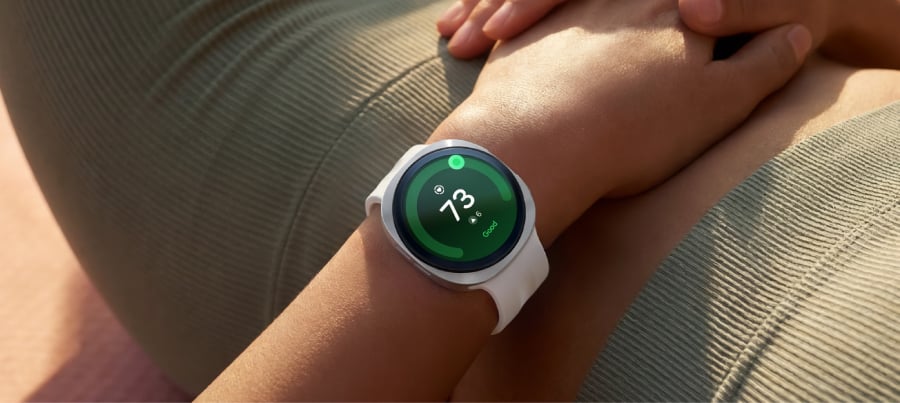
Not every Galaxy Watch 9 health feature behaves the same way out of the box.
This is exactly why deciding which Galaxy Watch 9 settings to enable on day one matters. Hard fall detection is a genuine toggle, and it ships off by default, doing nothing until someone switches it on, according to Samsung Support.
Vitals and Sleep Coach aren’t toggles in that sense. Vitals needs seven nights of overnight wear to build a baseline before it can flag anything unusual, and Sleep Coach needs at least seven days of wear to gather enough data for personalized coaching, as noted by PCMag and Samsung Mobile.
Samsung opened pre-orders for the Watch 9 in select markets on July 22, roughly three weeks ago, with general availability following on Aug. 7, according to the Samsung Newsroom. Samsung markets it as delivering “a new era of effortless health,” built for continuous 24/7 wear, as the Samsung Newsroom describes. It runs Wear OS 7 with One UI 9 layered on top and requires Android 13 or later on the paired phone, as reported by PCMag. That framing holds up reasonably well, but a handful of features need a nudge before they start doing their job.
This guide covers four decisions worth making in the first day of ownership: finishing fall detection setup, starting consistent overnight wear for Vitals and Sleep Coach, deciding how to handle always-on display and charging without losing a night of data, and picking which health metrics show up first. It isn’t a menu-by-menu walkthrough. Samsung shifts label wording between software updates, so each section says what to confirm rather than exactly where to tap.
What you need before configuring the Watch 9, and what your phone determines
The watch is managed through the Galaxy Wearable app, and fall detection specifically can only be turned on from there. Pair the phone before anything else, as recommended by Samsung Support.
Any phone running Android 13 or later works with the Watch 9, and Samsung Health is the app used to view the watch’s health data and scores, as noted by PCMag. A few features are locked to Samsung’s own hardware, though: ECG, blood-pressure tracking, and sleep apnea/snoring detection all require a Galaxy phone specifically, not just any Android device, as reported by GadgetCV and PCMag UK.
The available testing confirms Galaxy-phone requirements for ECG, blood-pressure tracking, and sleep-apnea detection. Samsung’s documentation doesn’t establish the phone requirements for every other feature in this guide, so check the relevant feature in Galaxy Wearable or Samsung Health before relying on it. You may not see the sleep-apnea or blood-pressure options on a non-Galaxy phone; if that’s the case, the rest of this checklist still applies as written.
Turning on hard fall detection, and what it actually requires
Fall detection ships disabled and can only be switched on through the Galaxy Wearable app: open the app, head into the watch’s settings, and tap the switch next to Hard fall detection, according to Samsung Support. Flipping that switch feels like the whole job. It’s really just the first step.
The toggle alone won’t do much, because the feature needs at least one emergency contact on file to notify, as recommended by Samsung Support. Beyond that, two more choices are optional rather than required: automatically texting location to emergency contacts after a fall, and triggering an emergency call, each a separate switch under the same menu, according to Samsung Support.
Sensitivity is a different setting entirely, found under “When to detect falls,” and it can be set to Always, During physical activity, or Only during workouts. Always monitors in more situations; the activity-only options limit when the watch looks for falls.
Samsung’s fall-detection documentation covers “all Wear OS models” and predates the Watch 9 by roughly four years. The actions above are confirmed; exact on-screen wording may differ slightly on current software.
By the end of this step:
- Hard fall detection is switched on
- At least one emergency contact is listed
- Location sharing and emergency calling are set the way you prefer, on or off
- A sensitivity mode is chosen
This step needs no repeat visits. Check the box once and move on. Vitals and Sleep Coach, by contrast, need seven consecutive nights on the wrist before they have anything to say.
Galaxy Watch 9 health monitoring settings to start on night one
Vitals tracks overnight SpO2, heart rate, heart-rate variability, respiratory rate, and skin temperature, then alerts owners to deviations once it has a seven-night baseline, as noted by PCMag and the Samsung Newsroom. Sleep Coach needs at least seven days of wear to gather enough data for personalized coaching, as noted by Samsung Mobile.
There’s no separate switch to force Sleep Coach into gear early; the only real action is wearing the watch nightly and checking, morning by morning, that the night actually recorded.
Nothing in the research confirms that a missed or short night resets that seven-day count, so treat one gap as an inconvenience rather than a reason to start over. That’s practical advice rather than a documented product behavior, and steady wear still beats sporadic wear.
Even flawless wear doesn’t guarantee flawless data. In one test, the watch stopped collecting overnight readings for more than an hour on two separate nights. Galaxy phone owners should also confirm that sleep apnea and snoring detection are active, since that feature only runs with a Samsung phone nearby.
The daily action is simple: wear the watch to bed and check the sleep section of Samsung Health the next morning. A successfully recorded night should show a score built from duration, deep sleep, REM sleep, time awake, and sleep latency.
By the end of night one:
- The watch has been worn continuously from bedtime to waking
- Samsung Health shows a sleep score the following morning
- Galaxy phone owners have confirmed sleep apnea and snoring detection are active
What’s hot at TechRepublic
The best Galaxy Watch 9 settings for battery and overnight tracking
Vitals and Sleep Coach only work if the watch survives a full night on the wrist, so this decision is about giving them a fair shot.
Vitals and Sleep Coach only work if the watch survives a full night on the wrist, so this decision is about giving them a fair shot. In one test, the Watch 9 ran 26 hours with always-on display (AOD) enabled versus 41.5 hours with it off, as noted by PCMag. Charging speed varied between reviewers: GadgetCV measured about 90 minutes from near zero to full, while PCMag’s test took 108 minutes. Either way, that’s long enough to leave a real hole in overnight data if it’s timed badly.
Testing the 40mm model, GadgetCV’s reviewer found the watch barely stretched from one morning to the next afternoon, short of two full days on a single charge. That reviewer still kept AOD on rather than switching it off, as reported by GadgetCV. Treat this as a genuine trade-off rather than an automatic “turn it off” call. Samsung’s own guidance warns that some health features, especially continuous monitoring, can consume more battery.
The 40mm’s 390mAh cell is a modest bump from the Watch 8’s 325mAh, but in PCMag’s testing it hasn’t translated into a meaningful jump in real-world runtime.
Setup actions:
- Decide on AOD in the watch’s display settings based on your priority: roughly 15 extra hours of runtime in one reviewer’s test, or an always-visible screen. There’s no universally correct answer.
- Choose a recurring slot, such as during a shower or commute, if that fits your routine, so a 90-minute or longer charge never overlaps with overnight tracking.
- If you have the 40mm model, plan for the possibility of a midday top-up based on the test above. The 44mm carries a larger 445mAh cell versus 390mAh on the 40mm (PCMag), though no test confirms that extra capacity actually extends real-world runtime.
By the end of today:
- Always-on display is set the way you want it
- A daily charging window is chosen outside sleep hours
- 40mm owners have a plan for a possible midday top-up
Settle AOD and a charging window, and the watch has the best chance of recording a complete night rather than a partial one.
A Galaxy Watch 9 setup guide to health dashboard priorities
The Watch 9 introduces three new scores, Fitness Index, Daily Cardio Load, and Heart Health Score, plus a Hearing feature that alerts on unsafe noise exposure, all built into Samsung Health, as noted by the Samsung Newsroom and PCMag. Not all of them are equally ready on day one.
For general wellness tracking, Fitness Index is worth surfacing first. PCMag’s reviewer received an initial score of 39 out of 100, which climbed to 41 during testing. Anyone training regularly might prefer Daily Cardio Load instead: PCMag describes it as guidance on how hard to push a given day’s workout without burning out.
Heart Health Score carries the most setup friction of the three. Its blood-pressure component requires calibration against a separate cuff, and blood-pressure tracking requires a Galaxy phone. Non-Galaxy owners should check whether the base score even shows up before investing time in cuff calibration.
Samsung Health does support reordering dashboard tiles so daily-checked metrics don’t get buried behind ones that aren’t, as reported by GadgetCV. The reviews confirm that the feature exists but don’t spell out the exact menu path, so look for a tile-editing or customization option inside the dashboard view and expect a little exploring.
None of these scores replace medical advice. Samsung says as much explicitly for the body-composition readings from its BIA sensor, as noted by Samsung Mobile, noting they’re for fitness and wellness purposes only, not diagnosis; the same caution is worth extending to these newer scores until Samsung says otherwise.
By the end of this step:
- Fitness Index or Daily Cardio Load is moved near the top of the dashboard
- Hearing alerts are checked, if available on your phone
- Heart Health Score availability is confirmed before attempting cuff calibration on a non-Galaxy phone
Where to focus first
These four settings don’t run on the same clock. Fall detection can be configured right after pairing, while Vitals and Sleep Coach won’t have anything meaningful to say for a week, no matter how carefully everything else gets set up.
Pair the watch, configure fall detection, choose a charging window, and wear it overnight tonight. Check the first sleep record the next morning, then give Vitals and Sleep Coach a full week before judging their results. Fitness Index, Daily Cardio Load, and Heart Health Score are worth revisiting once that first week of data is in hand, not before.
Editor’s note: This article originally appeared on our sister publication, GadgetHacks.
>

Ford made a $2 billion bet two years ago when it closed its Louisville Assembly Plant in Kentucky and scrapped the assembly line system it had used for more than a century. Its goal was to transform the factory into one capable of making a new generation of affordable EVs.
The auto giant provided an update on Thursday, stating that its factory overhaul is on track and in 2027 will be ready to start producing the Fathom, an all-electric midsize truck that costs less than $30,000 and the first EV built on its new universal platform.
Ford said it expects to begin prototype builds of the Fathom in the first quarter of 2027, with customer vehicles to follow later in the year. The U.S. automaker is already testing production-level tooling ahead of the prototypes.
The stakes for Ford are high. The company’s previous EV efforts were a drag on its profitability, while Chinese competitors and Tesla leapt ahead with vehicles that sell at volume and with a profit margin.
To catch up, Ford ditched the moving assembly line system that its founder Henry Ford launched and turned to a system developed by its skunkworks team led by former Tesla executive Alan Clarke.
This “universal production system,” as Ford calls it, uses a three-branched assembly tree. Ford will use large single-piece aluminum unicastings that use far fewer parts — a technique that Tesla has popularized — and that will allow the front and rear of the vehicle to be assembled separately on two of the branches. The third branch is where the structural battery will be assembled with seats, consoles, and carpeting. The three components will come together at the end of the line to form the vehicle.
As part of the factory rebuild, Ford has also nearly tripled the Wi-Fi coverage density in the factory to 1,080 access points to the kind of high-bandwidth, low-latency connectivity required for software quality checks.
Ford said it will be able assemble the Fathom a net 15% faster than the former vehicles that were built at the Louisville plant.
The company said some employees have already spent months training on the new system at its New Models Program Development Center in Allen Park, Michigan.
When you purchase through links in our articles, we may earn a small commission. This doesn’t affect our editorial independence.
>


If you haven’t already seen a job listing for a “product engineer,” you probably will soon. The job everyone’s suddenly hiring for, this role is like a cross between a product manager and an engineer (as the name suggests). And it’s a hiring trend worth paying attention to.
Companies are opening more of these roles every single month, but they’re struggling to fill them. The reason has almost nothing to do with engineers’ coding skills or years of experience.
The best career move you can make to prepare for these types of roles has almost nothing to do with getting more technical. Instead, it comes down to one of the fluffiest, most overused, and potentially cringiest words in all of tech: mindset.
Stick with me, I promise this goes somewhere useful.
The problem: We were trained to be task-takers
When I started out, my job looked like this:
Drive to an office. Sit through meetings that led to other meetings until a project manager handed me a task they’d already chopped into tiny pieces.
My job was to turn that task into code.
It took years for me to get good at a coding language and tech stack, and once I did, I executed that knowledge against specs that somebody else wrote.
You know what’s freakishly good at that exact job? I’ll give you a hint: It starts with A and ends with I.
Boris Cherny, the creator of Claude Code, recently said: “coding is basically solved,” and “the bottleneck is going to be good ideas.”
So if your entire value is “hand me a task and I’ll build it,” you’re in a footrace with the robots. I don’t like that for you.
The bad news… that is also good news
Many companies are flattening. Middle management is getting stripped out, for better or worse (mostly for worse), which means many of us are doing more with less.
This might sound like purely more work, but it’s also an opening for anyone who cares about what they’re building and can put on their manager hat. Companies are no longer just hunting for the strongest engineer in one narrow domain.
What’s rare, and what actually moves revenue, is an engineer who can spot the thing that’s quietly costing money and either flag it to leadership or just go fix it.
What this actually looks like
Being product-minded has NOTHING to do with your tech stack.
Here’s where to start:
Have an opinion and back it up. As a former engineering manager, the worst thing I ever heard was silence. I’d often ask the team what they thought because I doubted myself and wanted a gut check. I was grateful to the ones who said “nope, bad idea, here’s why.” Pushback is a gift.
Learn the domain, casually. Work for a plumbing company? You don’t need to become a plumber, but spend an hour on Reddit threads where plumbers vent. Now your ideas come from your potential customers.
Make experiments cheap and safe. This is where any engineer has massive leverage. Experiments are not free. A bad one loses customers and frustrates users. Tools like LaunchDarkly and Optimizely let you ship a change to 5 percent of users and roll it back the second it tanks. Learn them, or build a scrappy version yourself. A team that can quickly run safe experiments will out-learn everyone else in the building.
Be data-driven. Stop fighting about button colors. Pick a goal: making money, finding product-market fit, or making the product sticky so people come back. Then measure it. If your gorgeous redesign tanks time-on-site, it failed, no matter how good it looked to you. If the ugly version makes more money, ship the ugly version.
You don’t have to be the ideas person. Maybe you’re not a visionary. That’s fine. Organize a hackathon around an actual company goal. Pull up your company’s quarterly targets and build something against one of them. Don’t know what those targets are? That’s your first assignment.
Good ideas are the new bottleneck—and they always have been
When I was a manager, I asked myself one question every week: What’s the single most impactful thing I could do right now? The answer was almost never “write more code.” It was understanding a gnarly problem nobody had defined yet. Building a deck to spread knowledge that was in one person’s head. Getting the right three people in a room to actually make a decision we’d been putting off.
Code is cheap, and it always has been. We just couldn’t see it, because for decades the typing took so long that it felt like the hard part. It never was. The hard part was always knowing what’s worth building.
— Brian
In January 2025, Siobahn Day Grady launched the first AI research institute at a historically Black college or university. The institute aims to help expand AI skills for all students at North Carolina Central University, where Grady is an associate professor, through both AI research opportunities and skills training. Though the institute is the first of its kind, Grady hopes it could serve as a model for other HBCUs.
Read more here.
AI is increasingly used in the scientific research process. So does publishing need to change to keep up? Jiachen Liu recently co-authored a paper published on ArXiv arguing that the PDF should be replaced with an “Agent-Native Research Artifact” designed with AI in mind. In this interview with IEEE Spectrum, Liu lays out a provocative vision of AI-driven research and an infrastructure that captures—and learns from—details that often get left out of today’s papers.
Read more here.
Astronomers still don’t know exactly what dark matter is, but they can detect it—and so can you. With a small radio telescope and a few other pieces, you can create a DIY setup to gauge how fast hydrogen clouds are moving across the Milky Way. Feed those measurements into a spreadsheet, and you can see the same signals that have baffled the astronomical community for decades.
Read more here.
From Your Site Articles
Related Articles Around the Web
>

X is significantly expanding its open-source codebase, which includes the app’s “For You” algorithm and its core ranking engine, and adding a feature that will let users see if their account or posts have been impacted by any of its ranking systems, the social network said on Thursday.
The company is making the source code for the “For You” timeline, the default feed you see when you open the app, available on GitHub under the Apache v2 license. It’s also expanding its previous efforts to open-source parts of its codebase to add more detail, including the model configuration, filter, and core ranking system details. That means it includes the parameters used to weight different signals — key to understanding which posts are actually displayed. This also makes the codebase roughly 10 to 15 times larger than it was before.
“You’ll get the core ranking code that pulls posts and ranks them for any given user and assembles the feed,” X’s VP of Product, Keith Coleman, told TechCrunch in an interview ahead of the announcement. “You can see the systems that filter out potentially problematic, rule-violating content…And some of those systems, like the ranker and the score, you can even run yourself outside the company.”
“This is this kind of thing that I think people will be fairly shocked that we are releasing,” he added.
In addition to the repository, X is providing tools that will let users see for themselves if and how X’s ranking systems have impacted their account or posts. A new transparency tool is rolling out to an “Under the Hood” page in the app’s settings, which will let users who have posted ten or more times over the past month download their aggregate stats as a JSON file. The file will show if any labels have been applied to their account or posts over the past calendar month.
Non-technical users can take advantage of this information by dropping it into an LLM of their choice, pointing the AI at X’s GitHub repo, and asking for an interpretation.
The company notes this tool will initially be available to a test group of accounts at least a year old as a pilot, before rolling out more broadly.

Ahead of launch, the company previewed its open source codebase to external researchers familiar with recommendation systems, who were able to get the “score,” or the numerical value calculated for every post, up and running outside of X. That was a major milestone for X’s transparency efforts, Coleman says.
From the GitHub repository, developers will be able to submit updates, known as pull requests, which X engineers will consider incorporating into its algorithm. While not all additions will make the cut, Coleman is enthusiastic about the idea.
“That would be amazing to have people submitting code that improves the algorithm…I mean, how cool would it be for the X algorithm to be not just visible to the public, but also, like, by the public?,” he said.
However, a few systems are not included in this release, like those that use Grok to predict whether a post could be violating a rule. This is meant to protect X from bad actors who could use this information to work around the company’s rules to flood the network with spam.
The changes are meant to address continuing concerns about how X’s algorithm influences politics, elections, the spread of misinformation, and more.
The platform has been home to political figures and high-profile individuals for years, and is now owned by a trillionaire who helped President Trump get elected. But Twitter had been under attack over its lack of transparency before it was bought by Musk, too. In earlier years, Republicans in Congress alleged that the California-headquartered social network leaned too far left, and claimed the network had “shadowbanned” their posts — meaning their posts were made invisible or undiscoverable without their knowledge. Twitter consistently denied this was the case.
“Our dream is that anyone in the public can be able to assess how posts are distributed on the platform, vet that it’s a level playing field, and, if they think it’s not, critique it so we can keep improving it and addressing it,” Coleman said.
“That’s the whole goal of this: [the code] can be audited; it can be critiqued. We’re going to listen, and we want to make the system one that people like and trust, and feel is fair,” he said.
Though X may be pushing itself to be more transparent around its code and other features, like its crowdsourced fact-checking system, Community Notes, it has arguably become less transparent overall under Musk, after becoming a private company again. No longer required to report to the SEC, X isn’t as forthcoming in other areas, like its user metrics, growth, revenue, or government takedown requests, which are now less frequently reported.
When you purchase through links in our articles, we may earn a small commission. This doesn’t affect our editorial independence.
>

‘First They Came For My College’ Sets Theatrical Release

How to watch the men’s National Bank Open Presented by Rogers: Streaming options for the Final

Stephan James & Colton Ryan Join Paramount+ Legal Drama ‘Discretion’
-

 movies3 months ago
Search For Canadian TV Actor Stewart McLean Now Homicide Investigation
-

 Fashion9 years ago
These ’90s fashion trends are making a comeback in 2017
-
Fashion9 years ago
According to Dior Couture, this taboo fashion accessory is back
-
Fashion9 years ago
Model Jocelyn Chew’s Instagram is the best vacation you’ve ever had
-
Fashion9 years ago
Your comprehensive guide to this fall’s biggest trends
-
Fashion9 years ago
Emily Ratajkowski channels back-to-school style
-
Fashion9 years ago
9 Celebrities who have spoken out about being photoshopped
-
Fashion9 years ago
A photo diary of the nightlife scene from LA To Ibiza