
Tech
Google gives publishers a new way to fight AI-driven traffic losses

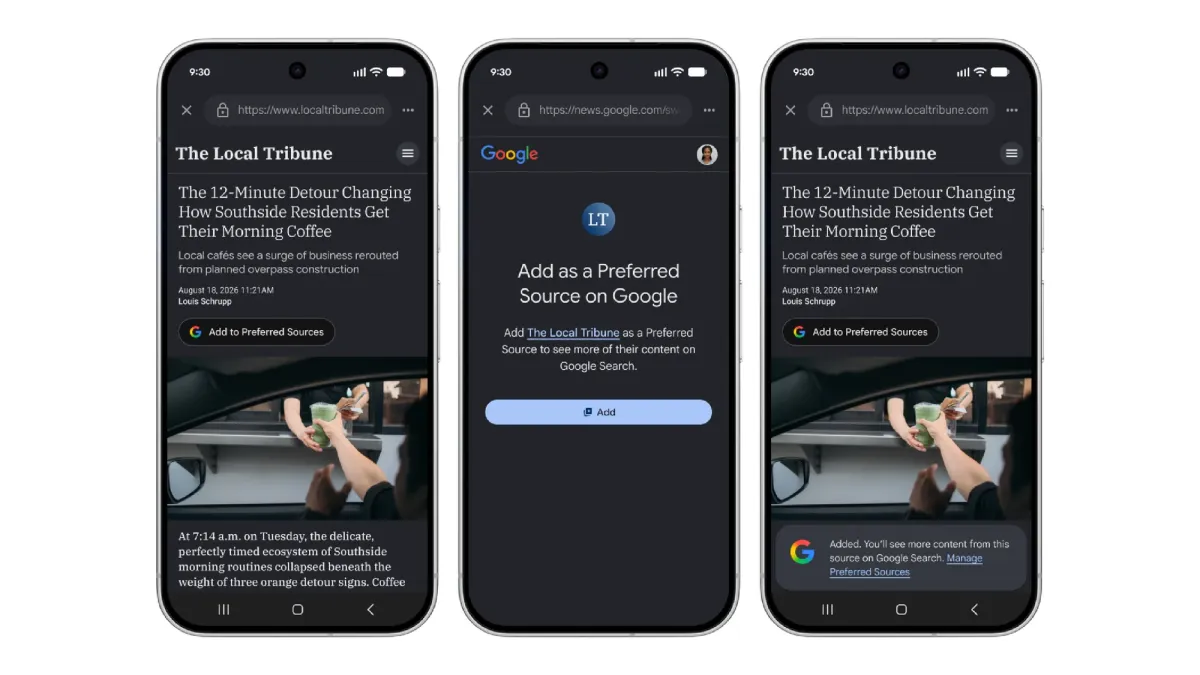
As AI continues to kill traffic to websites, Google on Thursday threw a bone to those publishers negatively impacted by the change. It’s now allowing readers to push a button on a publisher’s website to indicate it’s a “favorite source” they’d like to see highlighted more often across Google Search, Discover, and Google News.
The tech giant said it’s making this new, interactive “Preferred Sources” button available to online publishers to embed on their own websites.
The launch follows Google’s rollout of Preferred Sources in May to Google’s AI experiences, including AI Mode and AI Overviews. The option was previously available in Top Stories.
The idea is to make it easier for readers to find links from the sites they know and trust when they’re searching for content or interacting with Google’s AI to learn about a topic or read the latest news. As of May’s launch, the company said that people across the web had already selected over 345,000 unique sources through this method.
To add a site as a favorite publisher, you can visit Google’s source preferences page, then search for a publisher by name or website.
Becoming a preferred source can drive more traffic to publishers’ websites, Google said. In earlier studies, it found that people are twice as likely to click through to a preferred source when available. By offering publishers these additional tools, Google is trying to assuage the damage that the rapid growth of AI-powered search features has had on traffic-dependent businesses.
Alongside the new button, Google said that readers will soon be able to customize their Discover feed in Google’s app in their own words. To use this feature, readers will tap any three-dot menu in the feed and then tell Google what topics they’d like to see more or less of, using natural language commands. This helps Google refine the feed in real-time.

The search giant is not the only company turning to AI to offer feed-tuning tools powered by AI. In recent months, a number of top social media apps have launched user-controlled algorithms that allow people to fine-tune the content that is recommended to them.
In addition to personalizing the Discover feed, Google says Android users will be able to customize their audio daily briefings in the Google News app, as well.
When you purchase through links in our articles, we may earn a small commission. This doesn’t affect our editorial independence.
>

Castelion, a missile startup founded by former SpaceX executives, has raised a $1 billion Series C at a $13 billion valuation. The round was co-led by Andreessen Horowitz, Carlyle, and JP Morgan Chase.
Founded in 2022, Castelion set out to manufacture hypersonic weapon systems at a lower cost and at faster speeds than traditional defense primes. Since then, the startup has secured more than $500 million in U.S. military contracts.
The funding for the startup is timely. The Pentagon has been looking to procure more of these weapons, since the U.S.’s stockpile of hypersonic missiles capable of travelling at speeds above Mach 5 hasn’t kept pace with China’s. Castelion is betting it can help close the gap with its faster manufacturing process.
The Torrance, Calif.-based startup will use the fresh capital to produce its Blackbeard missiles, named after a fierce English pirate, and other hypersonic weapons in its New Mexico production facility.
The funding round, which included participation from existing backers including Lightspeed, General Catalyst, and Altimeter, comprised $800 million in equity and a $250 million revolving credit facility.
>

Google and Samsung have priced their newest Android smartwatches within $20 of each other, making the cheaper option easy to identify. The real decision comes down to phone compatibility, battery life, and which health features you can actually use.
Pixel Watch 5 costs $399.99 for the 41mm Bluetooth/Wi-Fi model and $429.99 for the 45mm version. Galaxy Watch9 costs $379.99 for the 40mm Bluetooth model and $409.99 for the 44mm model, making Samsung exactly $20 cheaper at either comparable Bluetooth size.
Quick comparison
| Pixel Watch 5 | Galaxy Watch9 | |
|---|---|---|
| Price | $399.99 (41mm); $429.99 (45mm) | $379.99 (40mm); $409.99 (44mm) |
| Phone compatibility | Most phones running Android 12 or newer | Compatible Android phones |
| Battery claim with always-on display | Up to 30 hours (41mm); 40 hours (45mm) | Up to 30 hours |
| Key health restriction | Breathing Emergency Detection is limited to supported countries | ECG and sleep apnea require a compatible Galaxy phone |
Phone compatibility and battery life
Google’s official specifications say the Pixel Watch 5 works with most phones running Android 12 or newer, so you don’t need a Pixel phone to use it. The Pixel Watch 5 therefore works across a broad range of compatible Android phones.
Galaxy Watch9 also works with compatible Android phones, but Samsung Health Monitor is limited to compatible Galaxy phones. That restriction affects two of Samsung’s better-known health tools: ECG and sleep apnea monitoring.
For Galaxy phone owners, that restriction does not affect access. People using another Android brand can still use Galaxy Watch9, but they will not have access to those Samsung Health Monitor features.
Battery life is more straightforward to compare on paper. Google rates the 41mm Pixel Watch 5 for up to 30 hours with the always-on display enabled and the 45mm model for up to 40 hours. Samsung rates both Galaxy Watch9 sizes for up to 30 hours with the always-on display.
The smaller models are therefore even on the manufacturers’ estimates, while Google claims 10 additional hours for the 45mm Pixel Watch 5. Actual battery life will vary with GPS use, workouts, cellular connectivity, display settings, and other factors.
Gemini and health features
Both watches now support Gemini through a raise-your-wrist voice gesture. Google says Pixel Watch 5 can also handle some actions offline, including starting workouts and setting timers, and can provide proactive suggestions.
Samsung’s health suite includes Vitals, Heart Health Score, Fitness Index, and Daily Cardio Load. Its sleep apnea feature is FDA-cleared, although access still requires a compatible Galaxy phone because the feature runs through Samsung Health Monitor.
Google adds Breathing Emergency Detection, which can prompt a call to emergency services after detecting a severe, persistent drop in oxygen saturation if the wearer does not respond.
The feature is currently available only in supported European countries.
Google Health Premium starts at $9.99 per month and adds Gemini-powered health coaching. Basic activity, sleep, and health tracking do not require the subscription.
Neither watch directly measures blood glucose, so anyone looking specifically for blood sugar monitoring will still need a compatible continuous glucose monitor or separate app setup.
Galaxy Watch9 costs $20 less and gives Galaxy phone owners full access to Samsung Health Monitor. Pixel Watch 5 avoids that Galaxy-phone requirement, while the larger 45mm model also has the longer manufacturer-rated battery estimate.
Before buying, check the features available with your phone and in your region, because either watch can offer a different experience depending on both.
Also read: Check out our guide to smartwatch settings that can affect blood sugar alerts, visibility, and context across Apple Watch, Galaxy Watch, Pixel Watch, Huawei Watch, and Garmin.
>
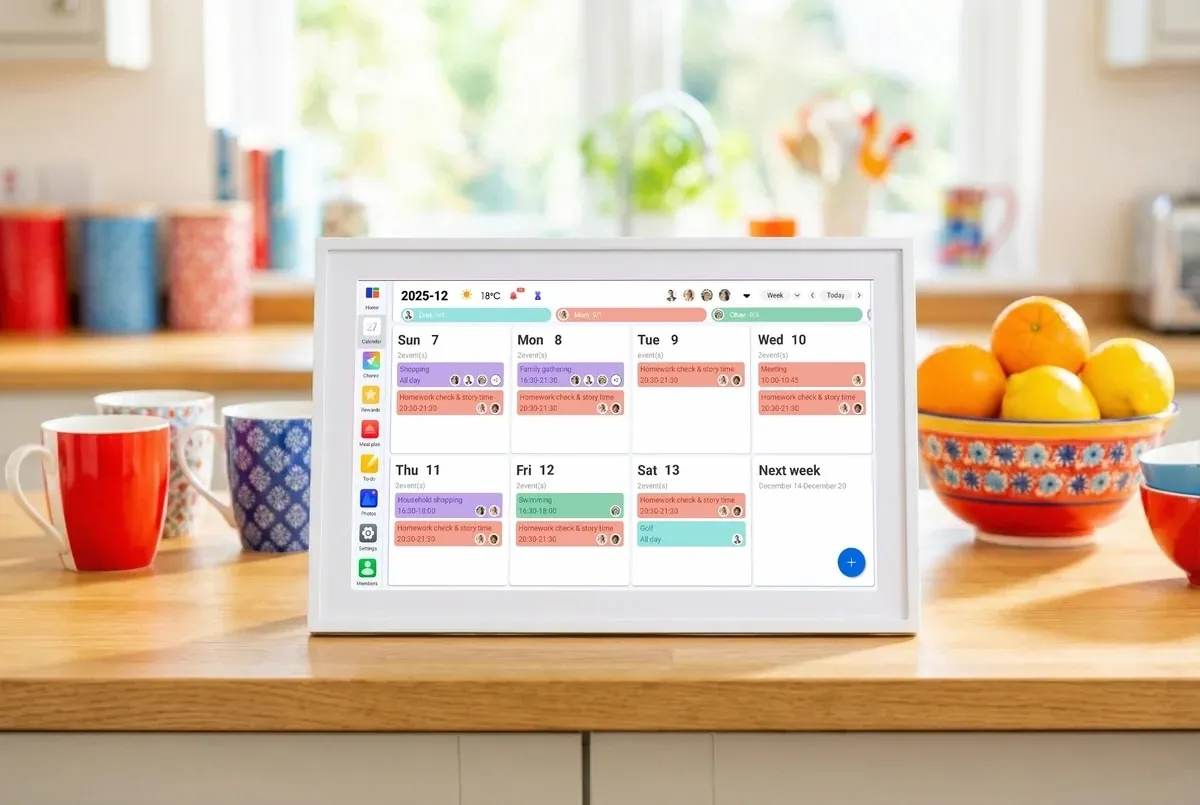
With back-to-school season approaching (or already here in some places), keeping track of everyone’s schedules can get pretty chaotic. Between work, school, appointments, sports, chores, and everything else going on, a regular paper calendar just doesn’t cut it. That’s where Linkdaze’s smart digital calendar comes in — a wall-mounted touchscreen tablet built specifically to organize a household rather than a single person.
One of Linkdaze’s biggest strengths is its calendar compatibility. The system can synchronize calendars from popular services including Google, iCloud, Outlook, Yahoo, and Cozi, which is a dedicated family-organizing app. This is particularly useful for families where different members use different platforms. Instead of asking everyone to switch to a single calendar app, Linkdaze brings multiple schedules together and uses color coding to make individual family members easy to identify.
Linkdaze is available in 15.6-inch and 10.1-inch models, giving you some flexibility depending on how much wall space you have. Beyond calendars and appointments, you can use it for chores and rewards, meal planning, shopping lists, and other family organization. It can even double as a digital photo frame for displaying family photos.

The most interesting feature, however, is Linkdaze’s AI meal planner with “Snap-to-Sync.” Instead of manually entering everything into a meal-planning app, you can take a photo of a paper recipe or your kid’s school lunch menu. Linkdaze will turn that information into a digital meal plan and generate a shopping list from it. While not an entirely new idea, it’s a useful feature that helps Linkdaze stand out from a basic digital calendar.
Another big plus is that Linkdaze doesn’t require a monthly subscription for its main features. It’s an interesting choice in a category where recurring revenue has become the default. Skylight, a competing smart-calendar brand, offers additional features through its $79 per month subscription. For a hardware company entering a crowded smart-display market, that decision is either going to differentiate its product or look like a lost revenue stream, depending on how the business scales.
Linkdaze is also less expensive upfront, with the 10.1-inch model priced at $119.99 compared with Skylight’s 10-inch model at $159.99.
Overall, this device could make a practical gift for busy parents who are trying to keep everyone’s schedules in one place. It could also be a great fit for college apartments, where roommates can use it to coordinate chores, study schedules, shared meals, and other household responsibilities. It’s also very helpful for those of us juggling interviews, deadlines, meetings, and story assignments.
When you purchase through links in our articles, we may earn a small commission. This doesn’t affect our editorial independence.
>

'First major milestone for Pakistan' – Usman takes five wickets

Google gives publishers a new way to fight AI-driven traffic losses

Kareem Rahma Interview on Making ‘SubwayTakes’
-

 movies3 months ago
Search For Canadian TV Actor Stewart McLean Now Homicide Investigation
-

 Fashion9 years ago
These ’90s fashion trends are making a comeback in 2017
-
Fashion9 years ago
According to Dior Couture, this taboo fashion accessory is back
-
Fashion9 years ago
Model Jocelyn Chew’s Instagram is the best vacation you’ve ever had
-
Fashion9 years ago
Emily Ratajkowski channels back-to-school style
-
Fashion9 years ago
9 Celebrities who have spoken out about being photoshopped
-
Fashion9 years ago
Your comprehensive guide to this fall’s biggest trends
-
Fashion9 years ago
A photo diary of the nightlife scene from LA To Ibiza