
Tech
How to Charge Your Phone Without a Charger: Full Guide


The scenario is universal: battery in the single digits, no outlet within reach, and a growing sense of dread about missing a call, a map, or a boarding announcement.
The fix isn’t luck. It’s knowing how to charge your phone without a charger by having the right power source on hand and understanding which fallback actually works when the usual one isn’t available, according to Engadget.
Carry stored power if you can. That’s most of the strategy right there. If you can’t, hunt for the most reliable USB source within reach, whether that’s a laptop, a car, or a wall adapter someone else has. Wireless charging, public USB stations, and solar panels are worth knowing about, but they belong in the situational-backup column, not the primary plan.
Power banks deserve credit for getting out of their own way. The brick-sized batteries that used to weigh down a bag are largely gone, replaced by units small enough to disappear into a pocket (Engadget). A 5,000 to 10,000mAh bank covers most emergency phone charging needs, while larger capacities are built for laptops or multi-day trips away from a wall outlet (Engadget).
The sections below cover choosing a bank that matches your habits, using one without one, handling outdoor trips, and flying with batteries without getting flagged at security.
Choosing a power bank: what the numbers on the box actually mean
Capacity is a starting point, not the whole decision. A 5,000-10,000mAh bank is plenty for rescuing a dead phone once or twice a day, while banks north of 20,000mAh tend to suit multi-day trips or keeping a second device alive rather than daily carry, according to Engadget.
The mAh number on the box is easy to misread. It isn’t a direct count of full phone charges. Conversion losses within the bank and your phone’s battery capacity both chip away at the rated figure, which means a 10,000mAh bank won’t reliably deliver two full charges to a high-capacity phone.
Two real tests illustrate the range. The 5,000mAh Anker Nano, small enough to plug straight into a phone with no cable required, brought a drained Galaxy S23 Ultra to 65% in an hour (Engadget). At the other end, the 20,000mAh Belkin BoostCharge 20K fully charged a Galaxy S24 Ultra in 75 minutes and repeated that feat three times before running dry (Engadget). Neither result crowns a winner; they show the trade-off between everyday-carry convenience and travel-grade capacity.
Two other variables matter just as much as capacity: output speed and connector type. Apple’s own charging guidance shows how much this can vary even within a single lineup. The iPhone 17, iPhone 17 Pro, and iPhone 17 Pro Max reach 50% battery in about 20 minutes, but only with a 40W or higher adapter, according to Apple Support.
The iPhone 17e and iPhone Air need just a 20W adapter to hit that same 50% mark, though it takes closer to 30 minutes. Apple notes that actual charging time still varies with the adapter, cable, and conditions, so treat these figures as a baseline rather than a guarantee. A power bank with generous capacity but the wrong output standard won’t charge quickly no matter what number is printed on the side.
Before buying, run through a short checklist:
- Match rated capacity to how often you actually need a rescue charge, not to the biggest number available.
- Confirm the bank supports your phone’s specific fast-charging standard, whether that’s USB Power Delivery or a proprietary protocol.
- Look for a built-in or foldable cable. Some Anker models include one, which means there’s one less thing to forget on the way out the door (Engadget).
Having the right bank solves most of these moments before they happen. The next question is what to do when the bank itself gets left behind.
No power bank? How to charge a phone without an outlet using just a cable
The right fallback depends less on a fixed hierarchy and more on what’s actually in your bag or pocket at that moment. Start with what you have, not with a universal list.
If you only have a cable, a dead phone can draw power directly from a laptop’s USB port, per Engadget. Staying in a hotel or an Airbnb with no accessible outlet? Check the TV. Some models deliver power through a USB port, though not all do, and the charge will be slow, but it can save the day in a pinch.
If you have a vehicle, a charger that plugs into the accessory socket can both charge the phone and mount it for navigation, which is especially useful when the car itself lacks built-in USB ports.
At a public charging station, like those found in airports and cafes, the option works, but it comes with a caveat. The FBI has warned that public USB ports can be exploited to infect connected devices with malware, a tactic known as juice jacking. Engadget notes this rarely happens in practice, so treat it as a precaution rather than a reason for alarm.
Decline any “Trust this device” prompt, since agreeing gives the connected device access to your data. A charge-only cable, sometimes sold as a “data blocker,” prevents USB data transfer entirely, since it’s not wired to carry data.
Speed differences between wired and wireless charging are worth knowing. In TechChick’s test of the BLAVOR Solar Power Bank, wired charging ran 35 to 45% faster than the device’s own wireless output, which topped out at around 5 to 10W. The exact gap won’t carry over to every phone, cable, and power source, but that test illustrates why a wired connection is usually the better first choice when speed matters. A cable is enough if you can find a laptop, television USB port, or vehicle charger.
Outdoor and off-grid charging: why solar is a backup, not a rescue plan
Solar-equipped power banks are, first and foremost, stored battery capacity with a slow solar top-up feature layered on top. Treating one as a same-day substitute for a wall outlet leads to disappointment.
In TechChick’s test of the BLAVOR Solar Power Bank, the integrated panel generated only 0.2-0.5W in direct sunlight, meaning a full recharge from solar alone can take several days, according to TechChick. That same unit recharged fully in 4.5 to 6 hours when plugged into an 18W wall adapter. Days versus hours is a wide enough gap to suggest a general pattern for solar-equipped banks: expect the panel to work as an emergency reserve, not a fast top-up method.
Solar earns its keep during extended outdoor trips or power outages, especially when no wall adapter is available and time isn’t the limiting factor. Campers, hikers, and people who deal with frequent outages get real value from that flexibility. Anyone charging at home or in an office is better off with a standard power bank, which charges faster and costs less.
Charging the phone is one problem. Getting a power bank through airport security with the right battery in the right bag is a separate one, and the rules are more specific than most travelers assume.
Mobility must-reads
Flying with a power bank: what the rules actually require
The core FAA rule is straightforward: spare lithium-ion batteries and power banks belong only in carry-on baggage. If a carry-on bag is gate-checked, its batteries must be removed and remain with the passenger in the cabin (FAA PackSafe, updated last week).
The math that actually matters here isn’t mAh; it’s watt-hours. Wh is calculated by multiplying voltage by amp-hours, and newer batteries print this rating directly on the device. Checking that number before a trip matters because mAh alone doesn’t determine whether a bank is flight-legal.
The federal caps break down like this:
- 100Wh per battery is the standard limit for lithium-ion batteries.
- Batteries between 101 and 160 Wh require airline approval and are capped at 2 per passenger.
- Individual airlines can, and often do, impose stricter rules than the federal minimum (FAA PackSafe).
Check your carrier’s rules before departure, because some airlines set stricter limits than the federal floor allows.
Beyond the rulebook, a few safety habits are worth adopting regardless of what any airline requires. Protect battery terminals from short circuit, since damage, overheating, water exposure, overcharging, or a manufacturing defect can trigger thermal runaway without warning (FAA PackSafe). Never fly with a battery that’s swollen, visibly damaged, or subject to a recall (FAA PackSafe).
Conclusion
Get in the habit of checking the bank itself before you need it, not after. A power bank left fully discharged for long stretches degrades faster than one topped off regularly; Battery University recommends storing lithium batteries around 50% charge during extended periods of disuse, a detail worth applying to whatever’s sitting untouched in a junk drawer (TechChick). Charge it the night before a trip, not the morning of.
Before flying, check two things: the Wh rating printed on the bank and the specific airline’s power bank policy, since carriers can and do set limits stricter than the FAA’s own thresholds (FAA PackSafe). Aviation authorities and airlines have tightened guidance following onboard smoke and fire incidents earlier this year, according to AP News, so a rule that applied to last year’s trip might not apply to the next one.
Five minutes reading the airline’s baggage page beats finding out at the gate.
Editor’s note: This article originally appeared on our sister publication, GadgetHacks.
>

Stripe confirmed on Wednesday that it was buying OpenRouter. While the company didn’t disclose the deal price, sources told the New York Times that it paid $7.5 billion.
That’s a huge step up from OpenRouter’s $1.3 billion valuation in May. To put that price in context, the founders alone will reportedly receive $1.5 billion from the sale — more than the startup’s entire valuation just three months ago. Investors will get the remaining $6 billion, according to the NYT. Stripe reportedly had to outbid others interested in the fast-growing startup, including Databricks.
But the question is: what does a payments giant want with a startup that routes prompts between different AI models?
The short and funny answer, according to a leaked letter from Stripe’s founders to its investors about the deal, is: the singularity.
“It’s a fuzzy and perhaps already overworked term but we decided that January 1 marked the beginning of the singularity and we’ve been operating on that basis,” they wrote in the letter, published by Eric Newcomer, and verified by TechCrunch.
The singularity is supposed to mean the point at which humans and the tech we’ve created merge to become a new species. This is obviously a tongue-and-cheek reference (as Patrick Collison admitted when using the term it at his company’s conference in April). We’re fairly certain Stripe’s founders, the brothers Patrick and John Collison, don’t think humanity started turning into The Borg eight months ago.
But they have referred to the economic uptick that AI is bringing to Stripe. With AI, more companies are being launched and more of them are using Stripe’s offerings. Stripe says that 88% of the Forbes AI 50 are using its products, including OpenAI and Anthropic, as do 100% of Brex’s fastest-growing startups. No one knows how AI and agents will change the economy of the future, but everyone is certain it will change it dramatically.
That still doesn’t explain why Stripe wants a company mostly known for helping developers manage their model usage. Stripe’s founders acknowledged that their customer bases overlap.
“OpenRouter is exceptionally useful for any developer and Stripe is one of the world’s largest developer platforms,” the founders write in their letter. No doubt that just using OpenRouter internally will probably offer significant benefits to Stripe and make it easier to roll out future model-agnostic agentic offerings, too.
It seems as if OpenRouter will continue to operate independently after the deal closes in a few weeks, or so the startup promised in its own blog post, saying that its “product, mission, and current commitments remain unchanged.”
Still, until now, most of Stripe’s large acquisitions have been related to helping people collect and manage incoming cash. Buying OpenRouter looks like a move to other side of the ledger, too: expense management, beginning with AI expenses.
This acquisition “is Stripe’s deliberate attempt to embed itself into the middle of capital flows in the AI era,” said PitchBook’s research analyst Franco Granda.
It’s joining an unusual assortment of companies also entering token expense management. Databricks developed its own AI gateway. Rippling just launched one focused on employee AI spend and ROI. Ramp just launched one, also for AI expense management. And the list goes on.
For Stripe, buying the granddaddy of popular AI gateways for developers gives it insight into how coders are using AI. But it also gains a lever on AI demand itself. OpenRouter will grant it “some degree of power over suppliers such as the frontier labs themselves, as well as hyperscalers and neoclouds,” Granda said.
It may not be the Borg, but payments plus token expense management and a model router? That’s a lot of power.
When you purchase through links in our articles, we may earn a small commission. This doesn’t affect our editorial independence.
>
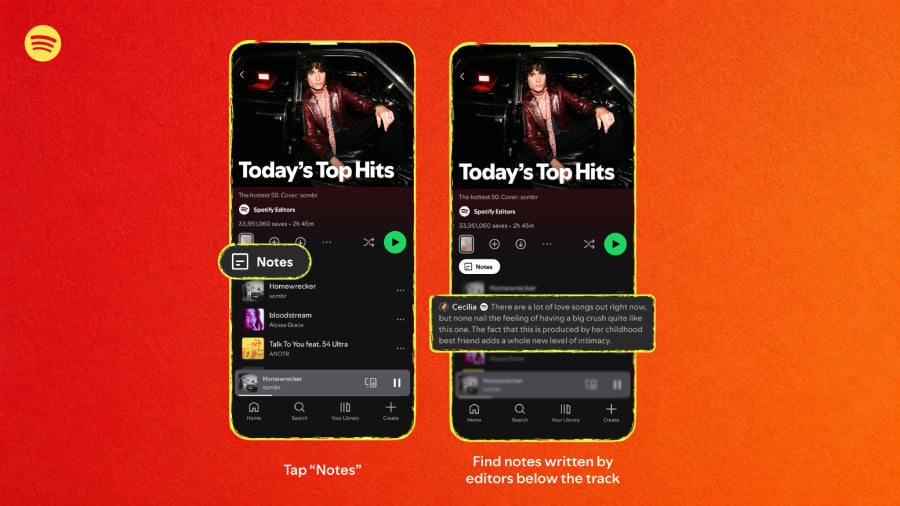
Spotify is finally giving listeners an answer to the question every playlist has silently left hanging: Why is this song here?
The company has launched Playlist Notes, a feature that lets listeners add short explanations to songs, podcast episodes, and audiobooks in playlists they create or manage.
The move adds a human layer to a service that increasingly relies on algorithms and AI to help people discover content. Instead of a playlist being only a sequence of recommendations, Spotify now wants some of those selections to come with the story, memory, or reasoning behind them.
Spotify has been steadily pushing AI deeper into discovery. Its Prompted Playlist lets users describe what they want in natural language, and the platform’s embedded AI turns that prompt into a collection of music.
Playlist Notes takes the opposite approach. Prompted Playlist uses AI to help decide what belongs in a playlist; Notes lets people explain in their own words why a particular song, podcast, or audiobook made the cut.
In April, Spotify introduced its Verified by Spotify badge to help listeners identify authentic artist profiles, and just last week it announced AI Persona badges for profiles representing AI-generated identities.
Starting in September, those profiles will also be excluded from Spotify’s editorial and algorithmic recommendations by default. Against that backdrop, Playlist Notes feels less like a minor playlist feature and more like another way for Spotify to keep human identity and judgment visible on a platform becoming increasingly shaped by AI.
How Spotify playlist notes work
For a playlist that you created or help manage:
- Open the playlist.
- Find the song, podcast episode, or audiobook.
- Tap the three-dot menu beside the item.
- Select Add note.
- Write the note.
- Save it.
TechRadar reports a 250-character limit for these notes.
According to TechCrunch, user-created Playlist Notes will roll out to iOS and Android users in more than 100 markets. Spotify’s separate Editor Notes feature will have a narrower launch, reaching free and Premium users aged 16 and older in the U.S., U.K., Canada, Australia, Ireland, and New Zealand.
More about Innovation
What this means for users
For Spotify users, Playlist Notes adds a simple way to make playlists feel more personal.
Instead of handing someone a list of songs with no explanation, users can now add the memories, recommendations, or reasons that make those selections meaningful, turning a playlist into something closer to a shared story.
The feature could also prompt other streaming platforms to follow suit. If this feature catches on, competitors such as Apple Music and YouTube Music could eventually explore similar features, especially as users increasingly demand that music platforms retain their human authenticity.
For Spotify, Playlist Notes is a relatively small feature with a bigger purpose. As algorithms and AI play a larger role in deciding what users hear, the notes give listeners and editors a simple way to show where human taste, memory, and judgment still enter the mix.
Other News: Samsung may be preparing Galaxy H1, a new pair of full-size wireless headphones that could expand its Galaxy audio lineup beyond earbuds, according to clues found in the Galaxy Wearable app.
>
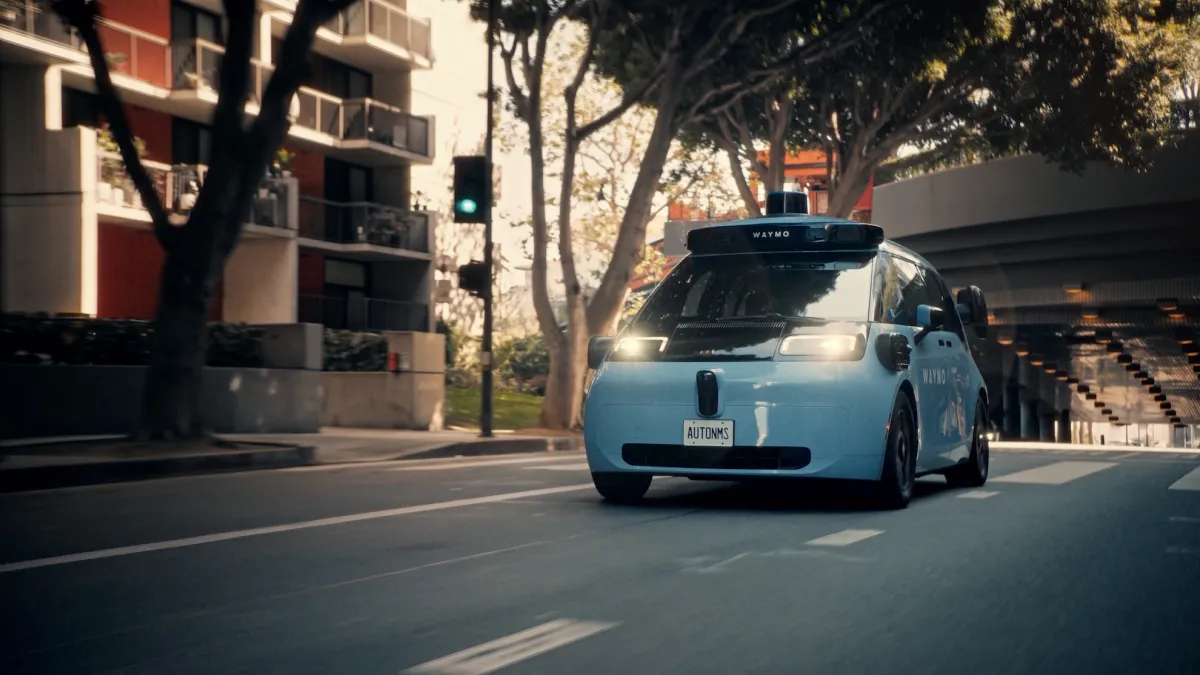
Waymo has opened its next-generation robotaxi to all riders in Los Angeles, Phoenix, and San Francisco — a notable milestone for the Alphabet company as it pushes to expand its fleet with vehicles that are cheaper to build, operate, and maintain.
For now, customers in these markets may be matched with the new robotaxi, called the Ojai (pronounced oh-hi) when they hail a ride. Once Waymo has enough Ojais in its fleet, riders will be able to choose between the new vehicle and the older Jaguar I-Pace robotaxi. Waymo has about 300 Ojai robotaxis in its commercial fleet today, according to a company spokesperson.
The company said Wednesday that it plans to roll out the Ojai in Denver, Las Vegas, and San Diego later this year.
For years, Waymo has relied on the all-electric, modified Jaguar I-Pace for its robotaxi fleet, which now operates in 11 U.S. cities today. While the white, sensor-laden autonomous hatchback has become ubiquitous in markets such as San Francisco, it has been more of a stopgap in Waymo’s longer term push towards mass scale, and eventually, profitability.
The Waymo Ojai robotaxi is meant to deliver on that ambition. The Ojai is equipped with Waymo’s sixth-generation self-driving system, which is critical to the company’s commercial strategy because it’s modular and designed to work across multiple vehicles types. The robotaxi also comes with a redesigned user interface and Google’s Gemini AI, which acts as an in-car assistant for riders.
Strip away that technology, though, and the Ojai is a minivan made by Zeekr, a brand owned by China’s Geely Holding Group. Waymo partnered with Zeekr in 2021 and has spent years testing a prototype, and later a production-intent version of the vehicle. It’s built on Zeekr’s SEA-M platform, an updated version of the automaker’s “Sustainable Experience Architecture,” which the company designed for vehicles like robotaxis and delivery vans. The goal was to create a robotaxi that was attractive and easy for riders to access, but also cheap to build and maintain and durable enough to withstand near-constant use.
The Ojai delivers on many of those goals, though tariffs on the imported vehicles have added cost. Under current U.S. trade policy, vehicles built in China face steep import tariffs, which raises Waymo’s costs for every Ojai it brings into the country. The base Zeekr vehicles ship without any Chinese connected-car technology on board. After arriving in the U.S., they’re sent to Waymo’s Arizona factory, where they are outfitted with the self-driving system.
New York-based research firm MoffettNathanson, which tracks Ojai imports by examining detailed receipts of shipped goods, said Waymo is on pace to bring 5,000 Ojai vehicles to the United States by the end of 2026. That would be more than double Waymo’s current Jaguar fleet, according to the firm. In July alone, 725 Ojai vehicles entered the country, underscoring the scale and pace of Waymo’s expansion efforts.
When you purchase through links in our articles, we may earn a small commission. This doesn’t affect our editorial independence.
>

Liverpool: What does Jeff Bezos’ Liverpool deal mean?

Edmonton Marathon organisers say 2026 route was 674m too long

Formula 1: Max Verstappen extends deal with Red Bull to 2030
-

 movies3 months ago
Search For Canadian TV Actor Stewart McLean Now Homicide Investigation
-

 Fashion9 years ago
These ’90s fashion trends are making a comeback in 2017
-
Fashion9 years ago
According to Dior Couture, this taboo fashion accessory is back
-
Fashion9 years ago
Model Jocelyn Chew’s Instagram is the best vacation you’ve ever had
-
Fashion9 years ago
Emily Ratajkowski channels back-to-school style
-
Fashion9 years ago
9 Celebrities who have spoken out about being photoshopped
-
Fashion9 years ago
Your comprehensive guide to this fall’s biggest trends
-
Fashion9 years ago
A photo diary of the nightlife scene from LA To Ibiza