
Tech
Anthropic CEO Says Open-Weight AI Won’t Decentralize Power


Anthropic chief executive Dario Amodei has a reality check for anyone expecting open-weight AI to democratize Silicon Valley: it won’t.
In an exchange on X with investor Gavin Baker, Amodei rejected the premise that policymakers face an ultimatum between concentrated regulatory control and wide open distribution.
Baker contended on a podcast and social media that Amodei has “lost the argument” on AI governance, claiming his warnings have fueled local backlashes against data centers while urging him to be a “more positive advocate for his own industry.”
Amodei responded that framing the debate as “either concentrate it in the hands of a chosen few companies and politicians via regulation or distribute it widely” represents a “false choice.” He argued that institutions can establish equitable frameworks, comparing formal rules to a legal system that protects individuals from mob justice.
According to Amodei, AI is “structurally a technology that tends to concentrate power” because of the computational demands dictated by scaling laws. Freely distributing model weights, he warned, simply shifts that dominance to whichever entities control the underlying chips and infrastructure.
Slowing down frontier labs
Amodei defended Anthropic’s policy track record, emphasizing that the startup actively designs proposals to “disadvantage (slow down) frontier AI companies while advantaging smaller competitors.”
He highlighted Anthropic’s backing of measures like California’s SB 53, which set compliance thresholds that exempt smaller enterprises below specific revenue or training cost cutoffs.
Amodei also backed tiered evaluation frameworks proposed to the White House and the Center for AI Safety (CAISI), alongside the concept of an independent, self-regulatory body similar to FINRA, originally suggested by Google DeepMind CEO Demis Hassabis.
Rethinking the public trust deficit
Addressing broader pushback against the sector, Amodei denied that his safety warnings have soured public sentiment. Instead, he framed the skepticism as a decades-old institutional trust deficit.
“I think by far the most accurate criticism of AI companies including Anthropic is that we haven’t yet delivered on our big promises to benefit the world,” Amodei wrote, adding that promising to cure cancer has become “more a cliché than it is inspiring.”
To overcome public cynicism, Amodei noted that Anthropic is accelerating internal research in biology and medicine, aiming to deliver tangible clinical advancements rather than relying on promotional spin.
The compute bottleneck reality
The debate between open-weight advocates and safety-focused frontier labs exposes a fundamental commercial reality: software accessibility does not equal infrastructure parity.
Open-weight models can give developers more control over software by allowing them to inspect, modify, and run models independently. But training and operating the most capable systems still requires substantial compute, advanced chips, and access to large-scale infrastructure.
Amodei argues that this infrastructure bottleneck limits how much decentralization open weights alone can achieve. For startups and enterprise users, that means greater software openness may still leave them dependent on a relatively small number of cloud and hardware providers.
The larger policy question is whether decentralizing access to models is enough when the physical infrastructure required to build and run frontier AI remains concentrated elsewhere.
More News: The rise of open-weight models is challenging OpenAI and Anthropic’s closed-model strategies as both companies command soaring valuations.
>

A routine-looking download can turn into a much bigger problem for Mac users.
Jamf Threat Labs found an AmnesiaStealer campaign reaching macOS through a fake software download and capable of keeping attackers connected to browser sessions after infection. Researchers say the added access can extend the intrusion beyond the malware’s initial data theft.
An attack begins with a user-run Terminal command, but its more unusual stage comes later, after AmnesiaStealer is already inside the system.
A fake download opens the door on macOS
Jamf Threat Labs traced the campaign to a counterfeit GitHub-style page offering a macOS download. Visitors are instructed to copy an encoded command into Terminal, using a ClickFix attack chain that relies on the target to execute the malicious instructions.
Running the command triggers a shell script that downloads and launches AmnesiaStealer. The malware also attempts to obtain the user’s login password as it prepares to collect information from the system.
Turning stolen data into browser access
AmnesiaStealer first collects information stored on the infected device. Jamf found it targeting browser data and the macOS Keychain, with Apple Notes and Telegram also in its sights.
Mac infostealers have pursued similar information before. FrigidStealer, for example, has targeted browser credentials and Apple Notes.
The malware can then download an optional component called stream_module. This can copy a Chromium browser profile and launch another browser instance outside the user’s view. Operators can see what appears in the browser and send keyboard or mouse input back to it.
Copied browser data can preserve an authenticated session. Services that still recognize an existing session may not immediately ask for another login. Stolen session cookies can create a similar problem, while remote browser control also allows an operator to interact with the session from the compromised system.
Must-read Apple coverage
Work accounts raise the cost of a compromised device
If you use a Mac for work, treat a suspected AmnesiaStealer infection as more than a malware-removal job. Accounts already open in the browser may include company email or cloud services, depending on your role and access.
Take the affected device offline and contact your IT or security team if it is company-managed. Use a clean device to revoke active sessions and reset passwords for sensitive accounts. Review recent activity for anything you do not recognize.
If your role includes privileged or financial access, tell responders which services were open or recently used. A session tied to an administrative console or finance platform can carry permissions well beyond an ordinary user account.
Credential recovery should run alongside endpoint investigation. Unexpected Chromium processes or copied browser profiles can help establish whether the browser-control component was used. Recent threats such as ClickLock malware have already made credential theft a concern for Apple users, and AmnesiaStealer adds another form of access for defenders to account for after an infection.
Other News: WhatsApp is testing on-device AI scam alerts that flag suspicious messages from unknown senders without sending message content to the cloud.
>

Google Workspace is my choice for the best small business email provider because it combines custom-domain Gmail with cloud storage, collaboration tools, security controls, and straightforward administration. Microsoft 365 is a close alternative for Microsoft-based teams, while Zoho Mail offers the best value for businesses on a tighter budget.
A professional address such as name@yourbusiness.com reinforces your brand and separates business communications from personal email. Depending on the provider, it can also offer shared calendars, productivity applications, administrative controls, migration tools, and stronger email authentication and security features.
I evaluated six providers using 27 criteria covering email functionality, security, administration, pricing, integrations, usability, and small-business fit. My recommendations include options for solo business owners, growing teams, privacy-focused companies, and businesses that want email bundled with website hosting.
*Fastmail’s displayed price can vary by term; verify the checkout total before publication.
**Hostinger’s introductory price requires a 48-month term and renews at $1.59 per mailbox per month.
Why you can trust us
At TechRepublic, I evaluate dozens of business software tools each year, including email hosting platforms, productivity suites, and website hosting providers. For this guide, I reviewed multiple business email providers and hosting platforms, comparing pricing, storage, security, and scalability.
I also evaluated ease of setup and day-to-day usability, drawing on my hands-on experience testing tools such as Google Workspace, Microsoft 365, Zoho Mail, and hosted email providers to understand how they perform in real business environments.
Best business email providers at a glance
A business email is a professional email address used for work or business (aka non-personal) purposes. Business emails use custom domains rather than generic ones (e.g., yourname@yourbusiness.com instead of yourname@gmail.com), which makes you look more professional and credible. They also help promote your brand.
Below, I break down each provider in more detail, including pricing, key features, and where each one fits best depending on your business needs.
Google Workspace: Best overall for small businesses

Expert score: 4.53 out of 5
Why I chose Google Workspace
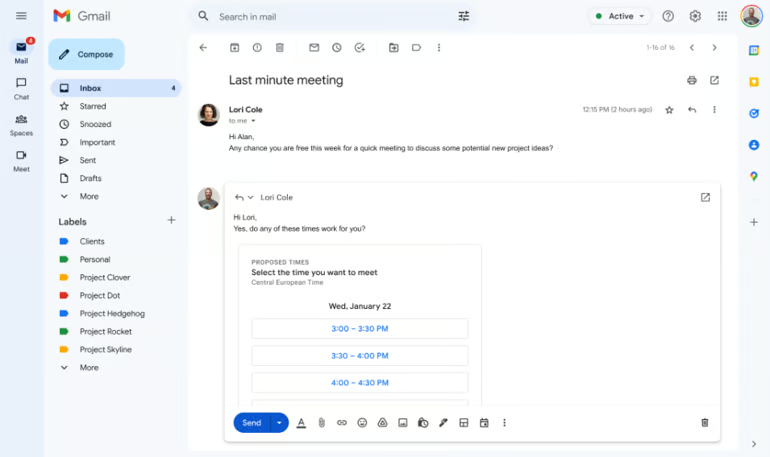
Google Workspace earned the highest score in my evaluation because it offers the best overall combination of usability, email functionality, collaboration, and small-business administration. In my experience, Gmail is one of the easiest business email platforms to introduce to a team because most users already understand its interface. Connecting a custom domain and completing the initial setup are also relatively approachable for a first-time administrator.
I find Google Workspace particularly valuable when email is only one part of the workflow. Gmail connects naturally with Drive, Docs, Sheets, Slides, Meet, and Calendar, allowing a small team to move from an email conversation to a shared document or video meeting without changing platforms. Business Starter also includes Gemini in Gmail, while higher tiers extend Gemini across more Workspace applications.
Google Workspace does not include a domain, and features such as Vault, eDiscovery, and enhanced endpoint management require Business Plus or Enterprise. Microsoft 365 also offers more advanced shared-mailbox and administrative capabilities. However, Google Workspace is easier to manage for most small teams and provides the strongest all-around experience.
Features
- Custom-domain business email through Gmail
- 30GB to 5TB of pooled storage per user
- Google Docs, Sheets, Slides, and Forms
- Google Meet and shared calendars
- Gemini assistance in Gmail
- Email aliases, groups, and administrative controls
- Spam, phishing, and malware protection
- Offline access and automatic synchronization
Google Workspace pricing
- Business Starter: $8.40 per user per month or $7 per user per month with a one-year commitment
- Includes custom-domain email, 30GB of pooled storage per user, core Workspace applications, Gemini in Gmail, and meetings for up to 100 participants
- Business Standard: $16.80 per user per month or $14 per user per month with a one-year commitment
- Includes 2TB of pooled storage per user, shared drives, appointment booking, mail merge, meeting recording, and Gemini in additional Workspace applications
- Business Plus: $26.40 per user per month or $22 per user per month with a one-year commitment
- Includes 5TB of pooled storage per user, Vault, eDiscovery, advanced endpoint management, and enhanced security controls
- Enterprise: Custom pricing
- Adds enterprise identity, security, compliance, data-region, and administrative capabilities
Pros and cons
| Pros | Cons |
|---|---|
|
|
Microsoft 365: Best for Microsoft-powered workplaces

Expert score: 4.51 out of 5
Why I chose Microsoft 365
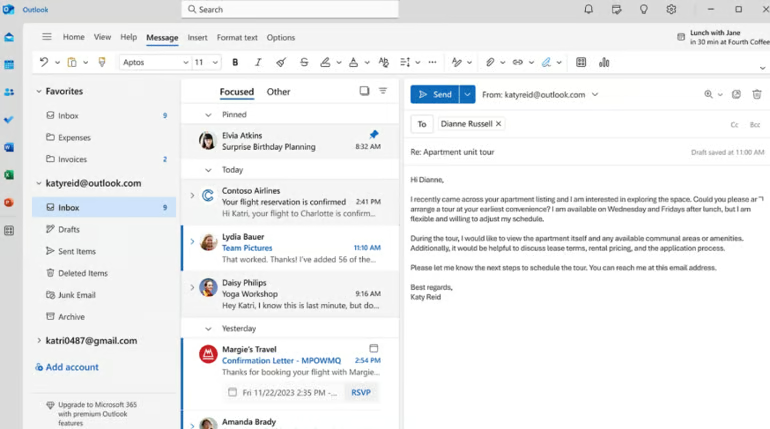
Microsoft 365 finished just behind Google Workspace in my evaluation, but it received stronger scores for mailbox functionality, administration, security, and scalability. It is my preferred option for businesses already working in Outlook, Word, Excel, Teams, and SharePoint because email, files, meetings, and collaborative workspaces operate within the same ecosystem.
I particularly value Microsoft 365’s support for shared mailboxes, distribution groups, calendar delegation, retention policies, and centralized user management. A 50GB shared mailbox generally does not require a separate license, although each person accessing it needs an eligible Exchange Online license. This can make addresses such as support@, sales@, and billing@ more practical for growing teams.
That said, Microsoft 365 requires more configuration than Google Workspace, and I find its administrative tools less approachable for first-time users. Desktop Office applications, advanced threat protection, device management, and some compliance capabilities also require higher-tier plans. However, its deeper controls make it a better long-term choice for businesses already committed to Microsoft applications.
Features
- Custom-domain business email through Outlook
- 50GB mailbox and 1TB of OneDrive storage per user
- Shared mailboxes, distribution groups, and email aliases
- Shared calendars and delegated mailbox access
- Web and mobile versions of Word, Excel, and PowerPoint
- Microsoft Teams, SharePoint, Planner, and Forms
- Spam, phishing, and malware filtering
- Messages and attachments totaling up to 150MB
Microsoft 365 pricing
- Microsoft 365 Business Basic: $7.20 per user per month or $6 per user per month with a one-year commitment
- Includes custom-domain email, a 50GB mailbox, 1TB of OneDrive storage, Teams, and web and mobile Office applications
- Microsoft 365 Business Standard: $15 per user per month or $12.50 per user per month with a one-year commitment
- Adds desktop versions of Outlook, Word, Excel, and PowerPoint, along with expanded collaboration and webinar tools
- Microsoft 365 Business Premium: $26.40 per user per month or $22 per user per month with a one-year commitment
- Adds advanced identity controls, device management, data protection, and enhanced cybersecurity features
Pros and cons
| Pros | Cons |
|---|---|
|
|
Zoho Mail: Best low-cost business email

Expert score: 4.47 out of 5
Why I chose Zoho Mail
Zoho Mail delivered the strongest pricing and value results in my evaluation. Its paid email plans start at $1 per user per month, making it considerably less expensive than Google Workspace, Microsoft 365, and Proton Mail. A free custom-domain plan is also available for up to five users in eligible regions.
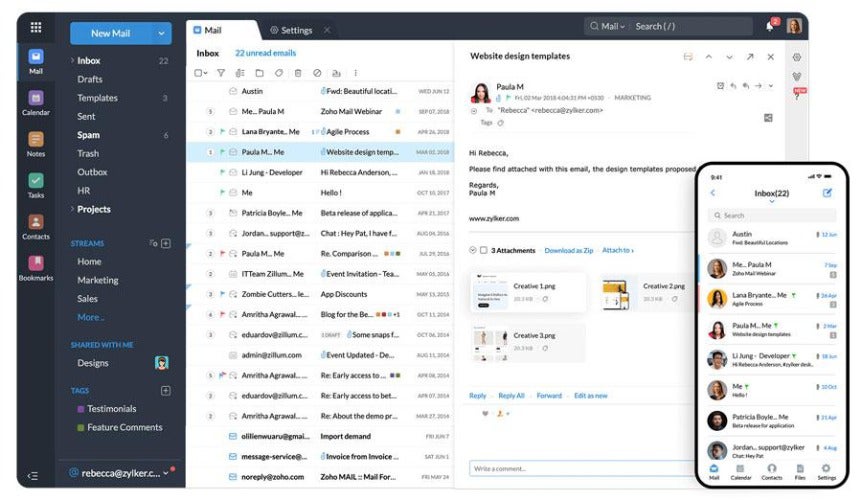
What impressed me most is that Zoho does not sacrifice essential business controls to reach its lower price. The platform supports custom domains, aliases, groups, shared calendars, multifactor authentication, migration tools, and SPF, DKIM, and DMARC configuration. Its security dashboard can also help administrators identify incomplete domain-authentication settings and suspicious sign-ins.
I find Zoho Mail most compelling for small teams already using applications such as Zoho CRM, Books, Projects, or Writer. Its interface is not as immediately familiar as Gmail or Outlook, and the free plan excludes IMAP, POP, and ActiveSync. Even with those limitations, Zoho Mail offers exceptional value for businesses that need professional email without a complete Google or Microsoft subscription.
Features
- Custom-domain business email
- Email and domain aliases
- Shared calendars, tasks, notes, and bookmarks
- SPF, DKIM, and DMARC configuration
- Spam, phishing, and malware protection
- Email migration and administrative tools
- Integration with Zoho business applications
- Mobile applications for iOS and Android
Zoho Mail pricing
- Free: $0 for up to five users in eligible regions
- Includes custom-domain email, 5GB of storage per user, and web and mobile access
- Does not include IMAP, POP, or ActiveSync
- Mail Lite with 5GB: $1 per user per month, billed annually
- Adds IMAP and POP access, aliases, shared calendars, offline access, and larger attachments
- Mail Lite with 10GB: $1.25 per user per month, billed annually
- Includes the same Mail Lite features with additional mailbox storage
- Workplace Standard: $3 per user per month, billed annually
- Includes 30GB of email storage per user, team file storage, Zoho Writer, Sheet, Show, WorkDrive, Cliq, Meeting, Vault, and Zia
- Mail Premium: $4 per user per month, billed annually
- Includes 50GB of mailbox storage plus 50GB of retention storage, email archiving, eDiscovery, backup and restoration, S/MIME, and attachments up to 1GB
- Workplace Professional: $6 per user per month, billed annually
- Includes 100GB of email storage plus 100GB of retention storage per user, expanded WorkDrive storage, advanced security and compliance tools, and the complete Workplace collaboration suite
- Workplace Enterprise: Contact Zoho for custom pricing
- Adds custom limits, endpoint controls, directory synchronization, and other enterprise administration options
Zoho also allows organizations to mix Mail-only and Workplace subscriptions, which can help control costs when not every employee needs the complete productivity suite.
Pros and cons
| Pros | Cons |
|---|---|
|
|
Fastmail: Best standalone business email service
Expert score: 4.26 out of 5

Why I chose Fastmail
Fastmail is my preferred option for businesses that want a dedicated email service without paying for a complete productivity suite. Instead of competing with Google Workspace or Microsoft 365 on documents and video meetings, Fastmail concentrates on email, calendars, contacts, custom domains, and a clean user experience.
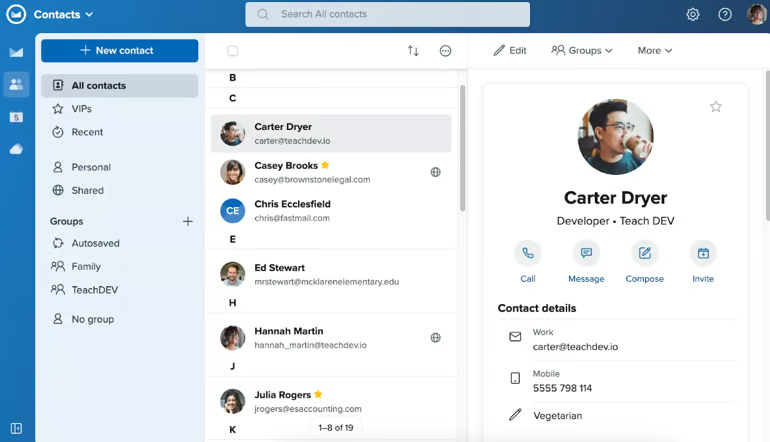
I particularly like how Fastmail handles business addresses. Teams can create shared addresses such as support@yourbusiness.com, share calendars and company contacts, and manage multiple addresses from one account. It also supports IMAP, so users can continue working through Outlook, Apple Mail, Thunderbird, or another compatible email client.
Fastmail performed especially well in my evaluation for usability, migration, billing flexibility, and mailbox management. Businesses can mix plan levels among employees, upgrade or downgrade users, and receive prorated credits when their needs change. However, it lacks a document suite, built-in video conferencing, and the extensive administrative controls available from Google or Microsoft. Email retention is also limited to the Professional plan.
Features
- Custom-domain business email
- Shared email addresses and aliases
- Shared calendars and company contacts
- 5GB to 100GB of email storage per user
- Scheduled Send, Snooze, and offline access
- IMAP support for third-party email clients
- Built-in migration and export tools
- Ad-free inbox with no email tracking
Fastmail pricing
- Basic: $3 per user per month, billed annually
- Includes 5GB of mail, calendar, and contact storage plus 1GB of file storage
- Standard: $5 per user per month, billed annually
- Includes 50GB of mail, calendar, and contact storage, 10GB of file storage, custom domains, shared addresses, and third-party email-client support
- Professional: $9 per user per month, billed annually
- Includes 100GB of mail, calendar, and contact storage, 50GB of file storage, and a tamper-resistant email-retention archive
Businesses can mix plans among users, but at least one user must have a Standard or Professional subscription to share a custom domain with the account. Fastmail provides a free trial of up to 30 days.
Pros and cons
| Pros | Cons |
|---|---|
|
|
Proton Mail: Best for privacy-focused businesses
Expert score: 4.06 out of 5

Why I chose Proton Mail
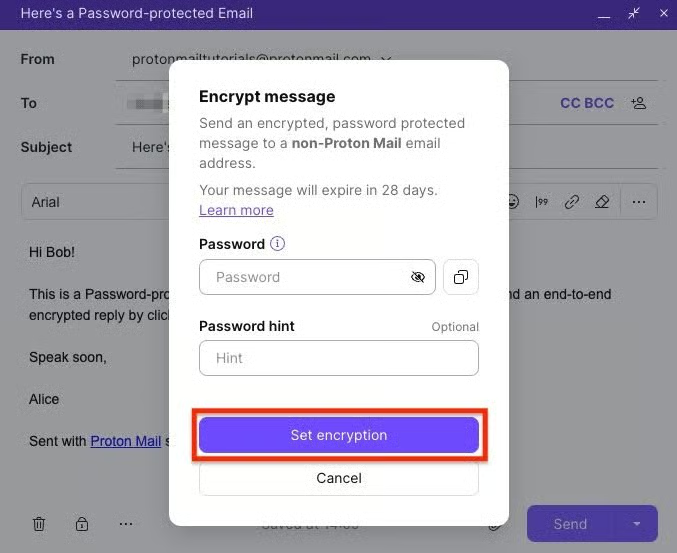
Proton Mail received the highest privacy and encryption scores in my evaluation. Emails exchanged between Proton accounts are automatically end-to-end encrypted, while its zero-access encryption prevents Proton from reading stored message content. Users can also send password-protected messages to recipients outside the Proton ecosystem.
This is why I recommend Proton Mail for businesses handling sensitive client conversations or prioritizing data privacy over extensive third-party integrations. Its business plans include custom domains, administrative controls, secure calendars, catch-all addresses, migration tools, and up to 10 business addresses per user on Mail Essentials. Proton also cites ISO 27001 certification and a SOC 2 Type II audit as independent validation of its security practices.
In my experience, the main trade-off is interoperability. Proton’s encryption model can make connections with conventional email applications and business services less seamless than they are with Google Workspace, Microsoft 365, or Fastmail. The entry plan also provides only 15GB of storage per user, while retention policies and AI writing tools require Workspace Premium.
Features
- End-to-end encryption between Proton accounts
- Zero-access encryption for stored email
- Password-protected messages for external recipients
- Custom business domains and catch-all addresses
- Up to 10 email addresses per user on Mail Essentials
- Proton Calendar and appointment scheduling
- Easy Switch migration tools
- Web, desktop, iOS, and Android applications
Proton Mail pricing
- Mail Essentials: $7.99 per user per month or $6.99 per user per month when billed annually
- Includes 15GB of storage per user, 10 email addresses per user, three custom domains, secure email and calendar, and migration tools
- Workspace Standard: $14.99 per user per month or $12.99 per user per month when billed annually
- Adds 1TB of storage per user, 15 custom domains, encrypted file storage, document tools, VPN access, password management, and video meetings
- Workspace Premium: $24.99 per user per month or $19.99 per user per month when billed annually
- Adds 3TB of storage per user, 20 custom domains, data-retention policies, private AI chat, email-writing assistance, and expanded meetings
- Enterprise: Custom pricing
- Provides a configurable package, dedicated account management, and enterprise support
Proton offers a 14-day business trial and a 30-day money-back guarantee.
Pros and cons
| Pros | Cons |
|---|---|
|
|
Hostinger Mail: Best for bundled website and email hosting
Expert score: 3.96 out of 5
Why I chose Hostinger Mail

Hostinger Mail is my top choice for entrepreneurs who want to manage their website, domain, and business email through the same provider. Hostinger sells email separately, but its web hosting
plans can also include introductory business mailboxes. This makes it convenient for a new business establishing its complete online presence at once.
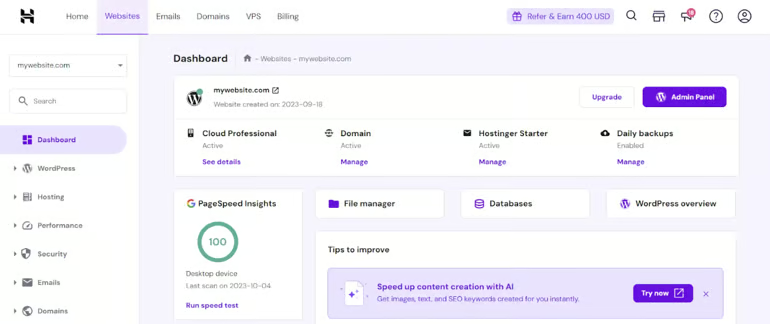
I found Hostinger’s hPanel easier to navigate than many traditional hosting dashboards. It guides users through connecting a domain, creating mailboxes, configuring DNS records, and importing messages from another provider. Mailboxes also work with Hostinger Webmail and compatible applications such as Gmail, Outlook, and Apple Mail.
Hostinger has expanded its email service with AI writing, summarization, search, and reply tools. Its Agentic Mail feature can also provide dedicated addresses and webhook-based triggers for AI agents and automated workflows. However, Hostinger does not offer the shared productivity suite, advanced mailbox administration, or compliance capabilities available from Google Workspace and Microsoft 365.
Features
- Custom-domain business email
- Email aliases and forwarding rules
- Spam, virus, and phishing protection
- Custom DKIM support
- Email migration tools
- AI writing, replies, summaries, and search
- Agentic Mail for automated workflows
- Webmail and third-party email-client access
Hostinger Mail pricing
- Business Starter: $2.99 per mailbox/month on a monthly plan or as low as $0.39 per month with a 48-month term
- Includes 5GB of storage, five aliases, five forwarding rules, and limited AI credits
- Business Standard: $3.99 per mailbox/month or as low as $0.99 per month with a 48-month term
- Includes 20GB of storage, 10 aliases, email tracking, automatic replies, and unlimited AI tools
- Business Premium: $5.99 per mailbox/month or as low as $1.99 per month with a 48-month term
- Includes 50GB of storage, 30 aliases, advanced tracking, unlimited AI tools, and a free domain for one year
Promotional prices require a 48-month term paid upfront. Plans renew at $1.59, $2.79, and $3.99 per mailbox per month, respectively, when renewed for another 48 months.
Pros and cons
| Pros | Cons |
|---|---|
|
|
Methodology: How I evaluated the best business email providers
To identify the best business email providers, I evaluated ten platforms with a focus on essential email functionality, security, administration, pricing, integrations, usability, and how well each service supports a growing team.
I also considered practical differences that may not be obvious from a feature list, such as setup complexity, introductory pricing, migration friction, and whether advanced security or retention tools require an upgrade.
The six evaluation categories were:
- Core email functionality (25%): I evaluated custom-domain support, mailbox storage, attachment limits, aliases, groups, shared mailboxes, spam and phishing protection, SPF, DKIM, DMARC, reliability, and deliverability controls.
- Security and administration (20%): This category covered user provisioning, administrative controls, scalability, multifactor authentication, single sign-on, encryption, privacy, audit logs, archiving, retention, eDiscovery, and compliance-supporting features.
- Pricing and value (20%): I compared the entry price for usable custom-domain email, billing flexibility, renewal terms, free trials, entry-tier storage, included features, and domain or website bundles. I gave less credit to promotional prices that require unusually long commitments.
- Productivity and integrations (15%): I considered calendars, contacts, tasks, office applications, cloud storage, meetings, third-party email clients, integrations, APIs, AI tools, automation, and migration utilities.
- Usability and support (10%): I reviewed domain setup, routine administration, web and mobile access, offline capabilities, support channels, documentation, and migration assistance.
- Expert assessment (10%): I assessed each provider’s overall value, usability, differentiation, and trade-offs based on how its features work together in a practical business environment.
Each provider received a score from zero to five for every criterion. The weighted scores determined the final rankings, but I also used the results to identify which use case each provider serves best.
5 things to consider when choosing an email host
The best business email provider depends on more than its monthly price. Before committing, consider how the service fits your current workflow and what will happen as your company adds employees, storage, domains, and security requirements.
- Your existing business ecosystem: Google Workspace is usually the most natural fit for teams using Gmail, Drive, and Google Docs, while Microsoft 365 works best for organizations centered on Outlook, Teams, Word, and Excel. If you do not need a full productivity suite, a focused service such as Fastmail may provide better value.
- Long-term cost: Compare the standard price, renewal rate, contract length, and cost per mailbox, not just the advertised introductory price. Hostinger offers inexpensive promotional rates, for example, but its lowest prices require a 48-month commitment.
- Security and domain authentication: Look for spam and malware filtering, multifactor authentication, and encryption. Businesses handling sensitive communications should also investigate retention, audit logs, eDiscovery, and access controls. Proton Mail is particularly strong when privacy is the priority.
- Administration and scalability: Consider how easily you can add users, create aliases, manage shared mailboxes, reset accounts, apply policies, and increase storage. Microsoft 365 provides extensive administrative controls, but I found it more complicated to configure than Google Workspace.
- Migration and support: Check whether the provider can import existing email, calendars, contacts, folders, and labels. A low-cost service can become expensive if your team must manually move years of messages or troubleshoot domain records without adequate support.
What is the best email provider for a small business?
I recommend Google Workspace as the best overall business email provider for most small businesses. It combines an approachable Gmail interface with custom-domain email, calendars, cloud storage, video meetings, collaborative applications, security controls, and Gemini tools. Plans start at $7 per user per month with a one-year commitment.
Microsoft 365 is a better fit for businesses that rely on Outlook and Microsoft Office, while Zoho Mail offers the strongest value for budget-conscious teams.
Can I get a free business email address?
Zoho Mail offers a free custom-domain email plan for up to five users in eligible regions. However, the free plan does not include IMAP, POP, or ActiveSync, so users generally need to access their inboxes through Zoho’s web or mobile applications.
You will also need to own a domain unless it is included with another service. Because free-plan availability varies by region, verify that the option is available before purchasing a domain specifically for Zoho Mail.
Is Gmail or Outlook better for businesses?
I recommend Gmail through Google Workspace for businesses that prioritize ease of use, straightforward administration, and browser-based collaboration. Its interface is familiar to many users, and it integrates closely with Drive, Docs, Meet, and Calendar.
Outlook through Microsoft 365 is better for organizations that need shared mailboxes, advanced administrative controls, larger attachment limits, or tight integration with Word, Excel, Teams, and SharePoint. However, Microsoft 365 generally requires more setup and administrative knowledge.
Which business email provider is best for privacy?
Proton Mail is my top choice for privacy-focused businesses because it uses end-to-end and zero-access encryption to protect supported communications. Its business plans also provide custom domains, administrative controls, secure calendars, and migration tools.
How much does business email cost?
The providers in this guide start at approximately $1 to $7 per user or mailbox per month, excluding temporary promotions. Zoho Mail is the least expensive conventional option at $1 per user per month when billed annually. Google Workspace starts at $7, Microsoft 365 Business Basic starts at $6, and Proton Mail Essentials starts at $6.99 per user per month with annual billing.
Hostinger advertises lower introductory prices, but these require a long prepaid term and increase at renewal. Always calculate the total cost over the full contract rather than comparing headline monthly rates.
Bottom line
Google Workspace is my choice for the best overall business email provider because it offers the strongest combination of usability, collaboration, cross-platform access, and small-business functionality. Microsoft 365 is a close second and is the better option for businesses that need advanced administration or already rely on Microsoft applications.
For more specialized needs, I recommend Zoho Mail for affordability, Fastmail for a standalone email service, Proton Mail for privacy, and Hostinger for businesses that want to manage email and website hosting together.
>

Johor has an incoming data center pipeline of 8,542 MW, but its colocation vacancy rate is just 0.7%, according to Knight Frank’s Data Centre Atlas 2026. The figures capture the tension in Malaysia’s expanding data center market: substantial future capacity is being announced while immediately available space remains tight.
Johor offers proximity to Singapore and a growing infrastructure base, but pipeline capacity is not the same as capacity ready for deployment. Enterprises evaluating Malaysia for colocation, cloud connectivity, AI infrastructure, or regional workloads need to examine delivery schedules, power access, and individual operators rather than relying on headline megawatt totals.
Johor’s pipeline outpaces available capacity
Johor’s 0.7% vacancy rate compares with 4.9% in Singapore, 20.5% in Jakarta, and 23.3% in Bangkok, according to the Data Centre Atlas 2026. Knight Frank puts Johor’s live IT capacity at 1,110 MW, behind Tokyo’s 1,473 MW and Singapore’s 1,118 MW.
Malaysia’s broader buildout remains substantial. The country approved RM34.6 billion (about US$8.5 billion) in data center and cloud-computing investments across 33 projects in the first quarter of 2026.
Microsoft’s Malaysia West cloud region in Greater Kuala Lumpur became generally available on May 28, 2025. The company later detailed its upcoming Johor Bahru region on Nov. 4, 2025 but has not announced an opening date.
Competition for regional AI workloads is also growing. In nearby Indonesia, Firmus Technologies is planning a 360 MW Nvidia-powered AI data center in Batam, another planned infrastructure cluster near Singapore.
Grid and water constraints shape expansion
Power delivery is becoming a larger constraint as development accelerates. As of December 2024, 38 Malaysian data center projects had Electricity Supply Agreements totaling 5.9 GW of maximum demand, compared with 405 MW of actual load utilization at the time.
Wood Mackenzie reported in June 2026 that transmission and distribution infrastructure was emerging as the primary constraint on Johor’s growth even though near-term generation remained sufficient. The firm estimates data centers could account for about 40% of the state’s electricity demand by 2035.
AI infrastructure demand is also broadening beyond accelerators. Recent growth in Intel’s data center business illustrates how spending is spreading across processors, foundry capacity, networking, and other supporting infrastructure as AI deployments expand.
Water use varies with cooling technology. AMRO estimates that a 100 MW facility using water-intensive cooling can consume about 4.2 million liters per day, increasing the importance of cooling design and local resource availability.
Malaysia has also tightened its approach to new projects. In February 2026, Prime Minister Anwar Ibrahim said approvals for non-AI data centers had already been limited for roughly one to two years because of electricity and water demands, while AI and advanced-technology projects continued to receive priority.
Johor’s 8,542 MW pipeline therefore represents potential future supply, not capacity buyers can procure today. Enterprises should verify committed power, delivery dates, cooling design, carrier connectivity, and the network architecture required for dense AI clusters before choosing a site.
Read more: As water becomes a bigger infrastructure constraint, Google’s push to replenish freshwater used by its data centers shows how major operators are beginning to address resource use alongside compute expansion.
>

LIV Golf to end season early to focus ‘on next chapter’

Mac Malware Can Control Active Browser Sessions

‘My Brother’s Wedding’ 4K Restoration Trailer: Charles Burnett Classic
-

 movies3 months ago
Search For Canadian TV Actor Stewart McLean Now Homicide Investigation
-

 Fashion9 years ago
These ’90s fashion trends are making a comeback in 2017
-
Fashion9 years ago
According to Dior Couture, this taboo fashion accessory is back
-
Fashion9 years ago
Model Jocelyn Chew’s Instagram is the best vacation you’ve ever had
-
Fashion9 years ago
Emily Ratajkowski channels back-to-school style
-
Fashion9 years ago
9 Celebrities who have spoken out about being photoshopped
-
Fashion9 years ago
Your comprehensive guide to this fall’s biggest trends
-
Fashion9 years ago
A photo diary of the nightlife scene from LA To Ibiza