
Tech
Apple Maps Ads Are Here: What iPhone Users Need to Know

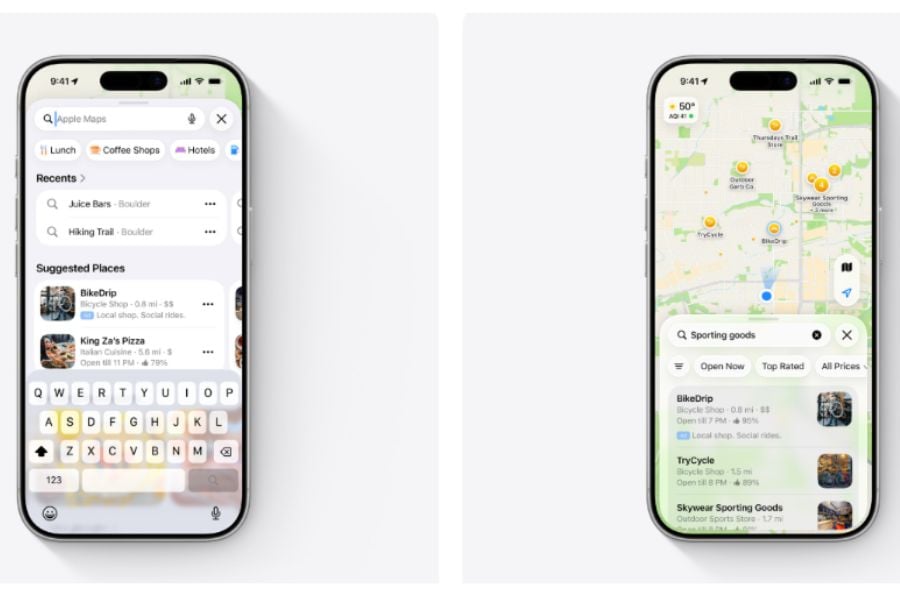
Well, the day many Apple users have dreaded has come. Apple Maps is no longer entirely ad-free.
Apple has begun rolling out sponsored business listings to Maps users in the U.S. and Canada, following plans announced earlier this year to expand its advertising business. Ads can appear before a search and at the top of relevant search results, with a broader rollout expected over the coming weeks.
For iPhone users, the biggest change is simple: sponsored listings are now part of the Maps experience, and there is currently no option to pay to remove them — even for iCloud+ or Apple One subscribers.
Where Apple Maps ads will appear
Fortunately, Apple isn’t flooding Maps with ads everywhere. Instead, the ads can appear in two places within the Maps app.
Before users search, an initial advertisement can appear in the “Suggested Places” section of the search screen. After a user enters a search, a second ad can also appear at the top of relevant search results.
Users will see at most one ad per location, according to 9to5mac. Paid listings are designed to look similar to other business results but carry a blue “Ad” label to distinguish them from organic listings. So while the ads may look similar to regular business listings, watchful users should be able to tell when a business has paid for placement.
Google Maps has offered promoted business listings for years. For Apple Maps users, however, the rollout removes one distinction between the two services: Apple Maps had previously offered an ad-free search experience.
Apple emphasizes privacy
This represents another step Apple is taking to expand advertising beyond traditional placements in services such as the App Store. The company has framed advertising as a business opportunity while attempting to differentiate its approach from competitors by emphasizing privacy.
Naturally, introducing advertising in a mapping app is going to raise some important privacy questions. After all, Maps has access to information about what users search for and where they are while using the app.
Fortunately, the company says Maps advertising will not associate a user’s location or the ads they see and interact with their Apple Account. Apple also says personal data stays on the user’s device and isn’t collected or stored by Apple or shared with third parties.
Users may still see ads based on their approximate location, current search terms, or the part of the map they’re viewing. But Apple says that this advertising information isn’t linked to users’ Apple Accounts.
Some Apple Maps users are unhappy
Of course, the ads have already attracted some criticism from Apple Maps users.
Initial reactions reported online have included complaints that advertising makes Maps less appealing and comparisons with Google Maps, particularly among users who previously preferred Apple Maps for its ad-free design.
Some responses have even included users saying they will switch to Google Maps, while others have questioned why they should continue using Apple Maps now that it has ads.
Another important thing: unlike some paid digital services, users cannot currently pay to remove the Maps advertisements. That means even users who pay for services such as iCloud+ or Apple One can’t remove the sponsored listings, either.
Now, does this really mean that Apple Maps is about to lose a huge number of users? Well, the impact on the app remains unclear. While some users might consider switching, ads alone are unlikely to determine everyone’s choice. Furthermore, Apple Maps is also deeply integrated into the iPhone and Apple’s broader ecosystem, which could make a wholesale switch less likely.
Still, the move for Apple is a risk. Ads might generate another stream of revenue for the company, but they also significantly change an experience that many users had come to expect.
What the ads mean for businesses
On the flip side, the rollout creates an immediate new advertising channel for businesses. For them, Maps ads could be a useful new way to reach potential customers.
A restaurant, retailer, or other local business can pay for a prominent position when people are looking for places to visit. Appearing near the top of a Maps search could allow advertisers to reach potential customers when they are actively looking for a particular type of business.
Apple has already opened Maps ad booking and is offering a promotional deal for businesses interested in trying the new placements, helping them compete for attention at the top of local search results.
Must-read Apple coverage
Apple’s growing advertising business
As the rollout continues, it points to Apple’s broader push to integrate advertising across its ecosystem. The company already sells ads across various parts of its business, including the App Store. Maps gives it another place to generate advertising revenue.
It will be interesting to see whether Maps advertising will remain relatively limited or eventually become a much larger part of the experience, and how this will impact customer response.
For now, the rollout remains relatively limited: sponsored listings are clearly labeled and appear only in specific parts of Maps. The bigger question is whether Apple keeps that footprint small as its advertising business expands — or whether ads gradually become a more visible part of using an iPhone.
Other News: Google has introduced pay-as-you-go pricing, spending caps, and savings plans for Gemini Enterprise to help businesses better control the unpredictable costs of AI agents.
>
Wave Accounting covers invoicing, basic bookkeeping, and expense tracking well for freelancers and very small businesses. Its limitations become more consequential as an organization adds inventory, more demanding reporting, approval requirements, additional accounting users, or a larger technology stack.
I evaluated five leading Wave Accounting alternatives using a weighted accounting software rubric. QuickBooks Online ranks first overall for its combination of accounting depth, reporting, controls, integrations, and scalability. Zoho Books follows closely and stands out for businesses that need stronger accounting automation without immediately taking on QuickBooks-level pricing.
| Provider | Best for | Monthly starting price |
|---|---|---|
| QuickBooks Online | Businesses outgrowing basic bookkeeping | $38 |
| Zoho Books | Value and accounting automation | $0; paid plans from $20 |
| Xero | Multiuser accounting teams | $25 |
| Sage 50 Accounting | Inventory and operational accounting | $128.67 |
| FreshBooks | Invoicing-focused service businesses | $23 |
Why you can trust TechRepublic
I bring an accountant’s perspective to software evaluation, focusing on how financial systems behave when everyday bookkeeping meets real operational complexity.
My experience covers general ledger accounting, accounts payable and receivable, bank reconciliation, financial reporting, inventory, workflow controls, and the practical accounting requirements that emerge as companies grow. That background helps me distinguish useful accounting functionality from features that sound impressive but add little value to the finance operation.
– Eric Gerard Ruiz, CPA, Accounting and Bookkeeping Expert
How I evaluated Wave Accounting alternatives
I used a weighted scoring rubric to compare each product across the areas that matter most once a business moves beyond basic bookkeeping.
- Pricing and value (10%): I reviewed pricing transparency, plan structure, upgrade costs, add-ons, trials, cancellation terms, discounts, and the accounting functionality included for the price.
- Core accounting features (20%): I evaluated the general ledger, accounts payable, accounts receivable, bank reconciliation, fixed assets, inventory, and sales tax.
- Automation and workflow (15%): I examined approval processes, recurring accounting tasks, workflow controls, and support for more complex finance operations.
- Reporting and analytics (20%): I assessed financial reports, customization, dashboards, segmentation, key performance indicators, forecasting, and advanced analysis.
- Compliance and security (15%): I reviewed permissions, audit trails, access controls, and features that strengthen oversight of financial data.
- Integrations and scalability (10%): I evaluated accounting integrations, broader app ecosystems, APIs, operational expansion, and support for growing organizations.
- Ease of use (10%): I considered navigation, search, dashboards, customization, workflow efficiency, and intelligent assistance.
Quick comparison of Wave Accounting alternatives
| Software | ||||
|---|---|---|---|---|
| QuickBooks Online | ||||
| Zoho Books | ||||
| Xero | ||||
| Sage 50 Accounting | ||||
| FreshBooks |
Why QuickBooks Online is my choice for businesses outgrowing Wave
| Overall score: 4.68 / 5 |
|
Pros
- Advanced includes custom reports, approval workflows, and granular user roles
- Plus and Advanced include inventory and project profitability tracking
- Supports class and location tracking for segmented financial reporting
- Integrates with more than 800 third-party applications
- Strong bank reconciliation with matching rules and discrepancy tools
- Advanced supports up to 25 users with role-based access
Cons
- Simple Start supports only one standard user
- Inventory requires the $140-per-month Plus plan or higher
- Custom approval workflows require the $340-per-month Advanced plan
- Advanced pricing creates a large jump from Wave Pro
- Standard QuickBooks Online keeps separate company files for separate entities
Pricing & other deciding factors
| Monthly pricing |
|
| Add-ons pricing | Intuit Payroll, payments, and other services carry separate fees |
| Discount | Introductory promotions vary |
| Free trial | 30 days |
| Customer support channels | Phone callback, chat, chatbot, and self-help resources |
| Features |
|
My evaluation
QuickBooks Online is the strongest Wave replacement for technology-driven organizations that need accounting to operate as part of a broader business systems environment. Its integration ecosystem, API connectivity, reporting depth, structured permissions, and Advanced workflow controls make it far better suited to organizations where finance data touches customer relationship management, ecommerce, payroll, expense management, analytics, and other operational systems.
For IT leaders and technology executives, the key advantage is control without abandoning a mainstream small-business accounting platform. Advanced gives finance teams more precise access management, approval routing, custom reporting, and batch processing. The main constraint is pricing: organizations need a clear operational reason for moving into Plus or Advanced, since those tiers contain many of the capabilities that distinguish QuickBooks from Wave.
Why Zoho Books is my choice for value and workflow automation
| Overall score: 4.59 / 5 |
|
Pros
- Supports configurable transaction approvals with up to 10 levels
- Premium adds native fixed asset management and depreciation tracking
- Elite adds advanced inventory and warehouse-related functionality
- Ultimate adds advanced analytics and business intelligence
- Integrates closely with Zoho CRM, Expense, Inventory, Analytics, and other Zoho apps
- Paid plans start at $20 per month
Cons
- Fixed asset management starts in the $70-per-month Premium plan
- Advanced inventory requires the $150-per-month Elite plan
- Included user counts remain capped by subscription tier
- Additional users cost extra after the plan allowance
- Native consolidated multi-entity accounting remains limited
Pricing & other deciding factors
| Monthly pricing |
|
| Add-ons pricing | Additional users start at $3 per user monthly; scanning, locations, and other services carry separate fees |
| Discount | Lower rates with annual billing |
| Free trial | 14 days |
| Customer support channels | Email, phone, chat, and help center resources |
| Features |
|
My evaluation
Zoho Books fits technology companies that value configurable workflows and tight application integration without paying enterprise accounting prices. Its strongest advantage appears inside the wider Zoho ecosystem: companies using Zoho CRM, Expense, Inventory, Analytics, or other Zoho products gain a more connected operating environment than Wave provides.
The approval engine also separates Zoho Books from simpler accounting platforms. Multi-level routing gives finance and operations teams more structure around purchasing and transaction review, which matters in startups and growing technology companies where spending authority expands faster than the finance team. Native multi-entity consolidation remains a weakness for organizations managing several legal entities.
Why Xero works well for multiuser accounting teams
| Overall score: 4.20 / 5 |
|
Pros
- No per-user license fees across standard plans
- Bank reconciliation includes rules, suggestions, and automated matching
- Native fixed asset register tracks depreciation and disposals
- More than 1,000 app integrations
- Established includes projects, expenses, and multi-currency accounting
- Tracking categories support segmented reporting
Cons
- Early limits users to 20 invoices and five bills
- Project tracking requires the $90-per-month Established plan
- Multi-currency accounting also requires Established
- Standard inventory lacks advanced warehouse and manufacturing controls
- Approval routing lacks configurable multilevel chains
- Native multi-entity consolidation sits outside core Xero accounting
Pricing & other deciding factors
| Monthly pricing |
|
| Add-ons pricing | Inventory Plus and other products carry separate fees |
| Discount | Promotional offers vary |
| Free trial | 30 days |
| Customer support channels | Online support and extensive help resources |
| Features |
|
My evaluation
Xero’s unlimited-user model stands out for technology organizations with distributed finance responsibilities. Finance staff, founders, department leaders, and external accountants all gain access without forcing the company into a more expensive plan simply to add seats. That structure fits startups and technology companies where responsibilities shift quickly across growing teams.
Its integration ecosystem also matters for IT buyers. Xero connects with more than 1,000 applications, which reduces the pressure to force accounting into an isolated workflow. The weakness appears in internal process control: organizations that require formal, conditional, multilevel transaction approvals get stronger native workflow functionality from Zoho Books or QuickBooks Online Advanced.
Why Sage 50 Accounting works well for inventory-heavy businesses
| Overall score: 3.96 / 5 |
|
Pros
- Premium and Quantum plans support inventory tracking
- Higher editions support multiple companies and consolidation
- Quantum supports up to 40 users with role-based permissions
- Advanced job costing tracks labor, materials, and project expenses
- Strong audit trails and traditional accounting controls
- Purchase order and inventory workflows suit product-based operations
Cons
- Pro starts at $128.67 per month for one user, which can be costly
- Subscription requires a one-year commitment
- Fixed asset management relies on a separate Sage product for full lifecycle functionality
- Integration breadth trails QuickBooks Online and Xero
- Desktop-oriented workflows add administrative overhead for cloud-first teams
- Advanced permissions and workflow controls concentrate in Quantum
Pricing & other deciding factors
| Monthly pricing |
|
| Add-ons pricing | Fixed assets and several adjacent Sage services use separate products or pricing |
| Discount | Standard billing offers vary |
| Free trial | 30-day product test drive |
| Customer support channels | Phone, online chat, and customer resources |
| Features |
|
My evaluation
Sage 50 makes sense for technology businesses whose financial complexity comes from physical operations rather than software alone. Hardware companies, device manufacturers, technical distributors, and businesses that combine services with physical inventory gain stronger inventory, purchasing, costing, and multi-company functionality than Wave provides.
Its architecture presents a different trade-off for IT leaders. Sage 50 delivers deep accounting controls, but it lacks the cloud-first extensibility and broad integration ecosystems of QuickBooks Online and Xero. Organizations centered on APIs, browser-based administration, and extensive SaaS interoperability face more friction. Organizations centered on inventory control and traditional financial operations gain more from Sage 50’s depth.
Why FreshBooks is good for invoicing-focused service businesses
| Overall score: 2.81 / 5 |
|
Pros
- Strong invoice customization and recurring billing
- Premium tracks profitability by client project
- Built-in time tracking connects billable hours to invoices
- Client portal centralizes invoices, estimates, and payments
- Expense and receipt capture suit service-based workflows
- Interface requires less accounting knowledge than the other products
Cons
- No native fixed asset lifecycle management
- Inventory functionality stops at basic items and quantities
- No configurable multistep transaction approval workflows
- Additional team members cost $11 per user monthly
- Advanced reporting lacks the segmentation depth of QuickBooks, Zoho Books, and Xero
- Select pricing lacks the transparency of lower tiers
Pricing & other deciding factors
| Monthly pricing |
|
| Add-ons pricing | Additional team members: $11 each per month; Advanced Payments and payroll carry separate fees |
| Discount | Introductory promotions vary |
| Free trial | 30 days |
| Customer support channels | Phone, email, and help center resources |
| Features |
|
My evaluation
FreshBooks fits technology consultancies, development agencies, managed service providers, recruiters, designers, and other service businesses where billing clients matters more than building a sophisticated finance operation. Time tracking, invoicing, project profitability, and client-facing workflows align closely with how those teams generate revenue.
Its limits become clear once finance requires stronger internal controls. FreshBooks lacks the approval depth, inventory, fixed asset management, advanced reporting, and scalability of the leading alternatives. Technology companies with simple service-based revenue gain an approachable system. Companies building a more formal finance function outgrow it faster.
More about Accounting
How to choose a Wave Accounting alternative
Start with the process that Wave no longer handles well. That constraint identifies the right alternative faster than comparing long feature lists.
- Choose QuickBooks Online for broad accounting and systems depth. It offers the strongest combination of reporting, permissions, integrations, inventory, project accounting, and workflow controls in this group.
- Choose Zoho Books for configurable automation at a lower price. Its approval workflows and broader Zoho ecosystem fit growing companies with increasingly structured finance operations.
- Choose Xero for broad user access and application connectivity. Unlimited users and a large integration marketplace suit collaborative, cloud-based organizations.
- Choose Sage 50 for inventory-intensive operations. Its inventory, costing, purchasing, and multi-company capabilities fit businesses with more demanding physical operations.
- Choose FreshBooks for service delivery and client billing. It prioritizes invoicing, time tracking, payments, and project profitability over advanced financial controls.
For technology buyers, the accounting feature list is only part of the decision. Review access controls, integration requirements, API availability, user provisioning, approval rules, reporting architecture, data migration, and the systems that already exchange financial information with accounting.
The strongest replacement solves the constraint that triggered the search and fits the surrounding technology environment.
Frequently asked questions (FAQs)
What is the cheapest Wave Accounting alternative?
Zoho Books has the lowest entry price among the alternatives in this comparison because it offers a free edition. Its paid Standard plan starts at $20 per month.
Is QuickBooks better than Wave?
QuickBooks Online delivers much deeper accounting functionality than Wave, including inventory, project profitability, advanced reporting, granular permissions, custom workflows, and a much larger integration ecosystem.
Wave remains the stronger choice for straightforward bookkeeping when low software cost takes priority over advanced controls and scalability.
Which Wave alternative is best for technology companies?
QuickBooks Online is the strongest overall choice for technology companies because of its reporting, integration ecosystem, API connectivity, role controls, and scalable finance workflows.
Zoho Books stands out for companies already invested in the Zoho ecosystem, while Xero fits organizations that prioritize unlimited user access and extensive SaaS integrations.
When is it time to move away from Wave?
The clearest signal is recurring operational friction. Manual management reports, spreadsheet-based inventory, weak approval controls, duplicate data entry, restricted user access, and accounting processes spread across disconnected tools all indicate that the organization has outgrown Wave.
>
In June 2026, Broadcom CEO Hock Tan and President Charlie Kawwas delivered Jalapeño to OpenAI CEO Sam Altman and President Greg Brockman. The custom AI inference chip was designed by OpenAI and co-developed with Broadcom.
OpenAI has now published its first benchmark results for Jalapeño following tests using InferenceX, a public AI inference benchmark from SemiAnalysis. The company said the chip delivered 1.5 to 1.9 times greater peak performance per watt than the Nvidia Blackwell systems used for comparison.
The results were produced by OpenAI rather than an independent testing organization, and the company normalized them using each accelerator’s published power rating.
What Jalapeño brings
Jalapeño was designed to work across different models, not only OpenAI’s systems. The ASIC (Application-Specific Integrated Circuit) was tested with GPT-OSS 120B and two non-OpenAI models: DeepSeek R1 670B and Kimi K2.5 1T. OpenAI said the results demonstrate that the architecture is not restricted to its own models.
AI inference has several phases with different bottlenecks. During prefill, the system processes the user’s prompt, which is compute-intensive. During decode, it generates the response token by token and relies more heavily on memory bandwidth. Communication between cores and chips can add further latency and reduce an AI model’s responsiveness.
Jalapeño has been designed to combine both high batch throughput and real-time responsiveness. OpenAI says that it has built a flexible AI accelerator “that can support changing model architectures, excel at both prefill and decode, and adapt as the balance between them changes, a defining feature of agentic workloads.”
One architectural feature behind this performance is a localized KV cache. OpenAI says model data can be explicitly placed and kept close to the required compute resources, reducing the time and power spent moving data during inference.
OpenAI says the resulting design can support high batch throughput and real-time responsiveness without making the same trade-off between throughput and latency found in some existing systems.
More must-read AI coverage
What Jalapeño means for enterprise users
Earlier this month, OpenAI launched a limited preview of an Ultrafast service tier that runs GPT-5.6 Sol at up to 14 times the speed of Standard processing. The service, powered by Cerebras, can generate up to 750 output tokens per second.
The Cerebras announcement came less than two months after OpenAI unveiled Jalapeño. Together, the announcements show that OpenAI is pursuing a multi-vendor infrastructure strategy rather than immediately replacing Nvidia and Cerebras hardware with its own chip.
OpenAI has confirmed that Jalapeño will complement rather than replace its partner-supplied accelerators. The company said: “Meeting growing demand for AI will require more compute from every available source. We will continue to widely deploy accelerators from NVIDIA and other partners for both training and inference workloads.”
For enterprise customers, Jalapeño could eventually mean faster AI responses, greater service capacity and lower inference costs. OpenAI plans to begin deploying the chip within its own infrastructure by the end of 2026, but it has not said whether customers will be able to select the hardware directly or how the efficiency gains will affect API pricing. Those details will determine whether the benchmark produces a measurable advantage for businesses.
>

AI agents can work around the clock, but their bills can run just as freely. Google is giving businesses more ways to keep those costs under control.
Google introduced pay-as-you-go pricing, spending caps and new savings plans for Gemini Enterprise on Wednesday. The options are designed to help IT and finance teams manage unpredictable agent workloads without relying entirely on fixed per-user subscriptions.
For businesses experimenting with AI agents, the changes provide more control over how usage is funded, monitored and stopped before an unexpected workload turns into an unexpected invoice.
Gemini Enterprise adds pay-as-you-go pricing
Organizations can now combine Gemini Enterprise’s existing per-user subscriptions with a consumption-based option that charges according to agent and model usage.
The pay-as-you-go edition does not require an upfront commitment or base subscription fee. Charges vary with model and agent usage, allowing costs to rise or fall with demand instead of requiring businesses to pay for unused seats.
Google said the option is available to select customers and will roll out more broadly. The company did not provide a date for general availability.
Per-user subscriptions will remain available for organizations that want predictable monthly costs. Those subscriptions include daily quota pools shared across a Google Cloud project.
Businesses can also allow workloads to move automatically to pay-as-you-go billing after the pooled quota is exhausted. This could help teams avoid interruptions, although administrators would need to monitor the resulting overage charges.
The approach gives organizations a choice between fixed costs for employees who use AI consistently and consumption billing for developers or agents with less predictable workloads. It builds on Google’s broader effort to position Gemini Enterprise as a central platform for building and governing workplace AI agents.
Spending caps can pause AI agents
Google is also introducing project-level monthly spending caps through the Google Cloud Billing Console.
When a project reaches its limit, Gemini Enterprise agent activity will pause without affecting other workloads in the Google Cloud project, according to Google. Administrators can increase or remove the cap when they are ready for the affected agents to resume operating.
Automated emails notify administrators when a project reaches 50%, 80% and 100% of its budget. Google said its billing tools can also flag unusual spending patterns and identify the three stock-keeping units, or SKUs, contributing most to an increase.
A pricing calculator will allow teams to estimate costs across licenses, developer tools and agent runtimes before deploying a project.
These controls address a growing enterprise problem because AI agent workloads can vary substantially in token consumption, making their final cost difficult to predict before a task begins.
Google offers discounts for committed spending
Organizations with steadier workloads can use Gemini Enterprise Flexible Savings Plans to reduce token costs.
Google is offering a 10% discount for a one-year commitment and a 20% discount for a three-year commitment. Businesses select a monthly spending amount, with no stated minimum or maximum, and the committed spending can count against an existing Google Cloud enterprise agreement.
The savings plans are available to self-service customers and organizations with enterprise agreements, according to Google.
Google also plans to introduce deferred-execution pricing for certain workloads. Eligible tasks that do not need to run immediately could be scheduled during off-peak periods for discounts of up to 50%.
That option is not yet generally available. Google said it is coming soon for select workloads but did not announce a rollout date.
More Google coverage
Developer AI usage moves under one subscription
Access to Google Antigravity and AI features in Android Studio will also be included with Gemini Enterprise subscriptions for eligible customers.
Usage across Gemini Enterprise, Antigravity and supported developer tools will appear in a consolidated view rather than being divided among separate licenses and billing systems.
Daily allowances will be pooled across a project, meaning unused quota from business users can be applied to developer tools and custom agents. Google said access is available to select customers and will roll out more broadly.
The new choices represent a different approach from when Google incorporated Gemini into its Workspace subscriptions, which gave businesses a predictable per-user cost. Agent workloads can run for different lengths of time and consume varying numbers of tokens, making consumption harder to forecast.
IT and FinOps teams should establish project-level caps, decide whether overages will be permitted and monitor token use before scaling an agent beyond a limited deployment. They should also determine whether pausing an agent at its spending limit could interrupt a business-critical workflow.
Google’s changes make it easier to start using Gemini Enterprise without paying for unused seats. Whether they reduce AI spending will depend on how closely organizations monitor consumption once their agents begin working at scale.
>

Ukraine file formal complaint to FIA ethics committee over decision to lift ban on Russian competitions

5 Best Wave Accounting Alternatives for 2026

Debuts Official Trailer For Cannes Palme d’Or Winner ‘Fjord’
-

 movies3 months ago
Search For Canadian TV Actor Stewart McLean Now Homicide Investigation
-

 Fashion9 years ago
These ’90s fashion trends are making a comeback in 2017
-
Fashion9 years ago
According to Dior Couture, this taboo fashion accessory is back
-
Fashion9 years ago
Model Jocelyn Chew’s Instagram is the best vacation you’ve ever had
-
Fashion9 years ago
Emily Ratajkowski channels back-to-school style
-
Fashion9 years ago
9 Celebrities who have spoken out about being photoshopped
-
Fashion9 years ago
Your comprehensive guide to this fall’s biggest trends
-

 Anime3 months ago
Rurouni Kenshin: Hokkaido Arc Manga Takes 1-Issue Break – News