
Tech
This slushie machine was a lifesaver during NYC’s heat wave

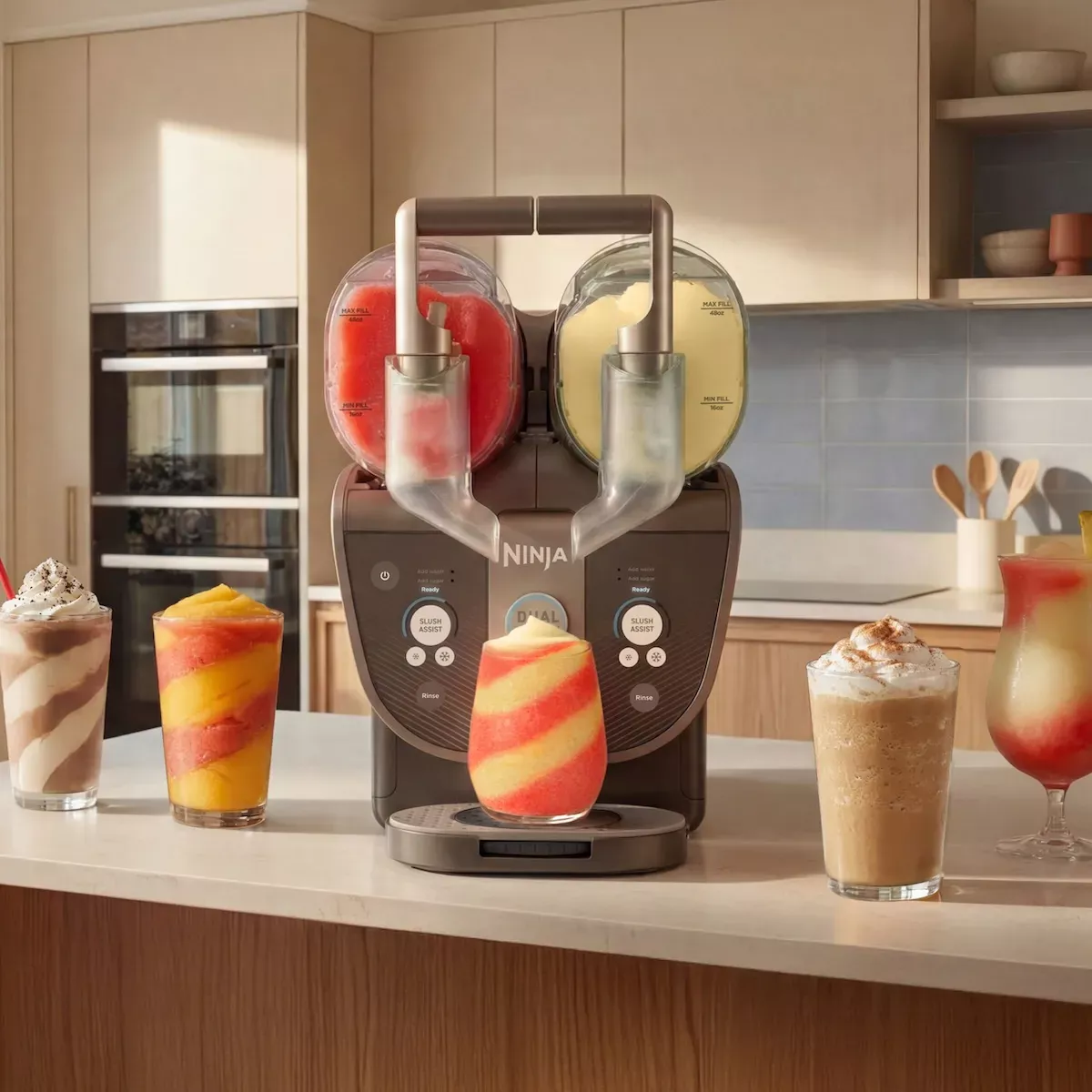
Last weekend’s brutal NYC heat wave had me craving a frozen drink almost every afternoon. Normally, that would mean sweating through a walk to 7-Eleven for a slurpee. This time, though, I stayed home and put the new Ninja Slushi Twist to the test.
Ninja’s latest slushie machine builds on the popularity of the original Slushi, but with a big upgrade. Instead of a single mixing chamber, the Slushi Twist has two 48-ounce vessels that can make two completely different frozen drinks at the same time. Beyond classic slushies, it can also make frappés, milkshakes, frozen coffees, and smoothies — and because the two sides work independently, you can even keep one alcohol-free for mocktails while the other side mixes up cocktails.
For entertaining, this machine solves a real problem. Instead of making multiple batches or asking everyone to agree on one flavor, both chambers run simultaneously, making enough frozen drinks for a crowd. Ninja says it can make more than 10 drinks per batch — plenty for summer parties or family gatherings.
The standout feature is what Ninja calls “Dual SlushAssist” technology. In plain terms, the machine senses what’s in each chamber and adjusts the freezing temperature for that side on its own. That means a creamy milkshake can stay smooth on one side while a fruit slush freezes to the perfect icy consistency on the other.
My favorite feature, though, is the twist dispenser. You can pour each drink separately or turn the dial on the drip tray to swirl both flavors together into one glass, which is great for making layered drinks that look way more impressive than the effort they take.
Cleaning is easy, too. Just hit the rinse button and keep adding warm water until it runs clear.
There are two things to keep in mind before buying. The Slushi Twist is noticeably larger than the original model, so you’ll want to make sure you have enough counter or storage space. At $399.99, it’s also a significant investment. If you only make the occasional frozen drink, it may be more machine than you need. But for larger households or anyone who loves hosting, the dual-vessel design makes a strong case for itself.
When you purchase through links in our articles, we may earn a small commission. This doesn’t affect our editorial independence.
>
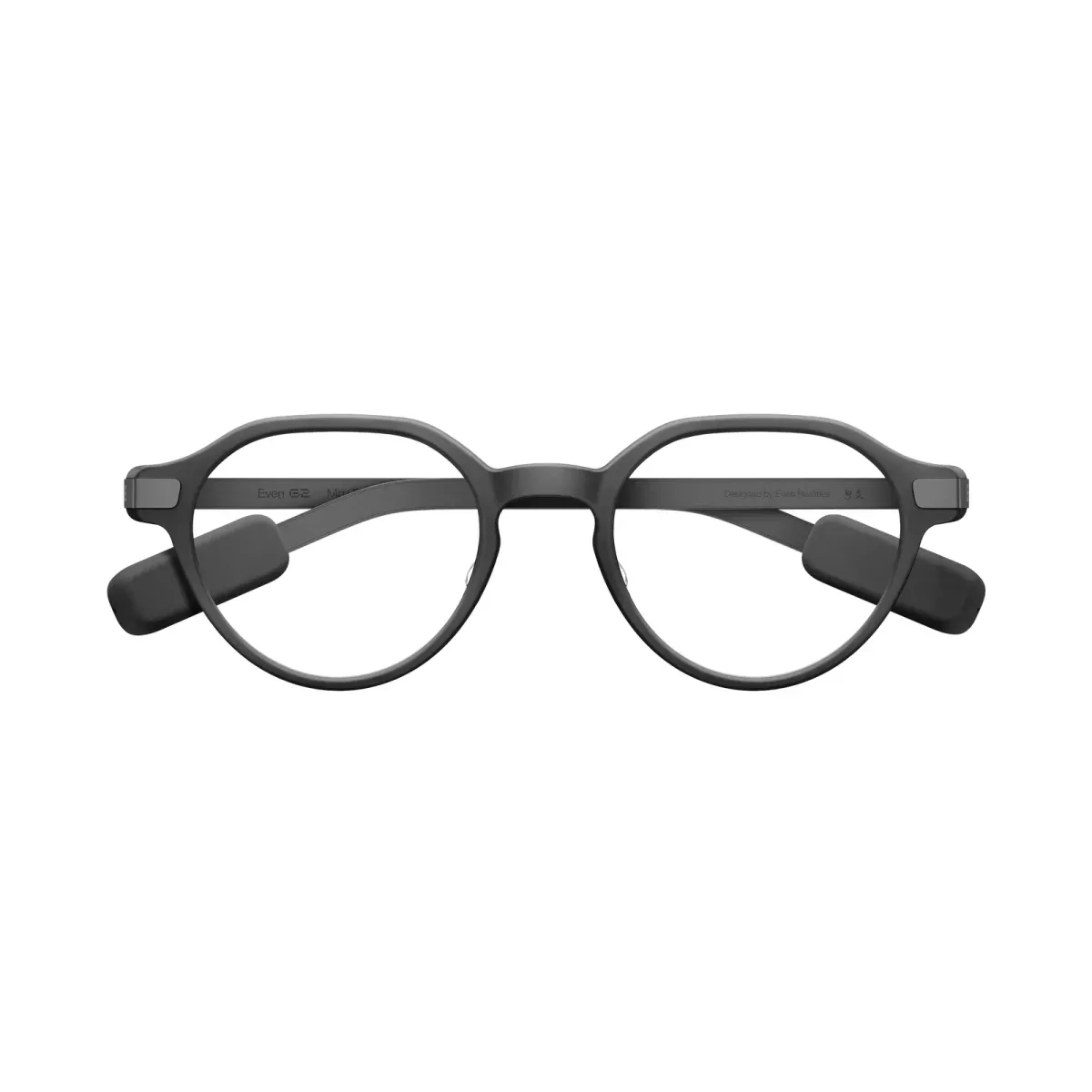
In the past few years, multiple tech executives have told us that glasses could be the next big interface for consumer hardware. And yet, today’s smart glasses rely a lot on phones, even if they have good hardware. Even Realities’ G2 smart glasses are in the same boat. They’re a premium-looking pair of glasses with a neon-style heads-up display you can see in any lighting — but their functionality relies heavily on their connectivity with the phone, which can be** unreliable and frustrating.
Even Realities takes a different approach to smart glasses than players like Meta. Their devices have a monochrome heads-up display that shows text and information in green, giving it the look of a neon board.
There are no cameras or speakers, and that is by design. The company wants to focus on productivity rather than recording, so the people around you don’t have to worry about being filmed.
The G2 is the second pair of smart glasses from Even Realities and an improvement over the G1 released a few years ago. The G2 has a brighter 1,200-nit display (vs. 1,000 nits on the G1), four mics (vs. two), and a 75% larger display area than its predecessor. The new display also has a better 60Hz refresh rate, compared with 20Hz on the G1.
In the few months I’ve used the G2, the connectivity with the phone has improved tremendously. Early on, the glasses would disconnect from the app so frequently that I nearly gave up on them. But after a few app updates, that issue got better.
The glasses are targeted at people who might be constantly in meetings, giving presentations, and traveling to countries where different languages are spoken.
Design
The glasses, which come in two frame designs, are very light at 35 grams. The frame is made out of magnesium alloy, and the temples (the arms that go over your ears) are made out of titanium alloy. In terms of weight and fit, the glasses were comfortable to wear.
Since I work from home most of the time, though, I didn’t feel much need to wear them all day. That said, the lenses have UV protection built in, so they’re still worth wearing outside just for eye protection — smart features or not.

The company claims that, based on typical usage, G2’s battery can last up to two days on a single charge. The glasses come with a protective case that can recharge them up to seven times before needing to be plugged in itself. I personally didn’t test the two-day claim, but the battery lasted me long enough to put them back into the case without running out of juice.
That case is big — you can’t shove it in a pocket — but it’s solid, and the glasses fit in snugly.
Features and operation
The glasses act as your companion for schedules, reminders, and access to notes. You can wake them up by tapping on the stem-based controls. If you double-tap on the control pad on the stem, you will see a dashboard with information like your upcoming meetings, stocks, and top news.
The G2 can also show real-time phone notifications, but the pop-ups weren’t always reliable — and since my phone is usually within reach anyway, I didn’t find much use for the feature.
Long-pressing the temple control opens a menu with several functions: a notifications tray, Translate, Conversate, Teleprompt, a to-do list, and Navigate. Translate lets you set a target language and converse with anyone. At the recent Global Connect Show (GCS) in China, I wore the glasses while talking to company reps doing demos, and the translation was good enough for me to follow along when someone spoke Chinese. I also tried it with other journalists speaking various languages, including French and Spanish. (The downside of this feature is that the other person doesn’t know what you’re saying in your language unless they’re also using the app.)
Navigate is a cool feature that shows turn-by-turn directions on the heads-up display. The catch: it doesn’t work with Google or Apple Maps. Instead, you have to set your route through the Even Realities app. I tried it a few times walking to cafes near my house. The directions showed up well on the display, but the app kept getting the addresses wrong, so I can’t rely on it for places I don’t already know how to get to. Still, I could see cyclists or motorbike riders finding it useful once the company fixes the accuracy issues.
Conversate, at first, just showed a live transcript of the conversation on the glasses, which felt pointless since you can just as easily record a meeting with an app or an external notetaker. Later, the company added a “prep notes” feature that surfaces more context: you can manually add notes or documents ahead of a meeting and let the AI reference them during the conversation, or let it listen in real time and pop up short explainer bubbles for concepts as they come up. For instance, during a briefing about energy, it showed me a bubble for “Green Hydrogen,” and tapping it brought up a definition right in front of my eyes. That was genuinely useful — though I wouldn’t want a transcript or explainer bubbles for every conversation I have.
At the center of all this is the built-in assistant, Even AI. As with any voice assistant, you say a wake word to activate it and ask questions or add items to your to-do list. It often misunderstood my to-do list requests, and for general questions, the answers were often long paragraphs that streamed across the screen with no way to interrupt or skip ahead.
Another issue: despite having four mics, Even AI often failed to activate, or misheard me, when I was outside. The ambient noise in India could have played a part, but I’d still expect a modern gadget to have better noise handling.
The G2’s screen was legible in most conditions, but in a bright room I had to adjust the brightness manually through the app. Even if the company hasn’t built an automatic-brightness sensor yet, I’d like to see a manual brightness control built into the glasses themselves, rather than requiring the phone app.
Don’t put the R1 ring on it
Even launched a companion ring called the R1 alongside the G2. The idea is to control the glasses through a touch surface on the ring instead of the glasses’ own touch controls. But its price and functionality don’t quite justify the cost.
The ring works well, and I didn’t have any issues using it. But I struggled to find scenarios where I actually needed it, since the touch-sensitive temples on the glasses already do the same job.

On top of that, Even built health tracking into the ring — heart rate, calories, steps, sleep, and SpO2 (blood oxygen level). Personally, I’d rather go for a dedicated ring like Oura or Ultrahuman if I wanted that form factor with health tracking. Second, if I already use a fitness tracker, I wouldn’t want to buy a ring where health is an auxiliary function for a ring that is meant to control the glass.
All this functionality bumps up the ring’s price to $249, which is not cheap. If I used my smart glasses a lot, I would consider buying a controller ring at a lower price if it also had a mic, which I could use for issuing commands to the AI assistant. As it stands, I’d skip the R1.
Where does Even G2 stand?
Smart glasses are coming out fast. Camera-equipped, screen-free models like the Meta Ray-Bans are popular, but Meta, Snap, and other competitors are racing to build glasses with color screens, too. Only a handful of Chinese companies — like Rokid and Inmo — are making glasses with this same neon-display style.
The Even G2 costs $599 and delivers solid hardware in a light, good-looking frame. The company is also working to make the glasses more customizable by supporting third-party apps, though I didn’t find any app compelling enough to make me reach for the glasses more often. They’re a nice-to-have: fun to explore if you like tinkering with new hardware and don’t mind trying out third-party apps.
The hardware itself is good, but outside of jobs that require constant translation or teleprompting, it’s hard to find a clear everyday use case for smart glasses like these.
Even’s bet is that skipping the camera and speakers is the right move for a productivity-focused device — and I don’t disagree with that direction. But now that the company has newly reached unicorn status, it needs to build out more first-party software to make the glasses something people actually reach for every day.
When you purchase through links in our articles, we may earn a small commission. This doesn’t affect our editorial independence.
>

More than three years after ChatGPT’s launch brought generative AI into the mainstream, OpenAI is broadening its focus beyond individual users to families.
OpenAI is hiring a dedicated product manager in San Francisco to build experiences for families, caregivers, and older adults across its products. The role calls for experience building products for parents and families, and other trust-sensitive consumer experiences, according to the job posting.
The hiring comes as ChatGPT’s audience continues to broaden beyond younger users. According to Sensor Tower estimates shared exclusively with TechCrunch, the share of ChatGPT users aged 35 and older globally rose to 31% in Q2 from 26% a year earlier, while the share of users aged 18 to 24 fell to 29% from 34%. In the U.S., nearly one in four smartphone users who are parents used ChatGPT during the quarter, up from 16% a year earlier, the firm estimates.
OpenAI did not respond to requests for comment about the job posting.
A dedicated product role focused on families signals that OpenAI is beginning to think about its products less as tools for individual productivity and more as technology designed for households, said Ben Bajarin, chief executive of technology consultancy Creative Strategies.
“This is similar to the path Google, Apple, and Meta eventually followed as their platforms became embedded in everyday life, but AI raises the stakes because the assistant is not just mediating content or devices,” he told TechCrunch.
That shift also brings new trust and safety challenges. Stephen Balkam, chief executive of the Family Online Safety Institute, said the hiring reflects both the maturation of OpenAI and a growing recognition that AI products used by children and teenagers require different safeguards than those designed for adults.
“I see this as safety by redesign,” Balkam told TechCrunch. “You take the initial product or service that was released… not really with kids in mind… so this is a much-needed reaction and response.”
The comments come as new research published this week by the Family Online Safety Institute found that parents are underestimating how often their children use generative AI. While 27% of U.S. parents said their child had used generative AI in the past week, 38% of children reported doing so themselves, according to the survey of more than 4,000 families in the United States and Australia.
Balkam told TechCrunch that AI companies should build products differently for younger users, with stronger content controls, age-appropriate experiences, parental oversight, and reminders to inform users that they are interacting with an AI — and not a human.

The hiring also comes amid growing scrutiny of how AI companies protect younger users. OpenAI has faced multiple lawsuits from parents alleging that ChatGPT contributed to harm suffered by their children, including in cases involving suicide.
In response to some of those concerns, OpenAI has introduced a series of safety measures over the past year, including parental controls for teen accounts, routing sensitive conversations to reasoning models designed to better handle signs of distress, and, more recently, an optional “Trusted Contact” feature that can alert a family member or caregiver in cases of potential self-harm.
AI companies, Balkam said, have an opportunity to avoid the mistakes made by social media platforms, which for years treated children much like adults before adding stronger safeguards amid mounting public pressure and regulatory scrutiny.
The hiring also aligns with OpenAI’s broader efforts around families. In a recent workshop organized with the San Antonio Spurs Community Impact organization and the Positive Coaching Alliance, the company said it aimed to explore AI’s role in learning, coaching, and youth engagement.
That said, the demographic shift is not unique to ChatGPT, though OpenAI’s audience is changing in some distinct ways.
Sensor Tower estimates that users aged 25 to 34 account for 40% of the global app audiences for Anthropic’s Claude and Google’s Gemini, matching ChatGPT, compared with 33% for Microsoft’s Copilot. Copilot, however, skews older, with 20% of its users aged 45 and above, compared with 14% for Claude, 12% for Gemini, and 11% for ChatGPT.
While ChatGPT remains relatively underpenetrated among older users, it is adding them faster than its rivals. The share of users aged 45 and above rose three percentage points year-over-year in the second quarter, compared with a two-point increase for Copilot and declines for Claude and Gemini, according to Sensor Tower.
Among U.S. smartphone users who are parents, Gemini had the widest reach at 32% in Q2, followed by ChatGPT at 24%, Claude at 4%, and Copilot at 2%.
For Bajarin, OpenAI’s decision to hire a product manager focused on families signals where consumer AI is headed. As AI becomes a technology shared across generations, he expects companies to roll out family plans, child and teen profiles, caregiver tools, shared household memory, AI tutoring, and stronger safety controls.
When you purchase through links in our articles, we may earn a small commission. This doesn’t affect our editorial independence.
>
OpenAI has doubled its top bio bounty to $50,000 for researchers who can develop a universal jailbreak against its biological safety challenge. The ongoing private program begins with GPT-5.6 and keeps GPT-5.5 in scope through July 27, 2026.
The post OpenAI Raises Bio Bounty to $50,000 for Universal Jailbreaks appeared first on TechRepublic.
>

Rate the players as England face Norway
This slushie machine was a lifesaver during NYC’s heat wave

World Cup 2026: Fifa official refuses to answer ban questions from BBC

-

 Fashion9 years ago
These ’90s fashion trends are making a comeback in 2017
-
Fashion9 years ago
According to Dior Couture, this taboo fashion accessory is back
-
Fashion9 years ago
Model Jocelyn Chew’s Instagram is the best vacation you’ve ever had
-
Fashion9 years ago
Your comprehensive guide to this fall’s biggest trends
-
Fashion9 years ago
A photo diary of the nightlife scene from LA To Ibiza
-
Fashion9 years ago
9 Celebrities who have spoken out about being photoshopped
-
Fashion9 years ago
Emily Ratajkowski channels back-to-school style
-

 Tech3 months ago
OpenAI CEO apologizes to Tumbler Ridge community

