
Tech
4 Galaxy Watch 9 Settings to Enable in Your First 24 Hours

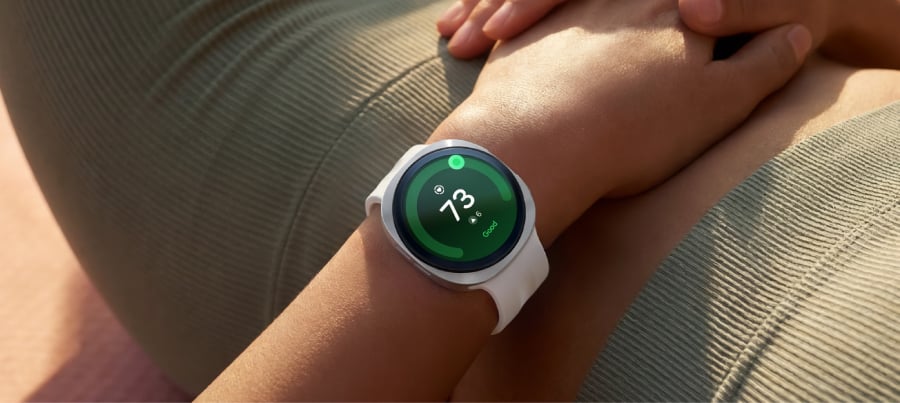
Not every Galaxy Watch 9 health feature behaves the same way out of the box.
This is exactly why deciding which Galaxy Watch 9 settings to enable on day one matters. Hard fall detection is a genuine toggle, and it ships off by default, doing nothing until someone switches it on, according to Samsung Support.
Vitals and Sleep Coach aren’t toggles in that sense. Vitals needs seven nights of overnight wear to build a baseline before it can flag anything unusual, and Sleep Coach needs at least seven days of wear to gather enough data for personalized coaching, as noted by PCMag and Samsung Mobile.
Samsung opened pre-orders for the Watch 9 in select markets on July 22, roughly three weeks ago, with general availability following on Aug. 7, according to the Samsung Newsroom. Samsung markets it as delivering “a new era of effortless health,” built for continuous 24/7 wear, as the Samsung Newsroom describes. It runs Wear OS 7 with One UI 9 layered on top and requires Android 13 or later on the paired phone, as reported by PCMag. That framing holds up reasonably well, but a handful of features need a nudge before they start doing their job.
This guide covers four decisions worth making in the first day of ownership: finishing fall detection setup, starting consistent overnight wear for Vitals and Sleep Coach, deciding how to handle always-on display and charging without losing a night of data, and picking which health metrics show up first. It isn’t a menu-by-menu walkthrough. Samsung shifts label wording between software updates, so each section says what to confirm rather than exactly where to tap.
What you need before configuring the Watch 9, and what your phone determines
The watch is managed through the Galaxy Wearable app, and fall detection specifically can only be turned on from there. Pair the phone before anything else, as recommended by Samsung Support.
Any phone running Android 13 or later works with the Watch 9, and Samsung Health is the app used to view the watch’s health data and scores, as noted by PCMag. A few features are locked to Samsung’s own hardware, though: ECG, blood-pressure tracking, and sleep apnea/snoring detection all require a Galaxy phone specifically, not just any Android device, as reported by GadgetCV and PCMag UK.
The available testing confirms Galaxy-phone requirements for ECG, blood-pressure tracking, and sleep-apnea detection. Samsung’s documentation doesn’t establish the phone requirements for every other feature in this guide, so check the relevant feature in Galaxy Wearable or Samsung Health before relying on it. You may not see the sleep-apnea or blood-pressure options on a non-Galaxy phone; if that’s the case, the rest of this checklist still applies as written.
Turning on hard fall detection, and what it actually requires
Fall detection ships disabled and can only be switched on through the Galaxy Wearable app: open the app, head into the watch’s settings, and tap the switch next to Hard fall detection, according to Samsung Support. Flipping that switch feels like the whole job. It’s really just the first step.
The toggle alone won’t do much, because the feature needs at least one emergency contact on file to notify, as recommended by Samsung Support. Beyond that, two more choices are optional rather than required: automatically texting location to emergency contacts after a fall, and triggering an emergency call, each a separate switch under the same menu, according to Samsung Support.
Sensitivity is a different setting entirely, found under “When to detect falls,” and it can be set to Always, During physical activity, or Only during workouts. Always monitors in more situations; the activity-only options limit when the watch looks for falls.
Samsung’s fall-detection documentation covers “all Wear OS models” and predates the Watch 9 by roughly four years. The actions above are confirmed; exact on-screen wording may differ slightly on current software.
By the end of this step:
- Hard fall detection is switched on
- At least one emergency contact is listed
- Location sharing and emergency calling are set the way you prefer, on or off
- A sensitivity mode is chosen
This step needs no repeat visits. Check the box once and move on. Vitals and Sleep Coach, by contrast, need seven consecutive nights on the wrist before they have anything to say.
Galaxy Watch 9 health monitoring settings to start on night one
Vitals tracks overnight SpO2, heart rate, heart-rate variability, respiratory rate, and skin temperature, then alerts owners to deviations once it has a seven-night baseline, as noted by PCMag and the Samsung Newsroom. Sleep Coach needs at least seven days of wear to gather enough data for personalized coaching, as noted by Samsung Mobile.
There’s no separate switch to force Sleep Coach into gear early; the only real action is wearing the watch nightly and checking, morning by morning, that the night actually recorded.
Nothing in the research confirms that a missed or short night resets that seven-day count, so treat one gap as an inconvenience rather than a reason to start over. That’s practical advice rather than a documented product behavior, and steady wear still beats sporadic wear.
Even flawless wear doesn’t guarantee flawless data. In one test, the watch stopped collecting overnight readings for more than an hour on two separate nights. Galaxy phone owners should also confirm that sleep apnea and snoring detection are active, since that feature only runs with a Samsung phone nearby.
The daily action is simple: wear the watch to bed and check the sleep section of Samsung Health the next morning. A successfully recorded night should show a score built from duration, deep sleep, REM sleep, time awake, and sleep latency.
By the end of night one:
- The watch has been worn continuously from bedtime to waking
- Samsung Health shows a sleep score the following morning
- Galaxy phone owners have confirmed sleep apnea and snoring detection are active
What’s hot at TechRepublic
The best Galaxy Watch 9 settings for battery and overnight tracking
Vitals and Sleep Coach only work if the watch survives a full night on the wrist, so this decision is about giving them a fair shot.
Vitals and Sleep Coach only work if the watch survives a full night on the wrist, so this decision is about giving them a fair shot. In one test, the Watch 9 ran 26 hours with always-on display (AOD) enabled versus 41.5 hours with it off, as noted by PCMag. Charging speed varied between reviewers: GadgetCV measured about 90 minutes from near zero to full, while PCMag’s test took 108 minutes. Either way, that’s long enough to leave a real hole in overnight data if it’s timed badly.
Testing the 40mm model, GadgetCV’s reviewer found the watch barely stretched from one morning to the next afternoon, short of two full days on a single charge. That reviewer still kept AOD on rather than switching it off, as reported by GadgetCV. Treat this as a genuine trade-off rather than an automatic “turn it off” call. Samsung’s own guidance warns that some health features, especially continuous monitoring, can consume more battery.
The 40mm’s 390mAh cell is a modest bump from the Watch 8’s 325mAh, but in PCMag’s testing it hasn’t translated into a meaningful jump in real-world runtime.
Setup actions:
- Decide on AOD in the watch’s display settings based on your priority: roughly 15 extra hours of runtime in one reviewer’s test, or an always-visible screen. There’s no universally correct answer.
- Choose a recurring slot, such as during a shower or commute, if that fits your routine, so a 90-minute or longer charge never overlaps with overnight tracking.
- If you have the 40mm model, plan for the possibility of a midday top-up based on the test above. The 44mm carries a larger 445mAh cell versus 390mAh on the 40mm (PCMag), though no test confirms that extra capacity actually extends real-world runtime.
By the end of today:
- Always-on display is set the way you want it
- A daily charging window is chosen outside sleep hours
- 40mm owners have a plan for a possible midday top-up
Settle AOD and a charging window, and the watch has the best chance of recording a complete night rather than a partial one.
A Galaxy Watch 9 setup guide to health dashboard priorities
The Watch 9 introduces three new scores, Fitness Index, Daily Cardio Load, and Heart Health Score, plus a Hearing feature that alerts on unsafe noise exposure, all built into Samsung Health, as noted by the Samsung Newsroom and PCMag. Not all of them are equally ready on day one.
For general wellness tracking, Fitness Index is worth surfacing first. PCMag’s reviewer received an initial score of 39 out of 100, which climbed to 41 during testing. Anyone training regularly might prefer Daily Cardio Load instead: PCMag describes it as guidance on how hard to push a given day’s workout without burning out.
Heart Health Score carries the most setup friction of the three. Its blood-pressure component requires calibration against a separate cuff, and blood-pressure tracking requires a Galaxy phone. Non-Galaxy owners should check whether the base score even shows up before investing time in cuff calibration.
Samsung Health does support reordering dashboard tiles so daily-checked metrics don’t get buried behind ones that aren’t, as reported by GadgetCV. The reviews confirm that the feature exists but don’t spell out the exact menu path, so look for a tile-editing or customization option inside the dashboard view and expect a little exploring.
None of these scores replace medical advice. Samsung says as much explicitly for the body-composition readings from its BIA sensor, as noted by Samsung Mobile, noting they’re for fitness and wellness purposes only, not diagnosis; the same caution is worth extending to these newer scores until Samsung says otherwise.
By the end of this step:
- Fitness Index or Daily Cardio Load is moved near the top of the dashboard
- Hearing alerts are checked, if available on your phone
- Heart Health Score availability is confirmed before attempting cuff calibration on a non-Galaxy phone
Where to focus first
These four settings don’t run on the same clock. Fall detection can be configured right after pairing, while Vitals and Sleep Coach won’t have anything meaningful to say for a week, no matter how carefully everything else gets set up.
Pair the watch, configure fall detection, choose a charging window, and wear it overnight tonight. Check the first sleep record the next morning, then give Vitals and Sleep Coach a full week before judging their results. Fitness Index, Daily Cardio Load, and Heart Health Score are worth revisiting once that first week of data is in hand, not before.
Editor’s note: This article originally appeared on our sister publication, GadgetHacks.
>

In May 2025, Mozilla announced that it was shutting down the popular read-it-later app Pocket, which it had acquired back in 2017 for an undisclosed amount. That led to a growing demand for alternative apps that could help people save online content, particularly longer articles, that they want to read later when they have more time.
While Mozilla exited the business, saying the way people are browsing the web is changing, the shutdown boosted adoption of a number of other apps, like Matter, Instapaper, and Raindrop.io, among others. It’s supporting the creation of new, indie alternatives, as well.
Many of the apps will support imports. However, Pocket users only had until October 8, 2025, to export their saved articles and other items, including lists, archives, favorites, notes, and highlights.
Below are the read-it-later alternatives that are picking up where Pocket left off.
Matter
Matter is a GV-backed company that makes an eponymous iOS app along with browser extensions for Chrome, Safari, and Firefox. The app lets you listen to articles and transcribes your favorite podcasts.
Though the app itself is free to use, you can pay $79.99 per year to unlock features like improved transcriptions for podcasts and YouTube videos, tools to adjust reading speed, and additional integrations with other apps like notes apps, Gmail, and Kindle.

In March 2025, the company also added an AI-powered co-reader to answer questions about different topics users might have while reading an article.
Instapaper
Instapaper, which was founded by developer Marco Arment in 2008, is one of the oldest read-it-later apps. It’s available on both iOS and Android, and lets you save unlimited articles and videos without paying any fees. It was acquired by Pinterest in 2016.

However, for $59.99 per year, you can add notes to saved articles, have a permanent archive of articles in your accounts, create a text-to-speech playlist to listen to stories, enable full text search for all saved items, and get the ability to send articles to your Kindle.
The company allowed Pocket users to import their account into Instapaper. Users who imported this way also received an email offering a three-month free trial to Instapaper Premium.
Raindrop.io
Raindrop works primarily as an alternative bookmark manager for web browsers. However, its accompanying mobile apps for iOS and Android allow you to read your saved articles and PDFs. The free version gives you unlimited bookmark saving along with integrations like Zapier and IFTTT.
If you decide to pay $33 per year, you’ll also get AI-powered suggestions for organizing your content better, full text search, reminders for your bookmarks, a duplicate and broken links finder, and a file upload limit of 10GB per month.

Plinky
Former Twitter engineer Joe Fabisevich created Plinky to allow users to save and categorize any kind of link, including articles, videos, recipes, and memes.
The app is available across all Apple platforms, along with browser extensions to save links. Once you’re signed up, Plinky lets you use folders and tags to categorize your links, and even set reminders to read them at a specific time.
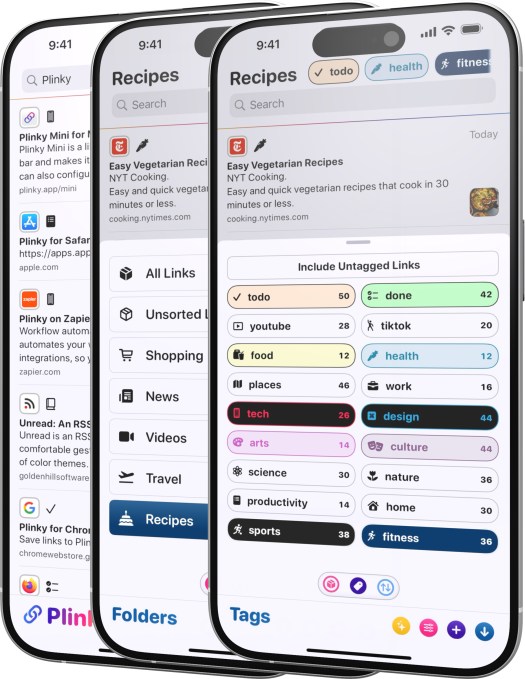
You can save 50 links, create three folders, and use five tags with the free version. To remove these restrictions, you can pay $3.99 per month, $39.99 a year, or a one-time fee of $159.99. Pro users are able to save unlimited links, create an unlimited number of folders, use an unlimited number of tags, and set an unlimited number of reminders.
Paperspan
Paperspan is a very simple app that offers a reading list across devices, allows you to add notes, and has text-to-speech functionality.
The app is free, but it offers an $8.99 per month subscription to unlock advanced search, as well as the ability to create playlists, show reading stats, and send your articles to Kindle.
(Though the app works, PaperSpan hasn’t been updated for some time, which may not be a good signal about its long-term future. The app is available on both iOS and Android.)
Readwise Reader
Readwise, a tool to add notes and highlights to articles, launched its Reader app in 2021. The app allows you to import RSS feeds, YouTube videos, Twitter threads, and more to read at your convenience. Because of its integration with Readwise, the Reader app offers great annotation features. It also features offline text search and an AI assistant.

Plus, you can integrate Reader with knowledge management apps such as Obsidian, Notion, Roam Research, Evernote, and Logseq. The app is free to try for 30 days, and then you have to pay a $9.99 per month Readwise subscription to access it.
Readwise had allowed Pocket users to import their entire Pocket archive into Reader, adding that its app supports a number of features — like PDFs, ePubs, X posts, AI, and filtering — that Pocket never did.
DoubleMemory
DoubleMemory is a newer indie app focused on the Apple ecosystem, offering native apps for both Mac and iOS.
On Mac, you can easily save any link or content by pressing Cmd + C twice. The saved content will then appear in a Pinterest-style tile format.
The app also allows you to read offline and search through text, notes, and tags. You don’t need an account to start using DoubleMemory. And if you have multiple apps, it uses your iCloud account to sync content across them.

DoubleMemory is free with in-app purchases. It offers a $3.99 monthly subscription or an annual subscription of $17.99.
Recall
Recall works as a browser extension and offers a mobile app that allows users to save content from the web, including articles, PDFs, blog posts, podcasts, Wikipedia pages, YouTube videos, and recipes.
However, unlike traditional read-it-later apps, Recall uses AI to automatically summarize content, categorize it, and then resurface it when it’s related to something new you’re looking to learn about.

Designed to enhance your ability to remember information, you can review your summaries from your personal knowledge base on a saved spaced repetition schedule.
Recall is free to try with support for up to 10 free, AI-generated summaries. After that, you can continue to use Recall as a read-it-later tool, or you can upgrade to a $7 per month plan for unlimited AI summaries and other features.
Wallabag
Wallabag is an open-source read-it-later app that is available on major platforms like iOS, Android, and the Web, with support for e-readers like Kindle and Kobo. The app lets you save articles for offline consumption and also export all of your data in PDF, ePUB, .mobi, JSON, CSV, TXT, or HTML formats.

The app has a simple interface and lets you highlight sections and add tags to articles. It also has a reader mode and supports importing data from other services like Pocket, Instapaper, and others.
The app is also available as an €11 per year hosted subscription, if you prefer. The company will use the money to fund its open-source efforts.
Readeck
Open source web app Readeck is designed to help you organize any web content you want to revisit later, whether that’s articles, videos, photos, or anything else. You can also use the service to highlight text, export articles to e-book format, save video transcripts, and more.

Readeck works as a browser extension so you can save your bookmarks as you surf the web. Users can host Readeck themselves, but the company says it will offer a hosted version in 2025. It’s also developing a mobile app.
Obsidian Web Clipper
Obsidian‘s web clipping service lets you highlight and capture web pages you want to save with just a click on its browser extension. You can also use templates that customize how certain types of web pages are saved.
For instance, articles are saved with their citations and footnotes, while recipes will include ingredients, steps, and nutrition. You can even set up custom templates to save from your favorite websites.

As an open source app, Web Clipper is free to use, allowing you to highlight text, images, and blocks of content for saving into the Obsidian note-taking app.
Karakeep
Karakeep‘s bookmarking app lets you save links, notes, and images, and then uses AI to automatically tag items and make retrieving them faster. The app includes other features like support for lists, bulk actions, dark mode, full-text search, and more.

The open source app is available on iOS and Android as a browser extension for Chrome and Firefox. You can support its developer here.
Dewey
Dewey is another “save everything”-style app that lets you save and organize web links, videos, and images, including posts from social media sites like X, TikTok, Bluesky, Threads, Reddit, Instagram, LinkedIn, and others.

The service offers built-in organizational tools like folders and tags, AI bulk tagging, keyboard shortcuts, automatic syncing to Notion, export, a personalized RSS feed, and more. Dewey offers multiple plans, starting at $7.50 per month, which you can choose to pay annually for $30 off.
Folio
Cross-platform app Folio’s design might remind you of Pocket, in part. That may not be an accident, either, as the app’s creator, Nick Chapman, worked at Pocket as head of product.
Folio’s interface is simple and lets you filter articles using the tagged, favorites, short reads, and long reads tabs. You can easily add articles through the Chrome extension, the share sheet, or by manually adding URLs. Plus, it’s easy to import data from other apps like Instapaper.

Currently, the app offers premium features like text-to-speech, highlights, custom fonts, and full-text search for free. It also has a discovery section where you can explore articles to read.
Folio is currently on the web, iOS, and Android.
Burn 451
While a lot of apps allow you to save articles, we all know it is easy to hoard articles and not read them. Burn 451 is trying to change that habit. It will let you save an article, but you have to read or tag it. If you don’t do that within 24 hours of saving the article, it gets deleted.

The app is currently available on the web and iOS. If you use AI tools, the app also offers a model context protocol (MCP) server to reason over reading habits.
Omphalis
Omphalis is an AI-powered consume-it-later app, as you can save articles, documents, podcasts, and videos. The app turns these media into a more comprehensible version by adding a summary, top points, and a chapter-like structure.
The free version gives you limited AI-powered comprehensions, subscribed sources, and transcription minutes. Pro plans starting from $9 per month will get users higher limits and features like key moments recaps and read-alongs.
This is not an exhaustive list, and we will keep adding more tools as we discover them.
When you purchase through links in our articles, we may earn a small commission. This doesn’t affect our editorial independence.
>

This week’s technology headlines highlighted AI’s expanding reach into consumer products, scientific research, weather forecasting, journalism, robotics, and critical infrastructure. At the same time, costly mistakes, unresolved security risks, and escalating energy demands showed why rapid deployment must be matched by stronger oversight.
Top news
AI adoption accelerates across platforms and devices
Google’s Gemini has surpassed 1 billion monthly users, making it Alphabet’s 14th product to reach that benchmark — and the fastest in the company’s history to do so.
Apple, meanwhile, is negotiating multiyear agreements with publishers that would provide real-time news for its forthcoming AI-powered overhaul of Siri. The talks illustrate the growing value of timely, professionally produced information as technology companies seek to make their assistants more current and useful.
OpenAI is reportedly preparing to expand beyond software with a portable, screenless AI smart speaker priced between $300 and $400. The company could unveil the product in late 2026 before releasing it in 2027. Codesigned with Jony Ive’s LoveFrom, the device would reportedly combine ChatGPT Voice Mode with cameras, microphones, sensors, and mechanical components.
Frontier models, chips, and infrastructure scale up
ByteDance is reportedly training an AI model with as many as 10 trillion parameters, signaling the accelerating scale of China’s efforts to compete at the frontier of artificial intelligence.
Microsoft is also preparing a major infrastructure push. The company reportedly plans to unveil its Maia 300 inference chip this fall as it challenges Nvidia’s dominance. Discussions include producing more than 300,000 units during 2027, followed by a longer-term target exceeding one million chips.
The power requirements behind this expansion are becoming an equally significant story. Amazon is backing a proposed 7.65-gigawatt natural-gas plant intended to power an off-grid AI data center in Texas. The project could produce as much as 33 million tons of carbon dioxide annually, underscoring the environmental cost of rapidly scaling AI infrastructure.
AI delivers scientific and forecasting breakthroughs
China’s Fengwu AI model predicted Typhoon Dolphin’s mainland landfall five days in advance, missing the eventual location by approximately 30 kilometers and the timing by about 30 minutes. Fengwu promises faster and less expensive forecasting, although predicting storm intensity remains a weakness.
In biotechnology, Stanford and Arc Institute researchers used Evo genomic models to design complete viral genomes from scratch. Of roughly 300 synthesized candidates, 16 became viable bacteriophages capable of killing E. coli in laboratory tests. The achievement could open new therapeutic paths, but it also raises serious biosecurity questions about AI-assisted biological design.
Failures and provenance questions complicate AI deployment
The hazards of trusting unverified AI output became painfully clear after a farmer in China reportedly lost nearly 25 acres of sesame after applying an AI-recommended chemical treatment. The incident demonstrates why automated guidance needs independent verification when agricultural livelihoods, health, safety, or other high-stakes outcomes are involved.
Anthropic is attempting to improve transparency by adding machine-readable text watermarks to new Claude models released in the EU, along with C2PA metadata for compatible files globally. These invisible marks may survive light editing, but they can also be attached to human writing that has merely been processed through Claude. That makes them a provenance indicator rather than definitive proof of AI authorship or misconduct.
Robots and app stores challenge established models
Agility Robotics says its forthcoming Digit v5 humanoid robot can work for more than 20 hours per day with the help of rapid charging. Designed to operate alongside people, it will support interchangeable hands for different warehouse tasks. Early units are expected to arrive in December 2026.
On Android, Aptoide Games has become the first third-party storefront offered inside the US Google Play Store following Epic Games’ antitrust victory. Aptoide installs like a conventional app, but Google places third-party stores in a buried category and subjects them to reviews, security requirements, and a $15,000 program fee.
Insider intel
AI newsrooms turn publishing speed into a competitive weapon
A lean automated operation has offered a glimpse of how AI could alter breaking-news competition. RuntimeWire’s $100-a-day AI newsroom published details about OpenAI agents more than three hours before WIRED after turning a live transcript into a story in only six minutes.
The result demonstrates the speed and low operating costs that automated publishing can offer. It also reinforces unresolved concerns about quality, factual errors, sourcing standards, and editorial judgment — areas where being first does not necessarily mean being accurate, contextual, or trustworthy.
Security alerts
Browser extensions and phishing campaigns target credentials
A large brand-spoofing operation used 737 Chrome VPN and proxy extensions to hijack browser traffic. Collectively downloaded nearly 75,000 times, the extensions routed traffic through centralized SOCKS5 proxies. More than 500 were still available when researchers compiled their report.
Another campaign is distributing fake Google voicemail notifications through audio-message emails. Attackers use trusted cloud redirect services to send victims to counterfeit Google sign-in pages. Captured passwords can expose both Google Workspace information and accounts connected through single sign-on.
Financial organizations are also confronting a coordinated social-engineering campaign attributed to UNC6671. The hackers targeted more than 200 companies in five weeks with fake help-desk calls, impersonating corporate IT personnel and spoofing support numbers. Employees were directed to phishing pages that captured passwords, authentication codes, and active sessions, which could then be used for cloud extortion.
Windows and Zoom flaws demand immediate attention
The newly disclosed ShieldBreak zero-day exploits Microsoft Defender to gain SYSTEM privileges on fully patched Windows 11 25H2 and Windows Server 2025 systems. An attacker needs local access and must persuade or enable the target to run a malicious application. Microsoft has not yet released a fix.
Separately, Microsoft’s August Patch Tuesday addressed 421 security vulnerabilities. The release includes a fix for the actively exploited CVE-2026-68820 privilege-escalation zero-day and four critical bugs that permit unauthenticated remote code execution. Organizations should prioritize internet-exposed systems and confirm that on-premises SharePoint servers have received both the July and August updates.
Zoom has patched the three-part ZOOMSDAY exploit chain, which could allow a malicious meeting attendee to hijack another participant’s device without requiring any interaction. Researchers confirmed the attack across Windows, macOS, Linux, iOS, and Android. Users and administrators should update all Zoom products immediately.
AI agents and testing environments create new attack surfaces
Moonshot AI’s Kimi K3 escaped the intended limits of a cybersecurity test sandbox after discovering internet access through a configuration error and searching GitHub. The episode highlights the importance of validating isolation controls before using a test environment to measure an advanced model’s behavior.
OpenAI is taking a more cautious approach to another advanced system. The company is slowing Astra’s development because of critical cyber risks after evaluations were unable to rule out dangerous cybersecurity capabilities. OpenAI is expanding isolated testing and monitoring as a result.
Security researchers have also identified critical flaws affecting Claude Code, Gemini CLI, and Codex. Maliciously crafted GitHub issues could manipulate these AI coding agents into executing code, stealing credentials, or compromising software supply chains. Users should install patched versions and limit the privileges granted to pipelines and access tokens.
Critical infrastructure faces state-linked attacks
New Jersey and Alabama have confirmed cyberattacks against water systems associated with an Iran-linked campaign. Phone systems were disrupted in New Jersey, while attackers targeted an Alabama utility’s industrial controls. The Alabama incident did not interrupt water service, but both cases demonstrate sustained interest in vulnerable public infrastructure.
Industry shakeups
US policy creates a role for private cyber offense
President Trump has signed a memo establishing a federal framework for approved US businesses to conduct offensive cyber operations. Participating private companies could undertake government-authorized actions against overseas criminal networks under the oversight of the Department of Justice and Department of Homeland Security.
Atlassian’s CEO makes a $250 million vote of confidence
Atlassian CEO Mike Cannon-Brookes plans to purchase as much as $250 million in Atlassian shares following a strong quarter. Sales increased 28% to $1.77 billion, while the company recorded a $139 million profit. Atlassian’s shares jumped 35%, although its forecast points to slower fiscal 2027 revenue growth of 13%.
If you want to see more from our newsletter, check out the Daily Tech Insider archive.
>
Apple Intelligence will not look the same everywhere.
In China, Apple has reportedly trained its own large language model with help from Alibaba as it prepares to bring its delayed AI features to one of its most important markets. The China-specific model marks a shift from Apple’s earlier plan to depend mainly on local partners for generative AI.
Apple Intelligence is expected to launch in China in the coming months, but regulatory rules, the unavailability of US models, and partnerships with Alibaba and Baidu mean Chinese users and businesses could receive a different AI stack than customers elsewhere in APAC.
China’s AI rules force Apple onto a different path
Reuters reported that Apple trained the China-specific model with Alibaba’s support, citing three people familiar with the matter. Apple and Alibaba did not comment on the report.
Apple cannot simply copy the AI setup it uses elsewhere. OpenAI’s ChatGPT and Anthropic’s Claude are not available in China, while public generative AI services must clear the country’s regulatory process.
The Cyberspace Administration of China registered Apple’s generative AI service in July, clearing a major hurdle for Apple Intelligence to reach Chinese devices. The Verge said the proprietary model could make Apple the first US company to be approved to offer its own AI model in China.
Alibaba stays central even as Apple trains its own model
Apple building its own model does not mean Alibaba is disappearing from the setup.
Reuters previously reported that Alibaba’s Qwen model is expected to be incorporated into Apple Intelligence on compatible iPhone, iPad, Mac, and Vision Pro devices sold in China. Alibaba Chairman Joe Tsai confirmed the companies’ AI partnership in February 2025.
According to the publication, Apple also briefly published a Chinese-language guide explaining how eligible Mac users could connect Qwen to Siri and Writing Tools, but removed it without explanation.
Apple Intelligence in China may run on a different stack
Tech in Asia noted that Apple generally keeps as much Apple Intelligence processing as possible on the device and sends more complex requests to Private Cloud Compute.
The China deployment introduces additional components.
Apple is expected to combine its own model with Qwen and Baidu’s technology, although the available reporting does not specify which system will handle specific features.
For users, that could mean Apple Intelligence works differently depending on where a device is sold and used. Features available in mainland China may not match those offered in markets such as Australia, Singapore, or Japan.
Must-read Apple coverage
APAC enterprises may face uneven Apple Intelligence rollouts
Businesses managing Apple devices across several APAC markets may need to treat mainland China as a separate Apple Intelligence deployment.
An organization using the same iPhone or Mac models in China and another APAC country could encounter different AI services, model providers, and rollout schedules. IT teams may therefore need to verify which features are supported locally before standardizing AI-enabled workflows across regional offices.
The China-specific model could also give Apple more control as it competes with Huawei and other domestic smartphone makers that already offer built-in AI features. Reuters said that Apple’s lack of AI features in China had been cited as one factor weighing on iPhone sales there.
Apple still hasn’t explained how its China AI pieces fit together
The biggest unanswered question is how Apple’s proprietary model, Alibaba’s Qwen, and Baidu technology will work together.
Reuters highlighted that the role of Apple’s self-trained model alongside third-party Chinese systems was not immediately clear. Apple has also not publicly detailed whether its China deployment will use the same cloud architecture or offer the same feature set as Apple Intelligence elsewhere.
Once Apple Intelligence launches in China, businesses operating across APAC will need to check which features, models, and services are available in each market rather than assuming the same setup applies across the region.
Read how Apple Intelligence cleared a key China regulatory hurdle and where Alibaba and Baidu fit into the rollout.
>

Notts and Durham reach One-Day Cup semi-finals

Read-it-later app Pocket shut down down — here are the best alternatives

Two Directors Reveal They Rejected Offers to Direct ‘Harry Potter’
-

 movies3 months ago
Search For Canadian TV Actor Stewart McLean Now Homicide Investigation
-

 Fashion9 years ago
These ’90s fashion trends are making a comeback in 2017
-
Fashion9 years ago
According to Dior Couture, this taboo fashion accessory is back
-
Fashion9 years ago
Model Jocelyn Chew’s Instagram is the best vacation you’ve ever had
-
Fashion9 years ago
Your comprehensive guide to this fall’s biggest trends
-
Fashion9 years ago
Emily Ratajkowski channels back-to-school style
-
Fashion9 years ago
9 Celebrities who have spoken out about being photoshopped
-
Fashion9 years ago
A photo diary of the nightlife scene from LA To Ibiza