
Tech
Every new iOS 27 feature that’s worth knowing about


While Apple’s new Siri AI and Apple Intelligence announcements dominated the WWDC spotlight earlier this month, the tech giant also packed iOS 27 with a number of upgrades across its everyday apps and services, including smarter bill splitting in Apple Wallet, new ways to share locations in Find My, and improved Apple Maps features.
Apple Maps

Apple introduced an improvement to “Flyover,” the feature that provides immersive 3D views of cities and landmarks. The feature has been refreshed with more detailed visuals and smoother navigation.
The company also launched “Local Lists,” a new way for users to discover and save recommendations for restaurants, attractions, and other spots within Maps by seeing what’s trending. This could be Apple’s way to entice users away from using third-party apps for local exploration, like Google Maps or even Instagram and TikTok.
Find My

Find My is becoming more flexible with new location-sharing controls. Beginning this fall, users will be able to share their location for a custom amount of time, whether that’s a few minutes, several hours, multiple days, or until a specific date and time.
Apple is also adding the ability to temporarily pause location sharing with individual contacts until the end of the day. The changes are designed for various situations, like keeping a surprise birthday party under wraps.
Apple Wallet

Apple Wallet is getting a significant boost. One of the standout additions allows users to scan receipts using their iPhone camera and automatically split bills with friends using Apple Cash. Powered by Apple Intelligence, the feature can identify individual items on a receipt, calculate each person’s share of taxes and tips, and facilitate repayment directly through Messages or Wallet.
Wallet is also gaining support for digitizing physical membership and loyalty cards. Users can simply point their iPhone camera at a barcode or scan a digital card to save it directly into Wallet. Support is extending to Apple Watch, so passes can even be pinned to the Apple Watch Smart Stack for faster retrieval.
Travelers will benefit from a revamped hotel key experience. In addition to unlocking rooms and amenities with an iPhone or Apple Watch, guests staying at participating hotels and resorts will be able to access trip details, activity schedules, service information, and real-time updates directly within Wallet.
Apple Pay
Apple Pay is receiving a redesigned checkout experience online and in apps. Users will be able to swipe between payment cards more easily while viewing information such as rewards balances, debit account balances, and available pay-later options. Later this year, Apple says users will also be able to add funds directly to eligible debit cards through Wallet or during Apple Pay checkout.
For merchants, Apple is expanding “Tap to Pay” on iPhone with a new feature called “Tap to Share.” Customers can connect directly with participating merchants using a simple tap to securely share information such as loyalty accounts, shipping addresses, and contact details.
Apple Music

Apple Music is expanding the “Lyrics Translation” feature to support seven additional language pairings, including English translations for songs in French, German, Italian, Korean, Spanish, and Japanese. “Lyrics Pronunciation” will now help users sing along to songs in languages they may not speak by displaying phonetically translated lyrics across five new language pairings.
The “AutoMix” feature, which automatically creates smoother transitions between songs, is being enhanced with more immersive mixes and is expanding beyond iPhone to Apple TV and HomePod. Apple Music subscribers are also getting access to Hi-Res Lossless Audio on Apple TV 4K, allowing users with compatible sound systems to experience studio-quality audio through tvOS.
Apple Podcasts
Podcast listeners are getting a few welcome upgrades. A new “search within show” feature allows users to search directly through episodes of a specific podcast across iPhone, iPad, Mac, Apple Vision Pro, and the web. Apple is also bringing video podcasts to both Mac and Apple TV, reflecting the growing popularity of video-first podcasting.
iCloud Shared Albums

Fitness+
Fitness+ is launching “Strong Through Menopause,” a three-week program featuring guided Yoga and Strength workouts designed to help people navigating perimenopause and menopause build strength, improve mobility and balance, and manage stress. Apple is also adding a new “Time to Walk” episode featuring actor Busy Philipps, who shares personal stories about her experiences with perimenopause.
All these features are available for developers to test right now through the Apple Developer Program, with a public beta arriving next month.
When you purchase through links in our articles, we may earn a small commission. This doesn’t affect our editorial independence.
>

Salome Mikadze-Struk is no stranger to adversity. The daughter of refugees, she built a software-development business as an undergraduate at the height of the COVID-19 pandemic and kept it running despite the outbreak of war in her native Ukraine. Now, she’s drawing on her experiences to mentor tech-startup founders and speak publicly about the importance of resilience in entrepreneurship.
Mikadze-Struk was studying at Georgetown University, in Washington, D.C., when COVID-19 struck. Classes went online, and she moved back to Ukraine. In the midst of that disruption she saw an opportunity to develop her business idea, called Movadex, by tapping Ukraine’s pool of talented young engineers. Then Russia invaded in early 2022, during her final semester. Taking online classes from bomb shelters and helping employees evacuate to safer parts of the country was surreal, she says, but the team kept the company afloat and she graduated later that year.
In 2023, Mikadze-Struk took a hiatus from her business to pursue an MBA at Stanford University, which she completed this year. In her precious spare time she’s been advising startups and giving talks, using her unique perspective to promote the need for resilience in entrepreneurship—something she thinks is increasingly important in the software industry as AI coding tools upend old business models.
“You need to be okay with risk, you need to be resilient. You need to be okay with disruption and okay with uncertainty,” she says, “because this is inevitably going to be part of this industry for the foreseeable future.”
An Early Focus on Education
Mikadze-Struk’s parents had settled in Ukraine after fleeing conflict in the Abkhazia region of Georgia in the early 1990s. “They left everything behind,” she says. “You can look on Google Maps and zoom in on where their houses were and it’s all rubble.”
Despite this backstory, Mikadze-Struk says she and her sister had a conventional middle-class upbringing in Kyiv. Her father ran a small shop and her mother was a stay-at-home mom. Her parents placed an emphasis on education and encouraged her to study hard and take part in extracurricular programs such as Ukraine’s Junior Academy of Sciences, which introduces students to research.
“They weren’t rich, so they knew that our way to make it in life was not through investments, but through merit-based accomplishments,” she says.
When Mikadze-Struk was 14, her family discovered the newly launched Ukraine Global Scholars program, a nonprofit that helps talented students secure scholarships abroad. The program helped her win a full scholarship to the Emma Willard School, a private girl’s school in Troy, N.Y.
Discovering Tech
After graduating high school in 2018, Mikadze-Struk was accepted to Georgetown to study business administration. But it was outside the classroom that her career direction began to take shape. She won a startup competition with a medical device she had developed for a school project and, while the business idea didn’t go anywhere, it sparked an interest in entrepreneurship.
Ukraine’s software industry was booming, and she began attending startup events and competitions in her home country the summer before starting college. There she met her eventual cofounder Nor Newman.
Despite both being just 18, they saw a gap in the market. The pair noticed many founders had strong ideas but lacked the technical expertise to realize them, while talented engineering students often struggled to gain real-world experience. Newman had begun informally connecting startups with his college friends, but the pair soon saw commercial potential. “We realized we could actually create our own startup studio and help startups as a team, versus just connecting people,” says Mikadze-Struk.
Then, when the COVID-19 pandemic struck in early 2020, halfway through her sophomore year, it brought both disruption and opportunity for Newman and Mikadze-Struk. While travel restrictions and lockdowns made life complicated, there was also a surge of companies looking to move their business online. “COVID really skyrocketed everything we were doing,” she says.
Sensing an opportunity, Mikadze-Struk and Newman incorporated Movadex in Ukraine in early 2020. From the start, they decided to focus on not only providing engineering talent, but also helping startups with product development. Many times, says Mikadze-Struk, a founder’s vision for the software doesn’t line up with what users actually want. “What really helped us grow is not just the engineering or quality of code, but rather a holistic approach to creating a product and actually getting into the brain of the user,” she says.
Navigating Adversity
Back in Ukraine, Mikadze-Struk had to juggle this booming business with studying remotely—taking classes at night and working during the day. It was exhausting, she says, but it also allowed her to immediately apply what she learned in business classes to building her startup.
Having successfully navigated the pandemic, Mikadze-Struk was dealt another wild card. In early 2022, Russia invaded Ukraine and her life was again turned upside down. It was particularly traumatic for her family, having already been forced from their home in Georgia once by war.
 In 2023, Mikadze-Struk took an extended leave from her company to pursue an MBA at Stanford.Christie Hemm Klok
“For my parents to experience their daughters going through all the same things they had gone through was really heartbreaking,” she says. “But at the same time, because I’d heard so much about their story of resilience I had power in me to not fully break down.”
On the day of the invasion the founders told employees to take the day off and emailed clients to warn of potential disruptions. The next couple of days were spent checking on staff and evacuating as many as possible to their headquarters in Lviv, in Western Ukraine.
By the following Monday the business was back up and running. Soon afterward, they partnered with the Lviv IT Cluster business association’s nonprofit arm to help resettle refugees from the eastern part of Ukraine, where strikes were focused, and offer job placements. Throughout this period, Mikadze-Struk was also completing her final year at Georgetown remotely. “Half of my senior year was actually spent in bomb shelters,” she says.
Promoting Resilience in Entrepreneurship
That summer, Mikadze-Struk graduated with a bachelor’s degree in business administration and learned she had been accepted onto Stanford University’s MBA program. In 2023, she took an extended leave from Movadex and moved to California. She also gave birth to her daughter in 2024.
Balancing studies and parenthood was already a full-time job, but she continued to engage with the startup ecosystem by volunteering as a startup mentor and public speaker. Now, after graduating from Stanford, she is stepping back into a more active leadership role at Movadex, where she hopes to drive the company’s expansion into the United States. She also wants to develop a stronger focus on helping customers understand and implement AI in their businesses.
While AI is undeniably disrupting the tech industry, Mikadze-Struk, now an IEEE Senior Member, is fundamentally optimistic about its impact. “The way AI democratized access to building software and to prototyping…is just mind blowing,” she says.
But it will require a significant shift in mind-set for engineers, especially junior developers hunting for jobs. They need to “fall in love with AI” and embrace it as a powerful copilot, she says. As these tools increasingly take over the nuts-and-bolts work of coding, engineers also need to nurture higher-level skills like systems thinking and architectural design.
Perhaps most importantly, given the rapid pace at which the technology is evolving, engineers need to nurture their adaptability and resilience. “It’s both exciting and scary, because you don’t know what tomorrow will bring.”
From Your Site Articles
Related Articles Around the Web
>

Key takeaways:
- A Gantt chart is a horizontal bar chart that illustrates a project schedule, showing the start and end dates of individual tasks or activities and their dependencies.
- It allows project managers to visualize the project’s critical path, the sequence of tasks that must be completed on time to keep the project on schedule.
- A Gantt chart is best used in linear projects where tasks follow a sequential order.
The first time I had to present a multiphase project to a stakeholder, a task list didn’t cut it. I needed one visual that showed the project timeline, task sequence, and key dependencies without making me narrate every detail. A Gantt chart gave me that view, helping me show how one task affected another and where delays could ripple through the project.
Despite the name, the earliest version of this kind of chart is often credited to Polish engineer Karol Adamiecki, who developed a scheduling tool called the harmonogram in the 1890s. Henry Gantt later popularized a similar version in the early 1900s, which is why the format became known as the Gantt chart.
In this guide, I’ll explain what a Gantt chart is, when to use one, and how to build one with easy-to-follow examples and templates.
What is a Gantt chart?
A Gantt chart is a visual scheduling tool that lays out tasks against a timeline using horizontal bars. The length of each bar represents the duration of the task, and connecting lines show which tasks depend on others finishing first. This gives teams a shared view of what needs to be done and in what order.
Why project managers use Gantt charts
Project managers use Gantt charts because they make complex schedules easier to understand and manage. Instead of reviewing separate task lists and status updates, you can see the entire project timeline in one place.
- Visualize project schedules: See task start and end dates alongside durations on a single timeline.
- Track project progress: Compare timelines with actual progress to spot potential delays in advance.
- Monitor milestones: Keep important deadlines visible and keep deliverables on track.
- Communicate with stakeholders: Share a visual project overview that is easier to understand than spreadsheets or task lists.
- Identify bottlenecks early: Quickly see which tasks could delay the project if they fall behind schedule and how it affects the rest of the project.
How a Gantt chart works
Each horizontal bar in a Gantt chart represents a task, with its position and length indicating when it starts, when it ends, and how long it will take to complete.
Key components of a Gantt chart
Gantt charts use a mix of bars, lines, markers, shading, and labels to communicate project information quickly. These visual symbols help teams understand what needs to happen, when it needs to happen, who owns it, and which tasks depend on others.
- Tasks: The individual activities required to complete the project. These appear on the left side of the chart.
- Timeline: The horizontal scale that shows days, weeks, or months, depending on the project’s duration.
- Task duration: The length of each bar indicates how much time is allocated for a task.
- Dependencies: Lines connecting tasks show relationships between activities and identify work that must be completed before another task can begin.
- Milestones: Important project checkpoints represented by diamond-shaped markers on the timeline.
- Progress indicators: Shaded sections within task bars show how much work has been completed.
- Assignees: Many modern Gantt charts display the team member or department responsible for each task.
Picture this: Take a website launch as an example. Design is listed as a task with a two-week bar. Development sits right after it, connected by a dependency line since coding can’t start until the designs are final, and any delay in design could push back the entire project schedule.
A milestone marks the launch date at the end. As work progresses, the bars fill in. If the design runs three days late, the dependency line immediately shows that it could back development shifts, too. This makes it clear that any delay in design could push back the entire project schedule
When to use a Gantt chart (& when not to)
Gantt charts are powerful planning tools, but they are not the best solution for every project. They work best when schedules, dependencies, and deadlines need close monitoring. For simpler projects or fast-moving workflows, a different tool may be easier to manage.
| Your project has multiple phases and interconnected tasks. | Your project consists of a few independent tasks with no dependencies. |
| Task sequencing is important, and delays could affect future work. | You only need a basic to-do list or checklist. |
| You need to track deadlines, milestones, and progress over time. | You want a quick overview of major dates without task-level details. |
| The project spans several weeks or months. | The project is short-term and doesn’t require detailed scheduling. |
Gantt Chart vs other project tools
Besides Gantt charts, project managers also use Kanban boards, project roadmaps, and PERT charts to track progress. The comparison table below compares their key features and use cases.
| Gantt chart | ||||
| Timeline | ||||
| Kanban Board | ||||
| PERT Chart |
- Timeline views look similar to Gantt charts but are lighter on structure. They show tasks across dates without enforcing dependencies or critical path logic. They work well for simple scheduling or content calendars where sequencing matters less than knowing what’s due when.
- Kanban boards organize work as cards moving across columns commonly labeled as To Do, In Progress, and Done. They’re built for teams prioritizing flow over fixed schedules. If your work is continuous, hard to predict upfront, or sprint-based, Kanban is a better fit. Gantt charts, by contrast, assume you know the tasks, sequence, and duration before the project starts.
- PERT charts also map task dependencies, but they represent tasks as nodes in a network diagram rather than bars on a timeline. PERT is useful when task durations are uncertain, and you need to calculate best-case, worst-case, and expected timelines.
How to build a simple Gantt chart
Creating a Gantt chart is easier than it looks, especially if you’re using project management software that can generate one from your existing schedule.
Whether you’re building it manually in a spreadsheet or switching to a Gantt view inside a project management tool, the goal is the same: map your project tasks on a timeline so you can see what needs to happen, when it needs to happen, and how tasks connect.
Here’s how to put one together:
1. List your tasks
Write every task the project requires, in the order they need to happen. For large deliverables, break them into smaller activities. For example, a website redesign project might include planning, design, development, testing, and launch tasks.
2. Estimate task durations
Determine how long each task will take to complete. Use estimates based on available resources and previous project experience.
3. Set task start and end dates
Assign dates to each task based on your deadline and resources. These dates will determine the length and position of each task bar on the chart.
4. Identify dependencies
Go through your task list and note which tasks can’t start until another task finishes. These connections will shape your timeline more than anything else.
5. Plot the tasks on a timeline
In a spreadsheet, create a column for each day, week, or month, depending on your project length. To form the bars, shade the cells that fall within each task’s start and end dates.
6. Mark your milestones
Add a marker, a different color or symbol, for any project checkpoints, such as a major deliverable, approval date, or a target deadline.
7. Assign owners
Add a column for the person or team responsible for each task so everyone understands their role and accountability within the project.
8. Update it as work progresses.
Once work begins, update task completion percentages and adjust schedules as needed. Most projects set a weekly cadence to update progress.
Gantt chart templates & examples
I’ve pulled together Gantt chart examples from top project management platforms. Whether you’re building your first chart or evaluating which tool fits your team, use these Gantt chart templates as your starting point.
1. Event campaign Gantt chart by monday work management
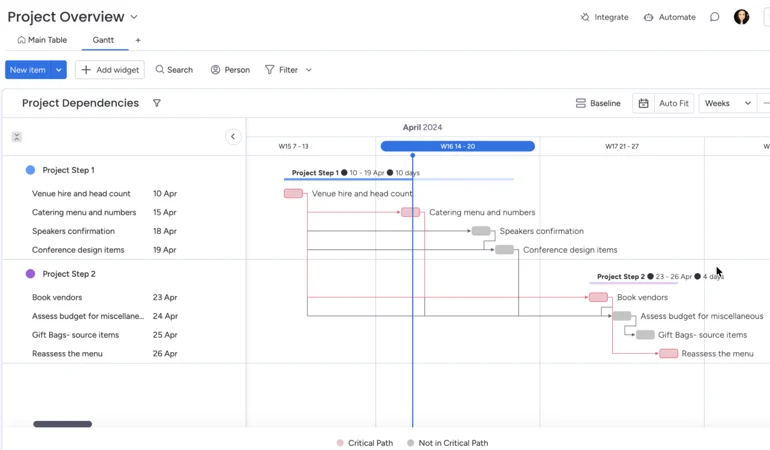
What stands out to me in monday’s Gantt view is the emphasis on dependencies rather than task durations alone. The project example uses two phases with connected activities, making it easy to trace how work flows from venue planning to vendor management. Colored dependency lines and critical path indicators help distinguish tasks that directly influence the schedule.
2. Construction Gantt chart by ClickUp
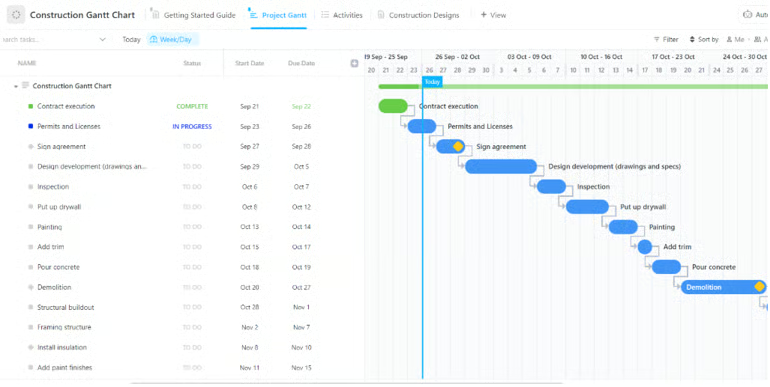
I like how ClickUp’s Gantt chart places the task list and schedule side by side, which makes it easy to connect dates with the timeline. In this construction Gantt view, each task appears as a horizontal bar with dependency lines showing the order of work from contract execution through demolition. Status labels such as Complete, In Progress, and To Do add context without cluttering the chart.
3. Go-To-Market strategy Gantt chart by Wrike
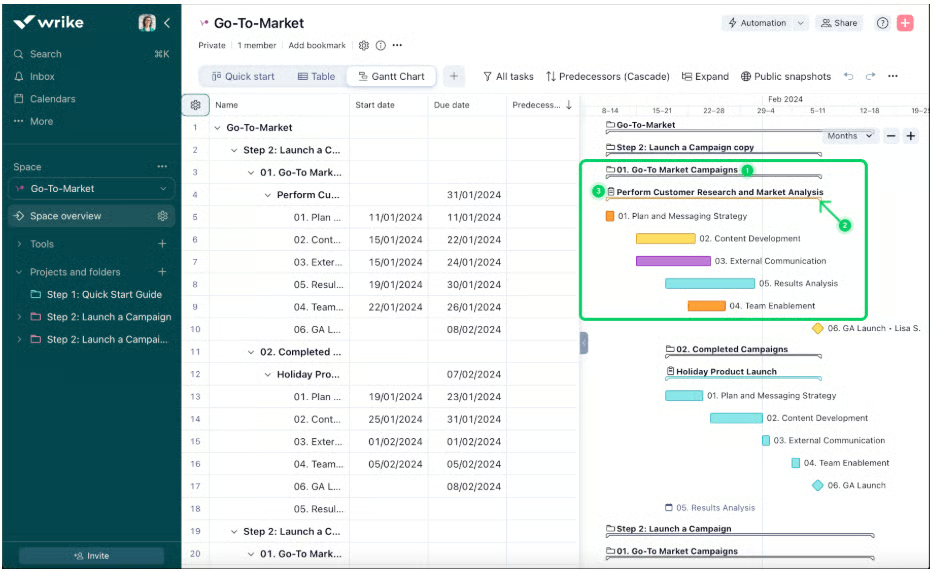
4. Gantt chart dashboard widget by Smartsheet
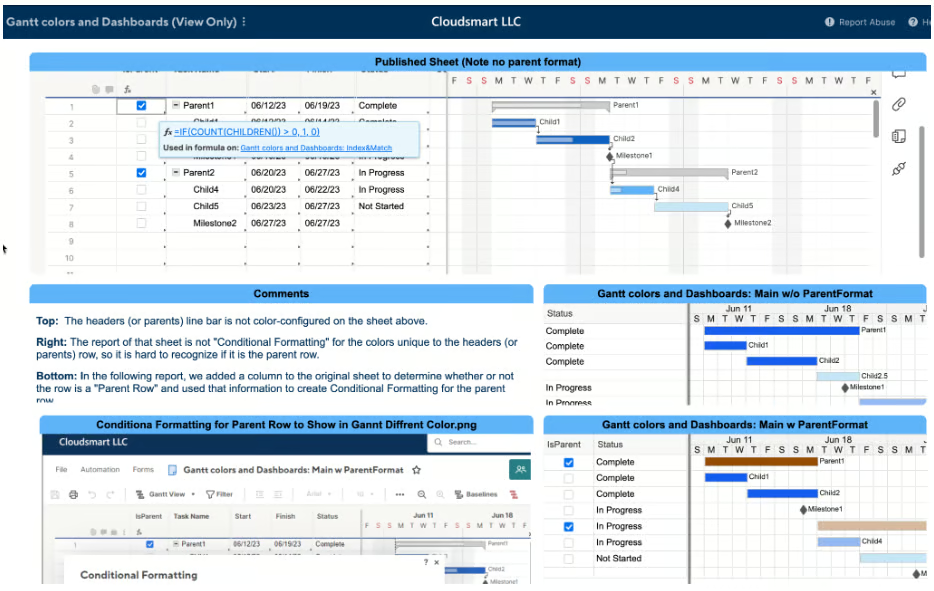
Smartsheet’s Gantt view combines spreadsheet-style data with a Gantt chart widget, which feels familiar if you already work in spreadsheets. The example organizes parent tasks, child tasks, and milestones in a hierarchy, with corresponding bars displayed across the timeline. Different colors separate project phases and statuses, making it easier to distinguish related work.
FAQs
What is the difference between a timeline and a Gantt chart?
A timeline shows you what’s scheduled and when. That’s enough for any situation where tasks run independently, and the main question is simply “what’s due this week.” A Gantt chart shows not just when tasks happen but how they connect, who owns each task, and which tasks lie on the critical path.
Is a Gantt chart still used today?
Yes, Gantt charts remain one of the most widely used project management tools. Modern project management software has expanded its capabilities with real-time updates, dependency tracking, resource management, and customizable Gantt chart templates.
How do you read a Gantt chart?
Start by reviewing the tasks listed on the left side of the chart. Then look at the horizontal bars to see when each task starts, ends, and how long it lasts. Dependency lines and milestones help you understand task relationships and deadlines.
>

Intel may have just landed the customer that could change everything.
After years of trying to convince the industry it can manufacture advanced chips for other companies, Intel appears to have secured a major vote of confidence from Apple. President Donald Trump announced Thursday that the iPhone maker would work with Intel to design and manufacture chips in the US, sending Intel’s shares soaring.
The significance extends beyond a single deal. If the partnership materializes, it would mark a major milestone in Washington’s effort to expand domestic chip production while giving Apple another manufacturing option at a time when chip supply chain reliability has become a strategic priority.
A partnership with a backdrop
The announcement comes at an interesting time for Intel. For years, the chipmaker has been trying to reinvent itself as a leading contract manufacturer capable of producing advanced chips for other companies, a difficult task in a market largely dominated by Taiwan Semiconductor Manufacturing Company (TSMC).
Since returning to office, President Trump has repeatedly backed initiatives aimed at expanding domestic chip production, a move that places Intel among the centerpiece companies in that effort.
The US government’s acquisition of a 10% stake in Intel marked one of the clearest signs of that support. Since then, the company has secured a series of high-profile wins carrying the administration’s fingerprints.
That includes a foundry manufacturing agreement with Terafab and a $5 billion commitment from Nvidia.
Against that backdrop, a potential Apple partnership would be one of Intel’s most prominent foundry wins yet.
Must-read Apple coverage
Shared benefits for all
In April, Apple CEO Tim Cook told Reuters that “there’s just a little less flexibility in the supply chain at the moment for getting more parts.” That comment offers a possible clue as to why Apple may be exploring new manufacturing relationships, even though the US government is involved in creating the partnership.
As demand for AI consumes more advanced chipmaking capacity, even companies with deep supplier relationships are looking for additional options. For Apple, Intel could provide access to more US-based manufacturing capacity and a hedge against future supply constraints.
For Intel, the stakes appear even higher. Getting a company like Apple on its side not only means higher sales revenue but also solid proof that Intel can deliver the kinds of chips favored by tech companies in an increasingly AI-focused world.
After the early Thursday announcement, Intel shares reportedly jumped 7%, while Apple’s shares rose 0.8%. When the US government acquired its Intel stake in 2025, the company was valued at about $100 billion. Intel’s market capitalization is now about $600 billion.
A glimpse into the future
Whether the deal is finalized, when supply is set to commence, or which specific chips Intel will make for Apple remain open questions, as both companies have yet to respond to the president’s Truth Social post. Yet even at this stage, the announcement highlights a broader shift underway across the semiconductor industry.
For years, advanced chip manufacturing has been concentrated in the hands of a few overseas players. Not only could this partnership help fragment that concentration, but it could also set a solid example that other American companies and industries will follow.
Also read: A Trump T1 teardown found hardware similarities with HTC’s U24 Pro, raising new questions about the phone’s origins.
>

Ben Stokes: England captain makes 95 for Durham as national team struggle in New Zealand Test

World Cup 2026: Boston bounce sends Scotland to Miami with hope and no fear

Berlin Open: Aryna Sabalenka beaten by Jessica Pegula after losing third set 6-0

-

 Fashion9 years ago
These ’90s fashion trends are making a comeback in 2017
-
Fashion9 years ago
According to Dior Couture, this taboo fashion accessory is back
-
Fashion9 years ago
Model Jocelyn Chew’s Instagram is the best vacation you’ve ever had
-
Fashion9 years ago
Your comprehensive guide to this fall’s biggest trends
-
Fashion9 years ago
A photo diary of the nightlife scene from LA To Ibiza
-
Fashion9 years ago
Emily Ratajkowski channels back-to-school style
-
Fashion9 years ago
9 Celebrities who have spoken out about being photoshopped
-
Fashion9 years ago
The tremendous importance of owning a perfect piece of clothing
