
Tech
AI Job Losses in Australia Explained: Why the Numbers Tell a More Complicated Story


For years, Australians have been warned that artificial intelligence is coming for their jobs. So far, the economy-wide wave of AI-driven layoffs hasn’t arrived.
A new Australian government analysis found no evidence that AI has caused broad upheaval across the country’s labour market since ChatGPT arrived in late 2022. But beneath that reassuring headline is a more complicated signal: Australians working in occupations most exposed to AI are seeing slower employment growth.
For Australians entering the workforce, changing careers or wondering which skills will remain valuable, that distinction matters. AI may reshape work long before it produces mass unemployment.
Australia’s AI job apocalypse hasn’t arrived
The Department of Employment and Workplace Relations examined whether occupations more exposed to AI have performed differently since ChatGPT’s launch.
Employment in the occupations most exposed to AI grew 5.6% between November 2022 and February 2026, compared with 9.5% growth in the least-exposed occupations, according to the government’s AI and employment analysis.
The report’s modelling also suggested employment in relatively AI-exposed occupations was about 2% lower by February than it would have been under pre-ChatGPT trends. But there is an important catch: the department repeatedly cautioned that its findings are suggestive, not definitive, because weaker growth in some AI-exposed occupations predates ChatGPT.
In other words, Australia isn’t seeing evidence of mass AI-driven job destruction. But it isn’t seeing nothing, either.
Hiring may be where AI shows up first
Companies don’t necessarily have to fire thousands of people for AI to change the labour market.
Deloitte Access Economics has identified 82 “AI-disrupted” occupations where tasks are considered particularly susceptible to the technology. Employment in those occupations is still growing, but vacancies in some are already falling, suggesting the effects could be appearing in recruitment before redundancies.
Deloitte forecasts average annual employment growth across those occupations could slow to 0.5% over the next five years once the effects of AI are incorporated, compared with a forecast of 1.2% without those effects.
For Australian workers, that creates a much quieter version of AI disruption.
Instead of an employee receiving a pink slip because a chatbot took their job, a company might simply decide it needs fewer new employees as AI handles more of the workload.
That kind of change is harder to spot in unemployment statistics.
What about young Australians?
Entry-level workers have become a particular source of anxiety in the AI debate.
Junior employees often perform tasks such as preparing first drafts, conducting basic research, summarising information and processing routine data, precisely the kind of work generative AI can increasingly assist with.
Yet Australia’s early evidence doesn’t show young workers collapsing under the weight of AI. The government report found employment among people aged 20 to 24 has actually grown slightly faster than employment among workers aged 25 and older since ChatGPT’s release. Graduate outcomes have also remained resilient.
That doesn’t settle the question. The department’s study was designed to monitor current developments rather than forecast what AI will eventually do to employment, and it plans to continue tracking the labour market as adoption grows.
For younger Australians, the question may therefore be less about whether entry-level jobs disappear tomorrow and more about how those jobs evolve over the next several years.
AI could change Australian jobs more than It eliminates them
Deloitte’s research points to another side of the equation.
While dozens of occupations could experience disruption, other jobs may see stronger demand when AI complements distinctly human abilities such as judgment, creativity, and empathy.
That could make AI proficiency increasingly valuable in Australian workplaces without making humans obsolete.
An accountant using AI to process information faster still needs to determine whether the output makes sense. A manager can automate a first draft while remaining responsible for the decision behind it. Professionals may spend less time producing routine material and more time evaluating what machines produce.
How employers translate those efficiencies into staffing and productivity expectations remains uncertain. The government study did not examine changes to individual tasks, productivity, work intensity or firm-level AI adoption, meaning those effects shouldn’t yet be treated as established Australian labour-market trends.
Australians should watch hiring, not just layoffs
The absence of widespread AI-driven unemployment doesn’t mean Australians can stop worrying about the technology’s effect on work. It means they may need to watch different numbers.
Vacancies, graduate recruitment, employment growth in AI-exposed occupations and changing skill requirements could reveal the transformation before national unemployment figures do. Deloitte’s finding that vacancies are already falling in some AI-disrupted occupations makes hiring an especially important indicator.
Australia may therefore be offering an early glimpse of a less cinematic AI revolution.
The machines aren’t sweeping through Australian offices and emptying desks en masse. Instead, early evidence points toward something subtler: slower growth in some exposed occupations, weaker hiring signals and jobs that may increasingly be reorganised around what humans can do alongside AI.
For Australian workers, the biggest AI story may not be who loses their job… it may be which jobs companies decide they no longer need to create.
Also read: For a wider APAC perspective, see how AI hiring in India is surging even as broader IT recruitment declines.
>
ADP: Fast factsStar rating: 4.4 stars
|
|---|
ADP (Automatic Data Processing) is one of the world’s most popular, best-known payroll and HR technology companies. As a provider of both in-house payroll software and outsourced PEO solutions, ADP has a plan and product for nearly any type and size of business in any industry.
Below, we’ll explain more about what ADP is and quickly review its most popular payroll products. Keep reading to find out which ADP payroll, HR, PEO or HCM solution is the best fit for your business.
ADP products: Feature comparison table
| ADP product | Starter monthly price | Software type | Ideal business size |
|---|---|---|---|
| Roll by ADP | $39 + $5/employee | Payroll app | Microbusinesses |
| Run Powered by ADP | Custom | Payroll and HR software | Small businesses |
| ADP TotalSource | Custom | Professional employer organization (PEO) | Small and midsize |
| ADP Workforce Now | Custom | HCM | Midsize to large |
| ADP Lyric HCM | Custom | HCM | Large and enterprise |
| ADP Global Payroll | Custom | Payroll software | Multinational |
What is ADP?
ADP sells payroll and HR technology that helps businesses hire, manage, and pay workers. Its portfolio ranges from a chat-based payroll app to enterprise HCM and multicountry payroll. ADP is not one uniform product, so a feature included with one product may not come standard with other solutions.
Depending on the product and package, ADP payroll features can include:
- Automated payroll processing and federal, state, and local payroll tax withholding, remittance, and filing.
- Employee self-service and mobile access to pay statements, tax forms, and HR information.
- Multi-jurisdiction payroll and support for employees and contractors.
- Payroll, HR, talent, benefits, and workforce reports, including custom reporting in some products.
- Accounting, point-of-sale, benefits, and HR integrations, including QuickBooks Online, through ADP Marketplace and API Central.
- Benefits administration, retirement, workers’ compensation, time tracking, and other services as included features or paid add-ons.
If you are comparing ADP pricing, I’d ask sales to itemize implementation, data migration, year-end forms, tax setup, time tracking, benefits administration, off-cycle payroll, support level, and cancellation terms. A custom quote can look competitive until required add-ons are included.
ADP products, pricing, and features
Below is a quick overview of some of the most popular ADP payroll software and PEO products.
Roll by ADP
Starting price: $39 per month + $5 per employee
Roll by ADP is the only ADP product made specifically for microbusinesses. As an AI-based app with browser access, Roll is less comprehensive than most other ADP products. However, along with enabling easy payroll runs with fast direct deposit, the Roll app assists small-business owners with a variety of other payroll and HR tasks:
- Multi-state payroll runs.
- Tipped wage support for cash and charged tips.
- Direct deposit and paper check payment options.
- Same-day and next-day direct deposit options.
- GenAI chat assistance and AI-driven error checks.
- Wage garnishments and automatic new-hire reporting.
- Basic time tracking, payroll reports, and QuickBooks Online integration.
To run payroll with Roll, business owners type a chat command like “run payroll,” and the app takes care of the rest. The process is simple and straightforward, but it may be confusing for business owners who are new to AI chatbot functionality.
To learn more, read our Roll by ADP review.
RUN Powered by ADP
Starting price: Custom quotes only
While ADP RUN was made mainly for small and midsize businesses, its higher-tier plans can support bigger businesses that want to blend fully automated payroll with a fairly comprehensive HR product suite.
RUN Powered by ADP is primarily a payroll software service, but depending on which of the four RUN plans you choose, you’ll secure HR tools like the following:
- Background checks.
- Self-guided onboarding tools for new hires.
- Salary benchmark data and insights.
- HR toolkits, trainings, documents and forms to maintain legal compliance.
The most advanced ADP RUN plan, HR Pro, also includes access to a learning management system and a sexual harassment training course.
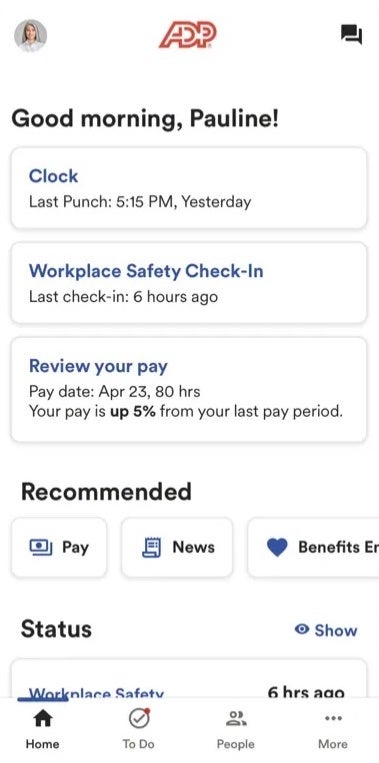
ADP RUN is a solid choice for smaller businesses that want HCM-level tools without paying for a fully fledged HCM or HRIS program. However, while RUN Powered by ADP costs less than HCM software for enterprises, it’s definitely pricier than more straightforward payroll services like Gusto or SurePayroll by Paychex.
Plus, some of RUN’s payroll services are only available as add-ons that cost an extra fee, including time and attendance.
To learn more, read our ADP RUN review.
ADP TotalSource
Starting price: Custom quotes only
ADP TotalSource is ADP’s PEO for small and midsize businesses. Under a co-employment agreement, ADP assumes most of the HR and payroll responsibilities, such as payroll administration, payroll taxes, benefits administration, compliance support, and HR guidance. You retain day-to-day control over employees and business operations.
PEOs are almost always more expensive than in-house payroll software. However, since ADP doesn’t list prices for any product besides Roll by ADP online, it’s unclear how much more expensive ADP TotalSource is than a product like ADP RUN. Still, it’s worth noting that a PEO frees up time business owners would otherwise spend on complicated HR tasks and employment law compliance.
To learn more, read our review of the best PEO companies
ADP Workforce Now
Starting price: Custom quotes only
ADP Workforce Now is ADP’s HCM platform for midsize and enterprise businesses. Along with RUN by ADP’s powerful payroll tools, ADP Workforce Now includes the following key features:
- New hire onboarding, employee data management, and core HR tools.
- Employee engagement, including surveys with comprehensive reporting and data analysis.
- Benefits administration (not available with cheapest Workforce Now plan).
Customers can also add services like recruiting, performance management, compensation management and a learning management system for an extra fee.
To learn more, read our ADP Workforce Now review.
ADP Lyric HCM
Starting price: Custom quotes only
ADP Lyric HCM is ADP’s enterprise platform for large multinational organizations with complex operating models. It combines HR, payroll, talent, benefits, workforce management, analytics, and employee self-service in a flexible global HCM environment.
ADP Lyric supports payroll in more than 140 countries, localized systems of record in over 100 countries, and 14 languages and dialects. It also provides configurable workflows, global reporting, benchmarking, integrations, and dedicated implementation support.
The strongest fit for this product is an employer that already has legal entities and needs consistent payroll governance across countries. If you also need a third party to hire workers where you lack an entity, compare ADP’s EOR services with global employment platforms rather than assuming multicountry payroll includes EOR coverage.
To learn more, read our review of the top international payroll services.
ALSO SEE: Preparing to Evaluate HCM Solutions
ADP Global Payroll
Starting price: Custom quotes only
ADP Global Payroll is a cloud platform for employers that need to manage payroll across multiple countries. Its key capabilities include:
- A standardized operating model for multicountry payroll.
- Automated controls and payroll accuracy workflows.
- Consolidated reporting, analytics, and local compliance support.
- Country-specific self-service through a unified portal available in 35 languages.
- Scalable country onboarding.
To learn more, read our review of the top international payroll software.
ADP pros and cons
No matter which ADP product you ultimately settle on, you can expect to experience a similar set of software benefits:
Pros
- Multiple products that can support a business from its first hires through enterprise and global expansion.
- Strong core payroll software features, tax filing, compliance, and employee self-service capabilities.
- 24/7 live customer service (with some plans and products only).
- Exceptionally well-reviewed mobile payroll apps, including an app for employers to run payroll on the go.
- Extensive HR, benefits, talent, analytics, PEO, and global payroll options.
- A large integration marketplace plus APIs and custom connectivity for larger platforms.
Cons
Like any software solution, ADP has its downsides:
- Software may have a steep learning curve, especially for first-time employers unfamiliar with business software.
- Reports can be confusing, cumbersome or clunky.
- Customer service complaints of slow response times or confusing phone trees.
- Limited pricing transparency.
- Add-on fees for services some other payroll providers include in their base prices (e.g., time and attendance tracking).
More payroll coverage
Top ADP alternatives
Gusto: Best ADP alternative for small businesses
Starting price: $49 per month + $6 per employee

Gusto’s small-business payroll solution is a solid ADP alternative, especially for companies considering ADP RUN.
Gusto and RUN by ADP have comparable payroll features — but Gusto is available at a lower starting price. It also includes more pay functionalities with its base price rather than requiring customers to add them for an extra fee.
Gusto’s starting price is also above Roll by ADP, but its conventional interface and broader HR and benefits ecosystem may suit a growing business better. And while RUN offers deeper optional HR and compliance services, Gusto is easier to use and compare on price.
Learn more about Gusto by reading our Gusto review, including our ADP vs Gusto article.
Papaya Global: Best global payroll alternative
Starting price: $29 per employee monthly for global payroll

If you need a global payroll service, not an international HRIS or HCM solution, Papaya Global is an affordable ADP alternative.
As an employer of record (EOR) service, Papaya Global helps businesses hire and pay workers in 180+ countries and in local currencies. On-the-ground compliance experts also help companies stay up to date on current, ever-changing employment laws around the world.
Papaya offers multiple global payroll solutions:
- Payroll Plus: Starts from $29 per employee monthly
- EOR: Starts from $499 per employee monthly
- Contractor of record: Starts from $199 per contractor monthly
- Contractor solution: Starts from $5 per contractor monthly
Learn more about Papaya Global by reading our Papaya Global review.
Paycor: Best HCM alternative
Starting price: Custom quotes only
Paycor’s enterprise-level HCM system helps U.S.-based companies hire, onboard and pay employees. Like ADP Workforce Now and Lyric HCM, Paycor includes time tracking tools, comprehensive workforce management, employee engagement surveys and thorough personnel data and analytics.
However, unlike ADP, Paycor doesn’t provide benefits options through its own brokerage. Instead, it integrates with your business’s existing benefits partners to provide seamless benefits administration.
Learn more about Paycor by reading our Paycor review or our ADP vs Paycor article.
Our methodology
To review payroll software, including ADP’s payroll processing systems, we do our best to either set up free trial accounts or schedule demos to get personal experience with the products we review. Our payroll software review methodology page explains more about how we choose, rate and review products.
Which ADP product is right for your small business?
Choosing payroll software for your business is a challenging process, but it can pay huge dividends in terms of the time, effort and anxiety it saves. If you’re still not sure which ADP payroll product will work best for your unique organization, our quick rundown can point you in the right direction:
- Roll by ADP is best for tiny businesses with basic payroll needs.
- RUN Powered by ADP is best for small businesses that want a combined HR and payroll solution on the same platform.
- ADP TotalSource is best for businesses that need outsourced payroll support through a PEO.
- ADP Workforce Now is best for midsize to large businesses that want thorough HCM tools without paying enterprise-level prices.
- ADP Lyric HCM is optimal for a large or enterprise multinational employer with complex structures, workflows, and global HR requirements.
- ADP Global Payroll is great if you already operate across countries and need standardized multicountry payroll governance and reporting.
If you aren’t thrilled with ADP’s payroll processing service, take a look at our list of ADP’s top competitors to find a suitable alternative.
Looking for something else? Check out our guide to the best payroll software and services. And if you’re wondering whether or not to get a payroll service, our why does my business need a payroll service article can help.
Frequently asked questions
Is ADP a good payroll company?
Yes, ADP is generally considered a good payroll company. In fact, ADP is one of the oldest, most popular payroll companies in the United States. It has decades of experience, a solid reputation, and extensive payroll processing expertise.
How much does ADP payroll processing cost?
ADP doesn’t list prices for any of its key payroll products online. Interested customers should contact ADP directly to request a quote and schedule a free trial, which can run as long as three to four months.
Is ADP better than Paychex?
ADP and Paychex are two top providers of in-house payroll software and outsourced PEO services for small and midsize businesses. Both companies offer fully automated payroll, HR library access, top-notch benefits options, thorough customer service and multiple products that scale to accommodate growth.
Since both ADP and Paychex are so similar, it’s hard to say for sure which one is better than the other. However, one might be better for your business than the other depending on which features you need, which user interface you prefer and how much you can afford to spend on payroll.
Read our in-depth comparison of ADP and Paychex to learn more about which product will suit your needs better.
What are the benefits of ADP payroll?
The main benefit of using ADP or any other outsourced payroll solution is the time, hassle and stress it can save business owners who worry about payroll.
Running payroll by hand is a time consuming process with plenty of opportunities for error, including incorrect paycheck calculations or missed payroll tax deadlines. In contrast, payroll software companies like ADP let you process payroll automatically, which can include automatically deducting and submitting payroll taxes.
ADP’s other perks include the software’s ease of use, customizations, third-party integrations, lengthy free trial and 24/7 customer service.
Does ADP integrate with other apps?
Yes, ADP integrates with hundreds of third-party business apps, including a good amount of popular accounting, human resource, HCM, finance, personnel management and expense management services. For a comprehensive list of ADP’s integrations, check out the ADP app marketplace.
Read next: How to Do Payroll: A Step-by-Step Guide
>

The upper end of DDoS attacks is getting much bigger — and attacks that once looked exceptional are showing up far more often.
Cloudflare says it mitigated 805 network-layer distributed denial-of-service attacks exceeding 1 Tbps in Q2 2026, up from 130 in the previous quarter. The company also reported 13.17 million network-layer DDoS attacks overall, compared with 10.04 million in Q1.
Most attacks remain much smaller, but the sharp rise in high-bandwidth events matters because organizations increasingly need defenses capable of filtering extreme traffic volumes before they overwhelm internet links or backend infrastructure.
What did Cloudflare uncover
In a blog, Cloudflare reported that it also mitigated 13.17 million network-layer DDoS attacks in Q2 2026, up from 10.04 million in Q1. That growth is especially striking when put alongside the scale of attacks Cloudflare has already observed.
The current surge is not limited to terabit-level attacks. Attacks between 500 Gbps and 1 Tbps increased 143%. Attacks between 100 Gbps and 500 Gbps more than doubled, with a 105% increase. Meanwhile, malicious HTTP traffic reached 16.89 trillion requests, up 32.4% from the previous quarter.
Despite the reported growth, the majority of attacks remained much smaller: 96.62% of network-layer attacks transmitted less than 50 Mbps, and 90.6% lasted no more than 10 minutes.
In December 2025, Cloudflare mitigated a record-breaking 31.4 Tbps DDoS attack, demonstrating that terabit-scale attacks can reach volumes far beyond the 1 Tbps threshold, which is now being crossed hundreds of times per quarter. That record-breaking attack is attributed to the Aisuru/Kimwolf botnet.
How botnets turn ordinary devices into attack infrastructure
It’s hard to discuss DDoS without bringing in another hacker’s favorite: device takeovers.
A compromised device can become a DDoS bot, quietly waiting for instructions from an attacker and then sending traffic toward a chosen target. One infected device may have limited impact on its own, but thousands or millions of compromised machines acting together can generate sufficient volume to disrupt a service.
And those machines don’t have to be traditional computers. DDoS botnets can be built from compromised routers, security cameras, servers, network appliances, and even Smart TVs, as seen in last year’s 31.4 Tbps attack.
That gives DDoS operators an unusual advantage: they don’t need to own the infrastructure generating the attack. They can borrow the combined computing and network capacity of devices belonging to unsuspecting users and organizations, turning ordinary hardware into attack infrastructure at scale.
What organizations should do about larger DDoS attacks
For organizations, simply having enough server capacity may not be enough. It needs upstream filtering, load balancing, traffic scrubbing, or other protective infrastructure.
Then there’s also the case of blocking malicious bots. This can help distinguish legitimate users and automated traffic from bots attempting to overwhelm a website with requests, making it especially useful for platforms whose websites can’t afford to fail or go offline.
The broader lesson is that DDoS protection must work before malicious traffic reaches the systems an organization seeks to protect. The faster traffic can be identified, filtered, and routed elsewhere, the less likely a large attack is to cause an outage for legitimate users.
Other News: U.S. and South Korean authorities are warning about the growing Gunra ransomware threat, underscoring the need for organizations to strengthen defenses against increasingly aggressive ransomware campaigns.
>

Mesh, the relationship manager and personal CRM acquired by WordPress.com’s parent company, Automattic, last year, is now available to users on Android devices. The software allows users to privately visualize and keep track of the people in their personal and professional networks, add notes to people’s contact information, and be reminded when to reach out.
On Android, the company customized Mesh’s app to work with key platform features, like split-screen and pop-up views. This allows users to access Mesh while working in other apps, like messages or email. It also supports keyboard shortcuts for foldables and tablets, in-app search, home screen widgets (with Material You colors that match your Android’s wallpaper), and real-time sync across devices.

The company’s broader plans for Mesh could eventually see it tied more closely to Automattic’s all-in-one messaging app, Beeper, which offers a way to connect with people across platforms, including through WhatsApp, Instagram, Signal, Messenger, X, LinkedIn, Slack, Discord, Google Messages, and more.
Already, Mesh and Beeper interoperate to some extent, as Mesh users can draft a text to someone in Beeper or click deep links in the app to visit a Mesh user’s profile. In time, the company wants to add additional AI features that will make users of both products more productive in terms of managing their personal relationships.
“We’re thinking a lot about how can AI help you be a better friend and have better work and personal relationships?,” Mesh co-founder Zachary Hamed told TechCrunch in an interview earlier this spring. “We have users who have ten-, twenty-, or fifty-thousand connections across multiple social media apps, across their work products. It’s an impossible task to think and be conscientious with you, with each of those people, by yourself,” he noted.

Today, Mesh’s Nexus AI is in early access, offering a way to use AI to navigate your network. That means users can ask questions like who they know at a particular company or who lives in a certain city, or who has expertise in a particular topic. The company is also experimenting with using AI technology to provide a voice-based, hands-free experience and an improved business card scanning feature.
Importantly, personal information stored in Mesh isn’t shared or used for ad targeting, the company says, as the product is supported by subscriptions. (It’s free for up to 1,000 contacts, then has higher tiers for unlimited contacts and other features.)
In time, Mesh may consider a bundled subscription with Beeper or other Automattic products, but has nothing to announce on that front at this time.
Currently, the majority of Mesh’s customers, or around 70%, are using the app for some type of business purpose. Mesh co-founder Matthew Achariam says Mesh’s sweet spot is executives running bigger teams or those who have a tight network to stay in touch with. However, the company still thinks about the consumer use case, he notes.
“The beauty of [serving business users] is that the same things they’re using apply to every individual consumer. So every feature that we think about has to apply to both,” he says.
Mesh (formerly Clay) for Android will roll out to Google Play for phones, tablets, and foldables as a free download with in-app purchases.
When you purchase through links in our articles, we may earn a small commission. This doesn’t affect our editorial independence.
>

ADP Review: Features, pros and cons, and more

Jeremy Strong Messaged Mark Zuckerberg After Social Reckoning Casting

Romy Reiner Teams With Emmy Nominees for Short ‘Getting to That Age’
-

 movies3 months ago
Search For Canadian TV Actor Stewart McLean Now Homicide Investigation
-

 Fashion9 years ago
These ’90s fashion trends are making a comeback in 2017
-
Fashion9 years ago
According to Dior Couture, this taboo fashion accessory is back
-
Fashion9 years ago
Model Jocelyn Chew’s Instagram is the best vacation you’ve ever had
-
Fashion9 years ago
Your comprehensive guide to this fall’s biggest trends
-
Fashion9 years ago
9 Celebrities who have spoken out about being photoshopped
-
Fashion9 years ago
Emily Ratajkowski channels back-to-school style
-
Fashion9 years ago
A photo diary of the nightlife scene from LA To Ibiza