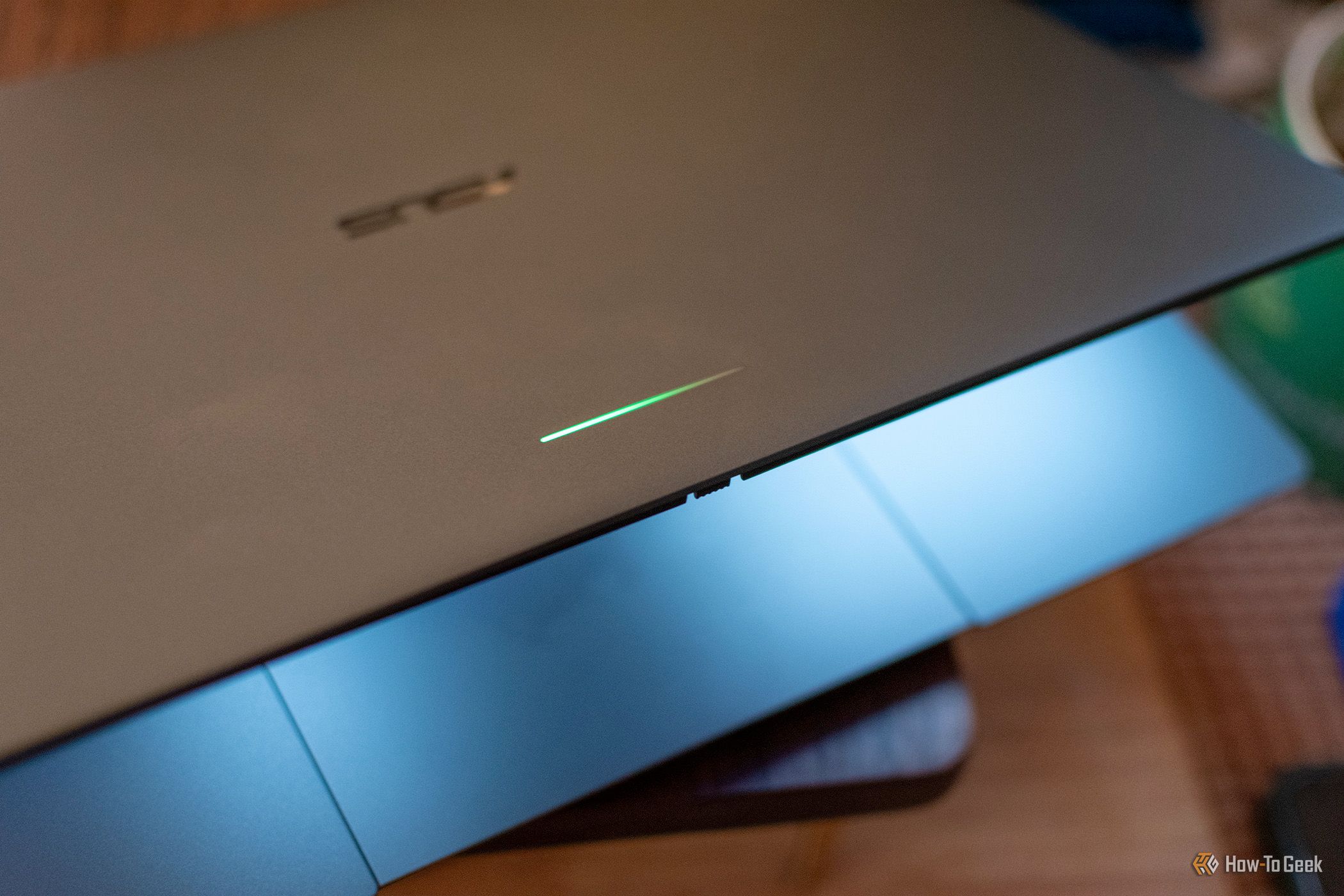
Googlebook Glowbar (Credits: How-To Geek)
If you bought a Googlebook for its headline features, you may have missed its best one — because you literally cannot see it while you are using the laptop. That is the verdict from How-To Geek’s Andrew Heinzman after two weeks with the ASUS Googlebook 14, and it centres on a thin strip of light called the Glowbar.
Heinzman is blunt about the device overall: after two weeks with a product he describes as unfinished and confused about its identity, the Glowbar is the one feature he cannot get out of his mind. Not because it is flashy, but because of what it quietly does when the laptop is closed, charging or running low.
What the Googlebook Glowbar actually does
The Glowbar is Google’s revival of the light bar from the 2013 Chromebook Pixel. On that older machine, the bar gave an abstract readout of battery life: it lit up when you plugged or unplugged the device, switched on automatically when battery fell below 25%, and could be checked at any time with a “Knock-Knock” gesture on the lid.
The Googlebook inherits that idea, with a catch. The Glowbar still shows battery readouts when you plug in, unplug or close the laptop, but it no longer supports the old Knock-Knock gesture. In other words, it cannot tell you your battery life on command — you only see it in those specific moments.
There is also a second Glowbar feature, and Heinzman is far less fond of it. A gradient light comes on while you are using Gemini, which he compares, unflatteringly, to holding up a book so strangers can see the cover. The implication — that the glow signals you are doing something clever with AI — falls flat when, as he points out, most people are simply using a chatbot as a search alternative.
The Googlebook Glowbar feature that should exist
What frustrates Heinzman most is the missed opportunity. One of the Googlebook’s biggest selling points is its Android smartphone integration: you can call and text from the laptop, see mobile notifications, cast your phone’s display, or hand off browsing between devices. So why, he asks, does the Glowbar not light up for phone calls or notifications?
It would not be a game-changing feature, he admits, but it could be genuinely handy — certainly more useful than the Gemini light show. He also floats a smarter idea: an AI agent progress bar. Kick off a task with Gemini, close the laptop, and watch the Glowbar slowly fill as the work completes, perhaps flashing red if the agent needs your approval.
You can already force the Glowbar to stay lit permanently through the hidden “Glowbar Disco” app in the Apps tab of Googlebook OS Settings, but Heinzman calls that cute rather than useful — good mainly for taking photos of the Glowbar itself.
The broader point is a familiar one for early adopters: the most memorable feature of a device is not always the one on the spec sheet. On the Googlebook, it is a light you only notice when you are not looking at the screen — and, Heinzman argues, it deserves to do a lot more than it currently does.
Also Read: Ubuntu Touch Is the Only Linux Distro Worth Running on Your Smartphone — Here’s Why
Source: How-To Geek — read the full story there.